
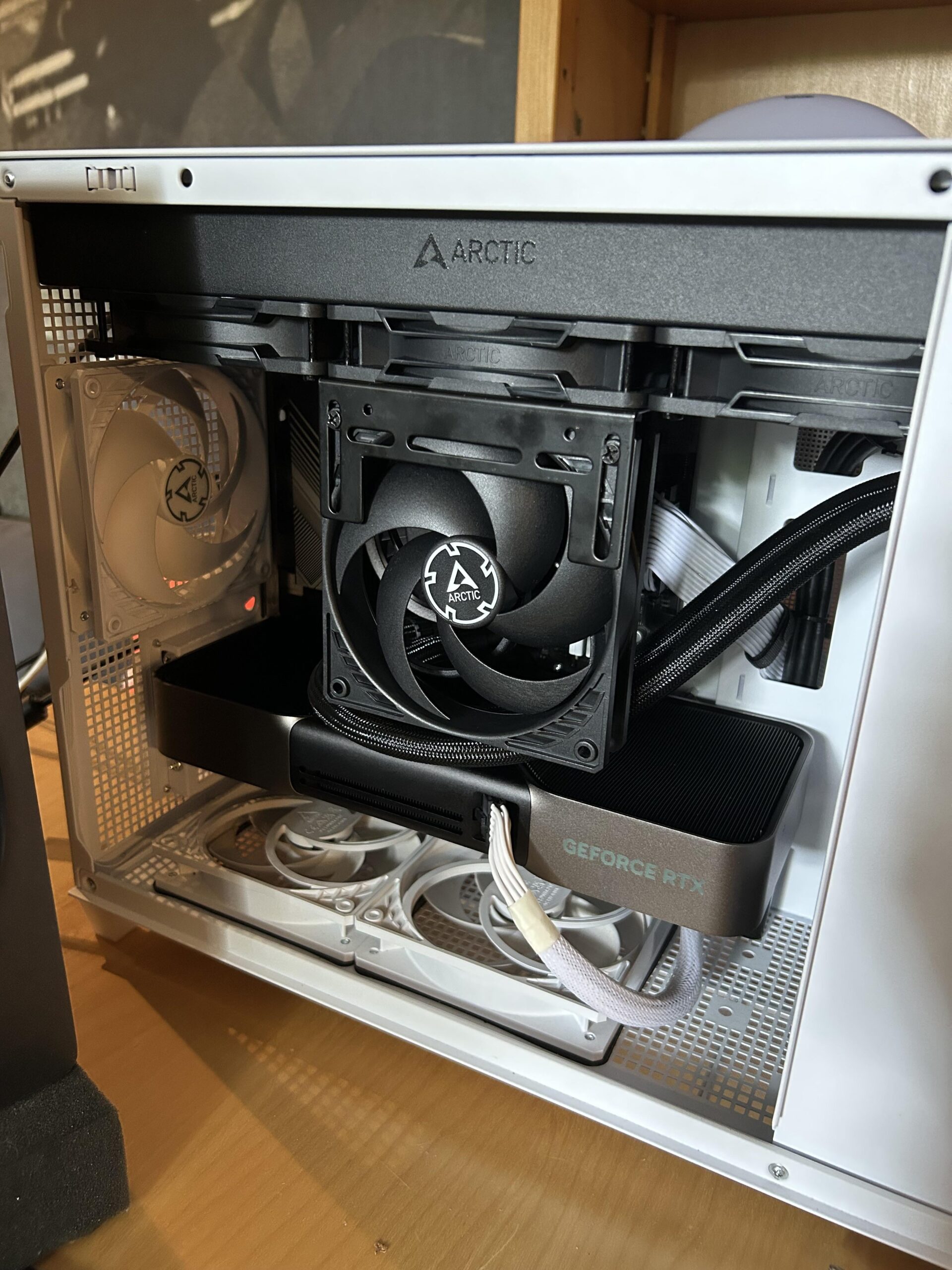
So my RAM was hitting 55C and erroring out during stress testing (TestMem5 + FurMark). I’ve heard many good things about using a dedicated RAM fan so I decided to install one only to find out I did literally nothing for temps.
Is it just inevitable that my RAM gets hot because of the design of my GPU (RTX 5080 FE)?
Is it worth trying to run the RAM without heatsinks? Or maybe I should try custom RAM heatsinks? I’ve heard the heatsinks on my kit (G.Skill Ripjaws S5) aren’t very good.
P.s. I’ve already tried placing the fan closer to the RAM.
25 Comments
Or you can back off your trefi to 32767 and lose a tiny little bit of performance and not worrying about ram temp
[deleted]
Ppl suggest taking of heatsinks so the air blows directly onto the chips it should lower temps a lot
What ram?
Ram fans work for sure, i’ve had 4090 suprim, 5090 FE and 5090 suprim – it works for all of them, in fact i want to say the 5090 FE (so maybe also 5080 fe) is better for ram temps.
The 50 FE design, makes a lot of the heat go out the left side of the gpu, whereas on the “normal” design, it mostly goes out the 2nd/3rd fan which is directly over the ram, switching from 5090 FE to 5090 suprim has caused my ram, chipset and NVME temps actually go up (I guess nvme is due to chipset that the gpu covers? not sure ).
As for the ram.
I had g skills ram and hit 70c+ at stock, ram fan helped dropped around 10c, heatspreader replacement helped drop about 5c or so in worse case and on lighter loads / gaming, it helped maintain a much lower temp overall.
This is for SR ram, DR ram is weird where it reaches much higher temps in a proper stresstest like TM5 + gpu load but in gaming it has an easier time than SR for me.
I switched the g skill SR to kingston DR and the kingston is designed better out the box, i have not swapped heatspreaders but the ram fan had a much better effect, i am guessing it’s due to the way the kingston fury ram is designed and allows more air in at the top.
I tested my ram with 2x40mm noctua fans running at 2.5-4.5k rpm which is silent vs case fans, i also tested with a 120mm noctua fan instead, both fans did the same thing for me, within 1-2c and the 2x40mm looks better so i stuck with that.
edit:
Make sure the ram is also intake, blowing air on to the ram. Exhaust is horrible for ram fan.
I do think 55°C is still within normal operating temperature range. If you start hitting 60 then you should worry about it My RAM usually runs at 57° during combined load
Using some RAM heatsinks (bykski and ekwb) and mine never go over 40c in stress tests with a fan pointed at them.
I’m curious, what bracket is that?
Above 50C you can definitely experience instability, especially with high TREFI. Also, the temp sensor isn’t actually on the modules themselves, just kinda close to them. 1.43VDD isn’t that high.
I removed the Heatspreaders from My 64GB Trident Z5’s and dropped like 8C. G.Skill Memory looks good, but they’re not the best performers.
Lots of people make they own heatsinks for ram. Ive seen some questionable strap down methods though.
honestly i dont think that fan will do anything for the ram especially if that rad is set to outtake. i remember watching a video about having exhaust fans on top pulls air away from cpu air cooler so i kind of think the same is happening here
Run your system like pic shown without the door perhaps.
Can you breathe well if I put my hand over your mouth and put a fan behind that ?
My trident z5 royal neo 96gb ddr5 ram is 70c while gaming, 55c on desktop. Gskill said that anything lower than 80c is OK.
I am interested why my ram is so hot? Because each stick is 48 gb?
I use an arctic 80mm 7000rpm fan, have it set to 4000rpm so its quiet, anything above 5k it whines. Im at 1.47v 6300mhz cl26 (102.4 bclk overclock on my 9800x3d) and my ram doesnt go above 35°C. I have the gskill 6000mhz cl26 kit, id get a better ram kit honestly, or better intake/bottom intake fans to help keep the gpu cooler.
This type of Arctic fan has low airflow
55c with errors seems like too high tRefi
55 is not high. Ddr5 can work without errors even at 90 degrees. Check you ram voltage, timings, frequency, memory controller max supporte frequency, memory controller voltage, ram bus voltage. Bye
Fan is to far away, you need to have it right on top of the sticks.
I heard it’s better to have a fan blowing across the length of the ram and not down on it.
I’ve always preferred a smaller fan blowing from above like so: [https://i.imgur.com/XbT4f5y.png](https://i.imgur.com/XbT4f5y.png)
My theory always has been it’s a better airflow method as air will go past the sticks and even between the pcb and heatsink.
I haven’t tested different fan directions but it kept my stuff cool so far.
Idk about fans super close to the ram sticks.. I did this and temps were worse.. i backed the fan a bit off and temps were much better during stress test but also that rad looks like it will pull the cold air out, it is an exhaust.. could be wrong though
My ram sticks get to 57C while gaming, I’m running max trefi and low trfc with a ram fan I bought from amazon, the ones that clip onto the ram slots with the 2 legs. I don’t get any problems even on a super hot day
I have corsair dominator plats
See this older post about RAM cooling options:
[https://www.reddit.com/r/overclocking/comments/1he6g7t/ram_cooling_versions_test_results/](https://www.reddit.com/r/overclocking/comments/1he6g7t/ram_cooling_versions_test_results/)
Perhaps you can find some valuable data there.
I would get them real toasty with a fohn or oven and remove those heathspreaders i bet it wil help
If you are running 4 exhaust fans (3 radiator fans, 1 rear case fan), you will want at least 5 intake case fans for proper positive pressure air flow.
More intake fans than exhaust fans lowers air flow temps.
I would leave the radiator fans exhaust and make every other fan an intake fan.
What are the IMC temps looking like?
Where is the photo of the ram? You’re not going to cool ram without a heatsink on the modules
Could try adding thin thermal pads to the heat sinks, or buy aftermarket heat sinks. Bitspower makes them and they come with thermal pads.