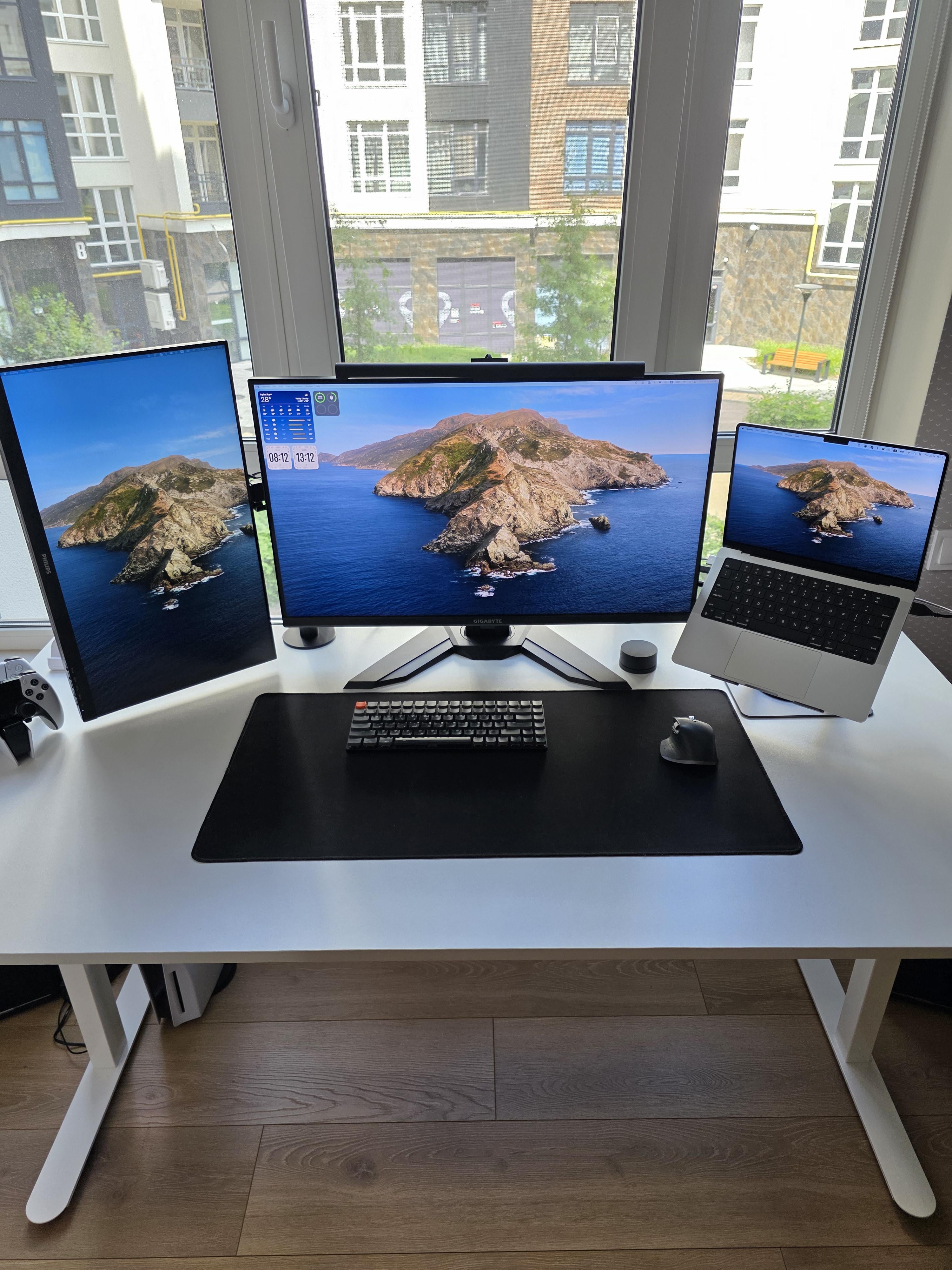
what do you want improve here? your setup is good and minimalistic.
QuantWizard
Would be great if you add the Epstein files
Nugget834
Make it a stand up desk 😁
P75N7
CLEEEEEEEEEEEEEEEEEEEEEEEEEEEEEEEEEEEEEEEEEEEAN
gconnorg_
Looks pretty perfect to me honestly. Simple, clean and effective. From the pics I can’t tell what your speaker setup is like but you maybe you could upgrade there
Bosn1an
I believe Windows would make it a bit more versatile 😀
hoodmajinbuu
Looks cool to me mate, why would you change? More is not always better.
TeeHeeHaw
It’s very clean but maybe add something that represents something you like. A small picture, figurine…something that identifies the space as yours!
Lots of natural light is very nice!
70MCKing
Place random outward facing memes on the windows for your neighbor’s viewing pleasure
rorowhat
The Mac is not helping, get a PC
MrMuf
Do you use the laptop screen? Its so much smaller than the rest
shoomborghini
By replacing your MacBook with a Mac mini 🙂 keep the MacBook a Macbook and make your work station with the new M4 Mac mini!
web-cyborg
For you? that’s your preference.
For me, I’d get a 3rd screen and connect the laptop to it, closing the laptop case. I’m assuming the laptop is the whole system in your scenario, but in the case where a laptop is it’s own separate system alongisde of a PC, I’d use a small ext. keyboard for the laptop – or – there are some nice BT keyboards that can swap between 2 or 3 different systems with a button press, too. I do that to swap between tablet and laptop when away from home. I also keep another mouse on the side, a logitech ergo pro thumb-ball mouse which has a 1 – 2 (A/B) toggle button between two systems. What’s nice about the logitech ergo trackball mice is that they don’t need any travel space, so no mouse pad area constraints at all. The mouse itself never has to move.
If that laptop is the main rig driving the two monitors, and you are limited to the two monitor outputs you are already using – I’ve had pretty good success with this adapter linked below, using it to run three screens off of my legion 5 pro. (Central gaming screen at 4k 120hz + two 4k side screens at 60Hz in my scenario).
A good usb-3 hub might also be a good idea, allowing you to keep the laptop stowed and closed yet still have an array of peripheral / thumb drive/ext. drive, etc. ports at reach for convenience.
. . . .
Personally I also like to use a split mechanical keyboard, so that I can keep the keyboard(s) in line with the arms of my chair, “throne” style. Sitting with my chair and height of chair arms in line with the desk surface allows me to have full support through elbow, forearm, wrist all the way to the keyboard(s) , but that’s just my preference.
Other than that, I’d probably get 2 or 3 monitor arms at some point, models that have enough articulation in order to keep the bottoms of all three screens aligned.
. . .
Your setup looks neat as it is though, I had been doing something similar before I got that adapter. I still like having a tablet on the side, too, because I often play fullscreen mode in games and don’t like alt-tabbing.
Setups with a laptop combined with a desktop pc rig (and some BT device toggle-able, or side, peripherals) are also nice for an alternate monitor config mode similarly, where whichever is the weaker of the two systems gpu wise takes over the side monitors while full screen gaming on the more powerful gpu.
Profanity1272
Looks pretty clean, tbh I wouldn’t really change anything.
Out of curiosity, what keyboard is that?
Morall_tach
Push the monitors together so you don’t have gaps, but other than that it looks pretty good.
Archipocalypse
Drapes or some other kind of covering for those windows.
CitizenLisa
I personally would:
1 – Add a stylish coaster for your drinks
2 – Use the macbook in clamshell mode and add a third monitor like the one on your right.
3 – Add some plants
4 – A minimalistic phone wireless charger
5 – A wooden / light coloured wrist rest for your keyboard to contrast with your desk mat
6 – Center monitor on a stand
FunkHavoc
I would flip your left monitor to be horizontal, I’ve tried the vertical way and I just can’t do it, you’d think it’d be nice for emails but I find that I need screen real estate more. I’ve got 3 32in monitors

20 Comments
Add a cup of coffee
what do you want improve here? your setup is good and minimalistic.
Would be great if you add the Epstein files
Make it a stand up desk 😁
CLEEEEEEEEEEEEEEEEEEEEEEEEEEEEEEEEEEEEEEEEEEEAN
Looks pretty perfect to me honestly. Simple, clean and effective. From the pics I can’t tell what your speaker setup is like but you maybe you could upgrade there
I believe Windows would make it a bit more versatile 😀
Looks cool to me mate, why would you change? More is not always better.
It’s very clean but maybe add something that represents something you like. A small picture, figurine…something that identifies the space as yours!
Lots of natural light is very nice!
Place random outward facing memes on the windows for your neighbor’s viewing pleasure
The Mac is not helping, get a PC
Do you use the laptop screen? Its so much smaller than the rest
By replacing your MacBook with a Mac mini 🙂 keep the MacBook a Macbook and make your work station with the new M4 Mac mini!
For you? that’s your preference.
For me, I’d get a 3rd screen and connect the laptop to it, closing the laptop case. I’m assuming the laptop is the whole system in your scenario, but in the case where a laptop is it’s own separate system alongisde of a PC, I’d use a small ext. keyboard for the laptop – or – there are some nice BT keyboards that can swap between 2 or 3 different systems with a button press, too. I do that to swap between tablet and laptop when away from home. I also keep another mouse on the side, a logitech ergo pro thumb-ball mouse which has a 1 – 2 (A/B) toggle button between two systems. What’s nice about the logitech ergo trackball mice is that they don’t need any travel space, so no mouse pad area constraints at all. The mouse itself never has to move.
If that laptop is the main rig driving the two monitors, and you are limited to the two monitor outputs you are already using – I’ve had pretty good success with this adapter linked below, using it to run three screens off of my legion 5 pro. (Central gaming screen at 4k 120hz + two 4k side screens at 60Hz in my scenario).
[https://www.amazon.com/dp/B094G5JLNC](https://www.amazon.com/dp/B094G5JLNC)
A good usb-3 hub might also be a good idea, allowing you to keep the laptop stowed and closed yet still have an array of peripheral / thumb drive/ext. drive, etc. ports at reach for convenience.
. . . .
Personally I also like to use a split mechanical keyboard, so that I can keep the keyboard(s) in line with the arms of my chair, “throne” style. Sitting with my chair and height of chair arms in line with the desk surface allows me to have full support through elbow, forearm, wrist all the way to the keyboard(s) , but that’s just my preference.
Other than that, I’d probably get 2 or 3 monitor arms at some point, models that have enough articulation in order to keep the bottoms of all three screens aligned.
. . .
Your setup looks neat as it is though, I had been doing something similar before I got that adapter. I still like having a tablet on the side, too, because I often play fullscreen mode in games and don’t like alt-tabbing.
Setups with a laptop combined with a desktop pc rig (and some BT device toggle-able, or side, peripherals) are also nice for an alternate monitor config mode similarly, where whichever is the weaker of the two systems gpu wise takes over the side monitors while full screen gaming on the more powerful gpu.
Looks pretty clean, tbh I wouldn’t really change anything.
Out of curiosity, what keyboard is that?
Push the monitors together so you don’t have gaps, but other than that it looks pretty good.
Drapes or some other kind of covering for those windows.
I personally would:
1 – Add a stylish coaster for your drinks
2 – Use the macbook in clamshell mode and add a third monitor like the one on your right.
3 – Add some plants
4 – A minimalistic phone wireless charger
5 – A wooden / light coloured wrist rest for your keyboard to contrast with your desk mat
6 – Center monitor on a stand
I would flip your left monitor to be horizontal, I’ve tried the vertical way and I just can’t do it, you’d think it’d be nice for emails but I find that I need screen real estate more. I’ve got 3 32in monitors
get a chair