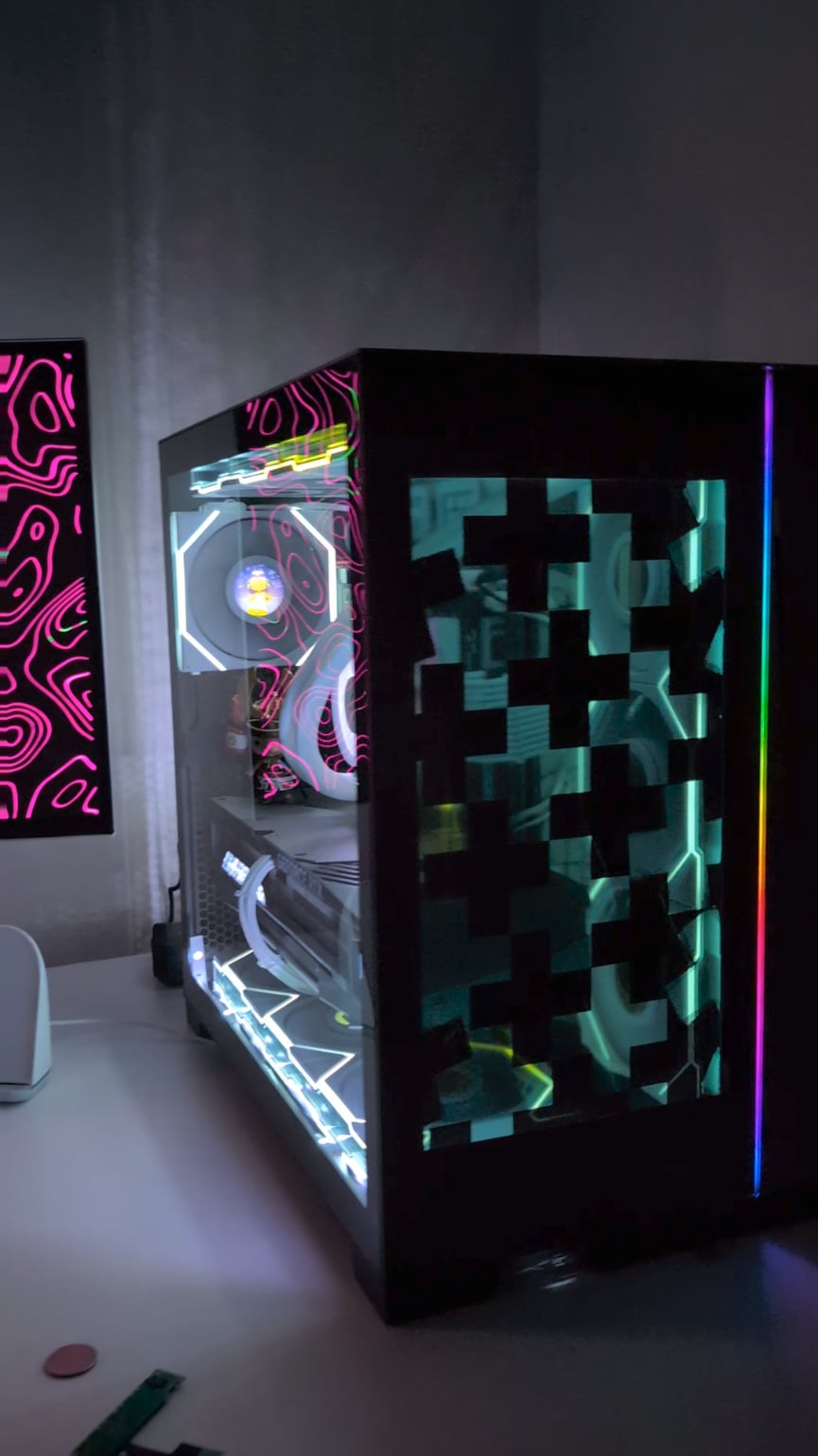
I opened up the plastic casing, took out the actual display, and disassembled the thin metal housing for the backlight, diffuser layers, and the LCD panel itself. Do be careful with the LCD as it’s a thin piece of glass and I had one break on me on my first attempt. 15 inch was the perfect size for this case as it just fits the front panel of the case with just enough room for the long pcb attached to the LCD glass as well. It’s a bit short height wise so I used vinyl tape to black out the top and bottom of the front glass panel. The rest is pretty easy, I just used double sided tape on the inside of the case to stick the display onto the case, the controller board goes around the back from the gaps next to the side vents and is powered via usb-c from the motherboard and hdmi to the gpu. Do note that the monitor I used is advertised as an HDR monitor and you’ll have to turn on hdr in the monitor settings otherwise the contrast is very terrible and the blacks will look very transparent too.
From there, it will act like another monitor connected to your PC and I use wallpaperengine for the video effects. Here are some of the wallpapers I use from the steam workshop:
* black and white optical illusion
* great animation for snowblind case
* black and white kaleidoscope
* bad apple
* the running men.

5 Comments
Looks interesting!
Great idea, very well done!
What kind of screen ist it?
OP please tell me how i can do this myself. I have the same case and I have so many ideas for this PLEASEEE.
For this project, I mostly followed [this ](https://www.instructables.com/DIY-Transparent-Side-Panel-From-a-Recycled-Monitor/)guide with a big difference that I used a cheap 15 inch [portable monitor](https://www.amazon.com/Yxk-Portable-Ultra-Slim-Kickstand-Ultra-Thin/dp/B0D9Y9ZXR4) from amazon that was usb powered so I didn’t have to bother with the electric wiring to make it work like in the guide.
I opened up the plastic casing, took out the actual display, and disassembled the thin metal housing for the backlight, diffuser layers, and the LCD panel itself. Do be careful with the LCD as it’s a thin piece of glass and I had one break on me on my first attempt. 15 inch was the perfect size for this case as it just fits the front panel of the case with just enough room for the long pcb attached to the LCD glass as well. It’s a bit short height wise so I used vinyl tape to black out the top and bottom of the front glass panel. The rest is pretty easy, I just used double sided tape on the inside of the case to stick the display onto the case, the controller board goes around the back from the gaps next to the side vents and is powered via usb-c from the motherboard and hdmi to the gpu. Do note that the monitor I used is advertised as an HDR monitor and you’ll have to turn on hdr in the monitor settings otherwise the contrast is very terrible and the blacks will look very transparent too.
From there, it will act like another monitor connected to your PC and I use wallpaperengine for the video effects. Here are some of the wallpapers I use from the steam workshop:
* black and white optical illusion
* great animation for snowblind case
* black and white kaleidoscope
* bad apple
* the running men.
holy crap thats cool