
Hi, there,
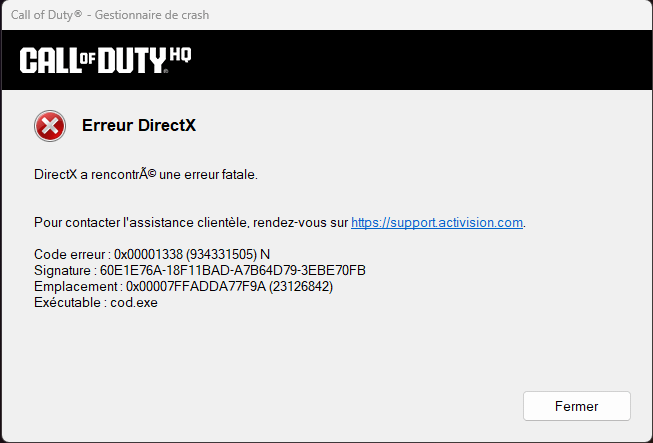
At the moment, I'm regularly experiencing a crash problem only on Warzone. It's a DirectX-related crash.
I've had a recent configuration for a few months:
-RTX 5080 Suprim SOC
-Ryzen 9 9800X3D
-64 GB DDR5 RAM
My PC is fully up to date: Windows, BIOS, drivers… everything is maintained on a daily basis.
I've also tested my machine with a number of programs such as OCCT, 3DMark, Windows Memory Diagnostics, etc.
The crashes mainly happen when I'm not playing, but rather when I'm in the Warzone menu, often using ALT+TAB to browse the web or do something else in parallel.
Frankly, I don't know where these damn crashes come from. It annoys me every time, especially when the game crashes and I get a DirectX crash message…
Would you have a solution to my problem please?
5 Comments
Your build is not good enough for Warzone Menu, should think about upgrading to a PS4
Lower GPU core clock with 100MHz and let us know if it helped.
That specific error code is a graphics driver fail.
Which can be caused by a few things. So there’s a list
1. you have to re verify the integrity of your game files.
2. Turn down your graphics. And GPU settings to default or stock if you adjusted them too high.
3. Turn off 3rd party overlays. This includes your Steam overweight, your Razor Synapse overlay. And your NVIDIA or AMD adrenal overlay. Which are on by default and have a shortcut to turn back on AMD’s is alt+ R. Which will bring up the overlay I always recommend installing just the drivers and never the graphics software ’cause you’d never really need it.
Only thing that worked for me was turning off ram xmp. Hoping to find a less aggressive solution.
Heyo, this driver stopped all of my crashing:
https://www.nvidia.com/en-us/drivers/details/242277/
I’m on a 5070ti/7800x3d/32gb cl26 6000, blah blah blah.
If the 5080 is on the same track as the 5060ti and can’t use the above 572.83, then this is 573.04, which also came before all the currently broken drivers. It’s a vulkan beta driver, but all the rest of the stuff in it is the same as 572.83.
https://developer.nvidia.com/downloads/vulkan-beta-57304-windows