not sure about this one, but every time I see someone use “Driver ***generic name***” i kinda cringe
remember one downloading wrong amd chipset drivers and bricking my mobo
NiceWeaknee
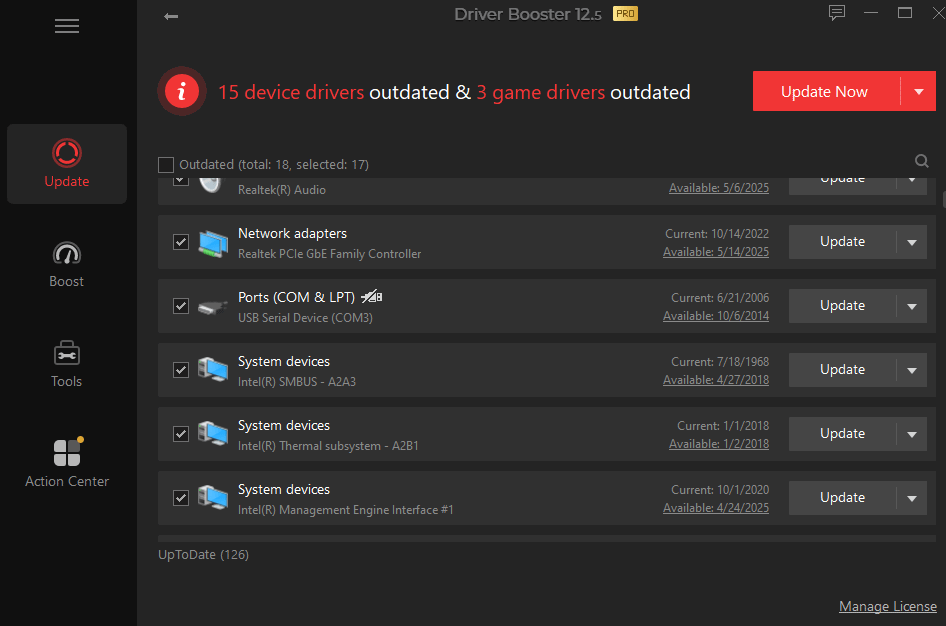
“The Intel Chipset Device Software Utility shows a date of 07/18/1968 because it is symbolic: Intel was founded on that date. The reason this date is used is to lower the rank of drivers in concern.
This is necessary because it’s a supporting utility that should not overwrite any other drivers. Updating these drivers is not needed. Do not worry if you don’t have the latest version.”
Also, these driver update utilities are usually malware, i would not recommend using any of them
C0DE_Vegeta
Who uses this software. Just compare your driver version with the one on the website.
zerosCoolReturn
please use SDIO instead of whatever this is
Radk6
If I were you I’d get rid of that program and never install anything similar. They can sometimes download the wrong stuff and cause more issues than they claim to solve.
Not to mention that not all drivers need regular updates, you only really have to keep track of the GPU drivers and *maybe* motherboard chipset drivers from time to time. Everything else can be left as-is if it works fine.
wolvesreign88
Oh no not the game drivers.
Shivers9000
Driver booster and game booster by IObit.
Man I remember my childhood
Takeasmoke
driver booster was useful like 15 years ago when it was hella hard to find some certain drivers and software like this was your last resort
today with windows update, custom software by every manufacturer and way more information available on the interwebz you don’t want to use any software like that
Krullexneo
Uninstall that malware pls
Electrical_Crew7195
Bro is using the apollo navigation system
191x7
Just let it update. I find it quite useful for updating Realtek Audio and LAN drivers.
It_just_works_bro
You don’t need to update 99% of your drivers unless something actually breaks one.
EX: Your wifi stops working, so you update your network drivers using the website of the manufacturer.
Don’t use stuff like this or you’ll end up getting fucked.
apachelives
Uninstall that crap
Streakflash
either use vendor provided driver update tool or compare manually on the support webpage for your laptop/motherboard
DamTheFam
Just get the drivers you need, those tools are all scuffed. Besides Chipset Drivers and GPU Drivers there are not many things you need to worry about these days unless you exactly know you have to worry about them – that would mean you have a specific usecase or had problems with drivers in the past. If neither is the case uninstall those „automatic driver install utilities“ – trust me they do more harm than good.
Far-Glove-888
Hello saar, your window driver needs update
jakethedemigod2
Everyone losing their **** over me using driver booster is hilarious to me. Like I get it, some people actually don’t know about the third party driver things being scummy, borderline or sometimes outright malware, but only one or two comments have mentioned that it is useful for a handful of scenarios when you know what your doing. For instance, using old hardware, or cheap third party stuff, or just to be lazy and see everything on one app.
I dont think you should particularly use the automatic download even if you have the pro feature, especially for stuff like graphics and chipset drivers. But if it shows me that there is a new driver for it and I haven’t found it yet, I’ll probably keep looking until I’m sure. I only use the download for stuff like audio drivers and small stuff that wouldn’t brick anything should it go haywire
csch1992
dude its not 2010! stop using such nonsense tools
gtrash81
Driver booster and such other programs are garbage, because they fake new driver versions.
dangus_007
The only driver tool I trust is SDI. Ridiculously accurate Freeware, no ads
Cyber_Cookie_
2006 was a good vintage
VigilanteRabbit
Stay away from these driver update tools; they’re mostly rubbish and mess stuff up more than they fix it.
If you want drivers, go visit official pages of your components; most often the mainboard and graphics are enough.
JonathanMovement
bro is using driver booster
USSHammond
Are you trying to brick your system? Such third party utilities are only good at offering drivers that are supposedly newer/better for your system but in reality are not and usually cripple your system
Nanami-chanX
you should definitely not be using this ‘driver booster’ software and should probably remove it ASAP
Sakth_Londa
This has to be the worst app to use to update your drivers.
You could do it manually. Why download some kind of bullshit in the name of “Driver Updater”?
_MaZ_
I remember I installed drivers with this software 10+ years ago and it fucked my PC up, luckily I had a backup restore point
ByteSpawn
Used to use this program when I was a kid like 10 years ago no need to do that anymore as drivers come with windows updates that are 3-5 years old more than enough to run ur pc without any problems
lincoln_2nd
Bro you dont need to install those so called driver installer. You can do by manually install driver alone without help.
Those driver installer is old times tricks. Windows 10 and 11 dont need those, the system knows what driver you need.
Straight_Story31
Imagine using Driver Booster. 🤢 The users in this sub. 🤦♂️
SoakingEggs
i only fck around with drivers if absolutely necessary, i have bricked too many systems this way, where only a complete wipe and windows reinstall helped it.
Big-Pound-5634
Any free program that let me scan my pc like that and actually will update the drivers and do it correctly or are they all paid?

32 Comments
not sure about this one, but every time I see someone use “Driver ***generic name***” i kinda cringe
remember one downloading wrong amd chipset drivers and bricking my mobo
“The Intel Chipset Device Software Utility shows a date of 07/18/1968 because it is symbolic: Intel was founded on that date. The reason this date is used is to lower the rank of drivers in concern.
This is necessary because it’s a supporting utility that should not overwrite any other drivers. Updating these drivers is not needed. Do not worry if you don’t have the latest version.”
[https://www.intel.com/content/www/us/en/support/articles/000095169/processors.html](https://www.intel.com/content/www/us/en/support/articles/000095169/processors.html)
Also, these driver update utilities are usually malware, i would not recommend using any of them
Who uses this software. Just compare your driver version with the one on the website.
please use SDIO instead of whatever this is
If I were you I’d get rid of that program and never install anything similar. They can sometimes download the wrong stuff and cause more issues than they claim to solve.
Not to mention that not all drivers need regular updates, you only really have to keep track of the GPU drivers and *maybe* motherboard chipset drivers from time to time. Everything else can be left as-is if it works fine.
Oh no not the game drivers.
Driver booster and game booster by IObit.
Man I remember my childhood
driver booster was useful like 15 years ago when it was hella hard to find some certain drivers and software like this was your last resort
today with windows update, custom software by every manufacturer and way more information available on the interwebz you don’t want to use any software like that
Uninstall that malware pls
Bro is using the apollo navigation system
Just let it update. I find it quite useful for updating Realtek Audio and LAN drivers.
You don’t need to update 99% of your drivers unless something actually breaks one.
EX: Your wifi stops working, so you update your network drivers using the website of the manufacturer.
Don’t use stuff like this or you’ll end up getting fucked.
Uninstall that crap
either use vendor provided driver update tool or compare manually on the support webpage for your laptop/motherboard
Just get the drivers you need, those tools are all scuffed. Besides Chipset Drivers and GPU Drivers there are not many things you need to worry about these days unless you exactly know you have to worry about them – that would mean you have a specific usecase or had problems with drivers in the past. If neither is the case uninstall those „automatic driver install utilities“ – trust me they do more harm than good.
Hello saar, your window driver needs update
Everyone losing their **** over me using driver booster is hilarious to me. Like I get it, some people actually don’t know about the third party driver things being scummy, borderline or sometimes outright malware, but only one or two comments have mentioned that it is useful for a handful of scenarios when you know what your doing. For instance, using old hardware, or cheap third party stuff, or just to be lazy and see everything on one app.
I dont think you should particularly use the automatic download even if you have the pro feature, especially for stuff like graphics and chipset drivers. But if it shows me that there is a new driver for it and I haven’t found it yet, I’ll probably keep looking until I’m sure. I only use the download for stuff like audio drivers and small stuff that wouldn’t brick anything should it go haywire
dude its not 2010! stop using such nonsense tools
Driver booster and such other programs are garbage, because they fake new driver versions.
The only driver tool I trust is SDI. Ridiculously accurate Freeware, no ads
2006 was a good vintage
Stay away from these driver update tools; they’re mostly rubbish and mess stuff up more than they fix it.
If you want drivers, go visit official pages of your components; most often the mainboard and graphics are enough.
bro is using driver booster
Are you trying to brick your system? Such third party utilities are only good at offering drivers that are supposedly newer/better for your system but in reality are not and usually cripple your system
you should definitely not be using this ‘driver booster’ software and should probably remove it ASAP
This has to be the worst app to use to update your drivers.
You could do it manually. Why download some kind of bullshit in the name of “Driver Updater”?
I remember I installed drivers with this software 10+ years ago and it fucked my PC up, luckily I had a backup restore point
Used to use this program when I was a kid like 10 years ago no need to do that anymore as drivers come with windows updates that are 3-5 years old more than enough to run ur pc without any problems
Bro you dont need to install those so called driver installer. You can do by manually install driver alone without help.
Those driver installer is old times tricks. Windows 10 and 11 dont need those, the system knows what driver you need.
Imagine using Driver Booster. 🤢 The users in this sub. 🤦♂️
i only fck around with drivers if absolutely necessary, i have bricked too many systems this way, where only a complete wipe and windows reinstall helped it.
Any free program that let me scan my pc like that and actually will update the drivers and do it correctly or are they all paid?