I’m not sure if you’re religious or not, but I recommend trying it while you grip some form of bible very tightly.
coloredgreyscale
maybe a friend can solder it back on
sunkmonkey1208
It’s just one of probably several capacitors. Nothing bad will happen if you try it and the GPU will probably work fine without it.
Nena_Trinity
if you dare to solder it back on then good luck, or you could ask a local repair? Doubt warranty covers this…
AirSKiller
It’s fine, you could lose half the caps and it would probably still work.
dreadlordnotdruglord
What’s the verdict, OP?
TIGER_SUS
Odds are, it probably will just work
kaleperq
I’ve seen a 3060 having those things taken off one by one and it took surprisingly a lot a lot of them to make it stop working
Loud-Decision9817
Just swallow it and keep moving man as long as you have it it’ll still work wirelessly 😂😂
AMTierney
I caught one on my brand new ASUS ROG MB when inserting a GPU, never done it before and was rather embarrassed to be honest but I was rushing.
The computer and board has been completely fine, I’ll worry about it when it’s not.
Give it a test and see how you get on, if it’s faulty and it’s new – attempt a fault return it’s likely within some form of cover by big insurers beyond you and it’ll end up back at the manufacturer one way or another.
Good luck!
InfiniteEnter
It’s close to the power pins of the slot, so i am guessing it’s just a smoothing cap. Should be fine.
Ready-Management-918
did it work? please do not leave me hanging
dantedakilla
It looks like the pads are still intact. If you got steady hands, you can solder that back on.
Dependent-Land4418
It should work just fine
SnooMacarons5838
Op, are you alive?
Clunas

At this point, we all know what happened to the OP
shawndw
Manufacturers tend to go overkill with bypass caps. Most likely it’ll work just fine.
Delicious_Aside
Cheap £10 soldering kit will sort this for you. I see the pads are ripped off but at the same time, there are still some parts of the pads left for you to solder to.
Flux tho! That’s the key!
Been doing this for a while now, saved quite a few expensive items!
sampik121
Any skilled electronic repair man can repair this for pretty cheap!
mintchococutie
Should still work , a lot of these are kinda redundant , could get it fixed later if you want.
Scottish_Sicario
Get soldering kit mate 😁👍
betttris13
Since you already tested and it works you are all good. Just want to add, based on the positioning and the empty cap straws next to it,this is likely for RF noise suppression (required legally in many countries) and if so will have no noticeable impact on you unless you happen to put a radio setup right next to it. Empty slots are likely for higher power cards. Alternatively this might also be a smoothing capacitor for the power which if so the card may be slightly more unstable at high load (i.e you might hit voltage reliability cap sooner) or on a low quality or nearly maxed PSU.
xIceFox
Im not a professional designing electrical circuits, but I designed a few as a hobby. Normally that capacitors are used to flatten the voltage curve and to prevent fluctuations in voltage. Loosing one should not make a big difference.
kappi1997
That cap looks like an output capacitor of a voltage regulator so I’d say you need to get it solfered back on. Otherwise you might damage your card
No-Upstairs-7001
How does that happen ? Haven’t even seen my GPU since I plugged it in 5 years ago
CubeMan76
I think it would be funny if you just resoldered the cap on upside down, since it would technically fix the issue of an unsoldered capacitor
ivvyditt
Don’t worry, there are more of those along the board.
/s
I know nothing about microelectronics, hope you can fix it somehow.
Ionita_-_Eduard
Well, your luck is that it didn’t rip off with the pads
LordVixen
Just glue it back on
Nike_486DX
Just a filtering cap
Ghozer
It looks like a de-coupling cap across the PCI-e slot power connectors, you should be ok with it, but if you have any stability issues with your GPU that could likely be why! 🙂
lordfwahfnah

KuramaKitsune
Solder it
$$15 bucks as AutoZone
ziplock9000
Anyone with fairly basic soldering skills and a half decent setup could fix that.
MarcCDB
If you have access to someone who understands more about this, check the capacitor value, buy a new one, desolder the broken part and solder the new one (don’t rip the pads).
clickydap
GPU manufacturers put a lot of MLCC capacitors running in parallel for the cause of degradation. They know many capacitors will eventually fail, and that’s why installing multiple ones in parallel helps compensate for the loss
You’ll be fine most of the time
JoyDiffusion
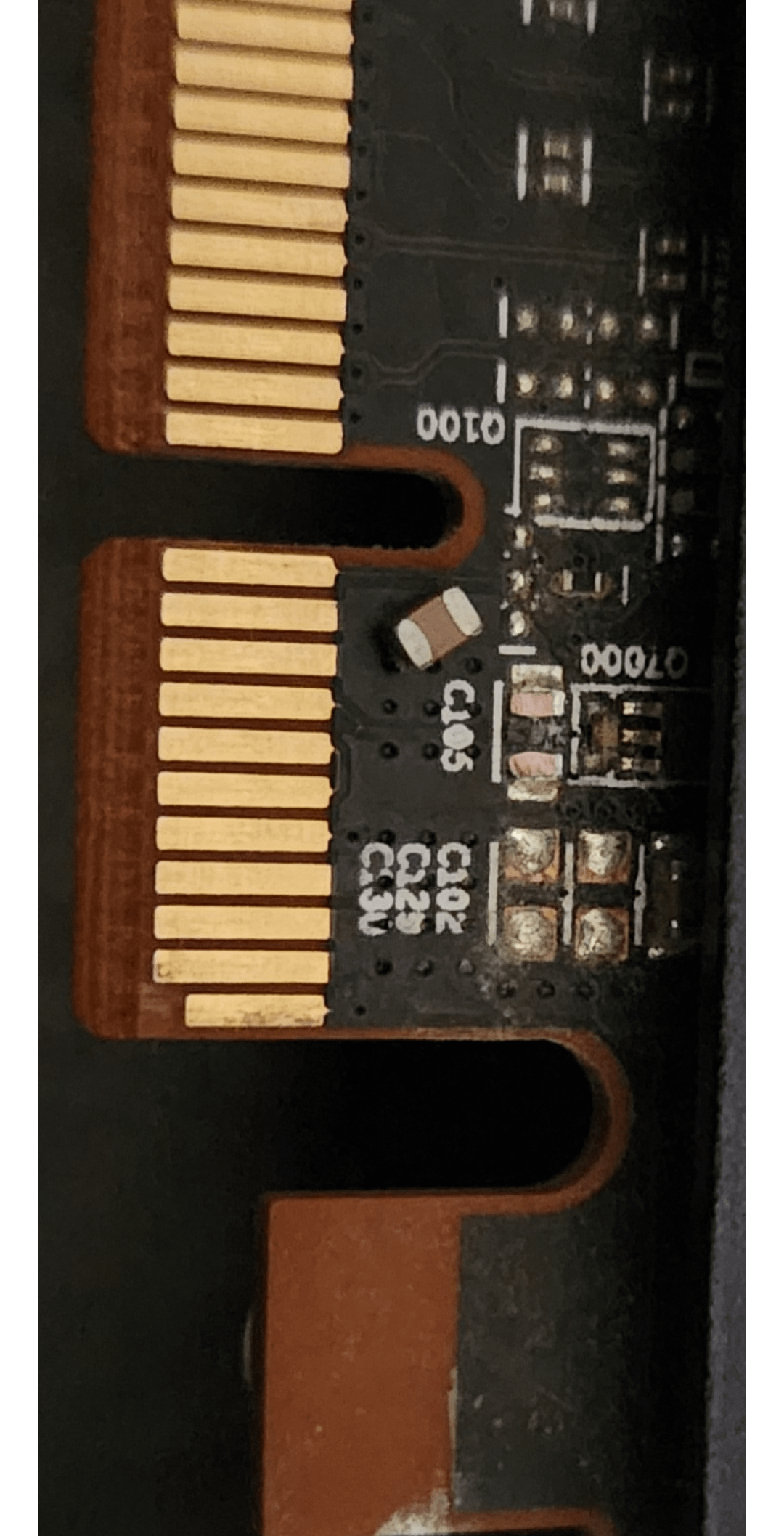
Based on the picture, it looks like only a portion of the ceramic cover plate and terminal bands broke off.
I would remove the broken pieces from the PCBA with a soldering iron or hot air. Flip the capacitor so that the broken portion is right side up and the non-broken against the pad, and solder. As long as the crack did not penetrate and damage internal electrodes, you should be good.
ykoech
Take it to an electronics shop nearby and get it soldered.
Logan_da_hamster
If you life in the EU you’d chances are good for this to get repaired through warranty (most give 5y).
Captnhappy
Most surface-mount capacitors like C105 are MLCCs (ceramic capacitors) used for decoupling power rails (e.g., GPU core, memory, PCIe, etc.) and are usually not alone. These help filter high-frequency noise from the power supply, ensuring stable operation, but you will likely never see any difference by losing one.

40 Comments
I’m not sure if you’re religious or not, but I recommend trying it while you grip some form of bible very tightly.
maybe a friend can solder it back on
It’s just one of probably several capacitors. Nothing bad will happen if you try it and the GPU will probably work fine without it.
if you dare to solder it back on then good luck, or you could ask a local repair? Doubt warranty covers this…
It’s fine, you could lose half the caps and it would probably still work.
What’s the verdict, OP?
Odds are, it probably will just work
I’ve seen a 3060 having those things taken off one by one and it took surprisingly a lot a lot of them to make it stop working
Just swallow it and keep moving man as long as you have it it’ll still work wirelessly 😂😂
I caught one on my brand new ASUS ROG MB when inserting a GPU, never done it before and was rather embarrassed to be honest but I was rushing.
The computer and board has been completely fine, I’ll worry about it when it’s not.
Give it a test and see how you get on, if it’s faulty and it’s new – attempt a fault return it’s likely within some form of cover by big insurers beyond you and it’ll end up back at the manufacturer one way or another.
Good luck!
It’s close to the power pins of the slot, so i am guessing it’s just a smoothing cap. Should be fine.
did it work? please do not leave me hanging
It looks like the pads are still intact. If you got steady hands, you can solder that back on.
It should work just fine
Op, are you alive?

At this point, we all know what happened to the OP
Manufacturers tend to go overkill with bypass caps. Most likely it’ll work just fine.
Cheap £10 soldering kit will sort this for you. I see the pads are ripped off but at the same time, there are still some parts of the pads left for you to solder to.
Flux tho! That’s the key!
Been doing this for a while now, saved quite a few expensive items!
Any skilled electronic repair man can repair this for pretty cheap!
Should still work , a lot of these are kinda redundant , could get it fixed later if you want.
Get soldering kit mate 😁👍
Since you already tested and it works you are all good. Just want to add, based on the positioning and the empty cap straws next to it,this is likely for RF noise suppression (required legally in many countries) and if so will have no noticeable impact on you unless you happen to put a radio setup right next to it. Empty slots are likely for higher power cards. Alternatively this might also be a smoothing capacitor for the power which if so the card may be slightly more unstable at high load (i.e you might hit voltage reliability cap sooner) or on a low quality or nearly maxed PSU.
Im not a professional designing electrical circuits, but I designed a few as a hobby. Normally that capacitors are used to flatten the voltage curve and to prevent fluctuations in voltage. Loosing one should not make a big difference.
That cap looks like an output capacitor of a voltage regulator so I’d say you need to get it solfered back on. Otherwise you might damage your card
How does that happen ? Haven’t even seen my GPU since I plugged it in 5 years ago
I think it would be funny if you just resoldered the cap on upside down, since it would technically fix the issue of an unsoldered capacitor
Don’t worry, there are more of those along the board.
/s
I know nothing about microelectronics, hope you can fix it somehow.
Well, your luck is that it didn’t rip off with the pads
Just glue it back on
Just a filtering cap
It looks like a de-coupling cap across the PCI-e slot power connectors, you should be ok with it, but if you have any stability issues with your GPU that could likely be why! 🙂

Solder it
$$15 bucks as AutoZone
Anyone with fairly basic soldering skills and a half decent setup could fix that.
If you have access to someone who understands more about this, check the capacitor value, buy a new one, desolder the broken part and solder the new one (don’t rip the pads).
GPU manufacturers put a lot of MLCC capacitors running in parallel for the cause of degradation. They know many capacitors will eventually fail, and that’s why installing multiple ones in parallel helps compensate for the loss
You’ll be fine most of the time
Based on the picture, it looks like only a portion of the ceramic cover plate and terminal bands broke off.
I would remove the broken pieces from the PCBA with a soldering iron or hot air. Flip the capacitor so that the broken portion is right side up and the non-broken against the pad, and solder. As long as the crack did not penetrate and damage internal electrodes, you should be good.
Take it to an electronics shop nearby and get it soldered.
If you life in the EU you’d chances are good for this to get repaired through warranty (most give 5y).
Most surface-mount capacitors like C105 are MLCCs (ceramic capacitors) used for decoupling power rails (e.g., GPU core, memory, PCIe, etc.) and are usually not alone. These help filter high-frequency noise from the power supply, ensuring stable operation, but you will likely never see any difference by losing one.