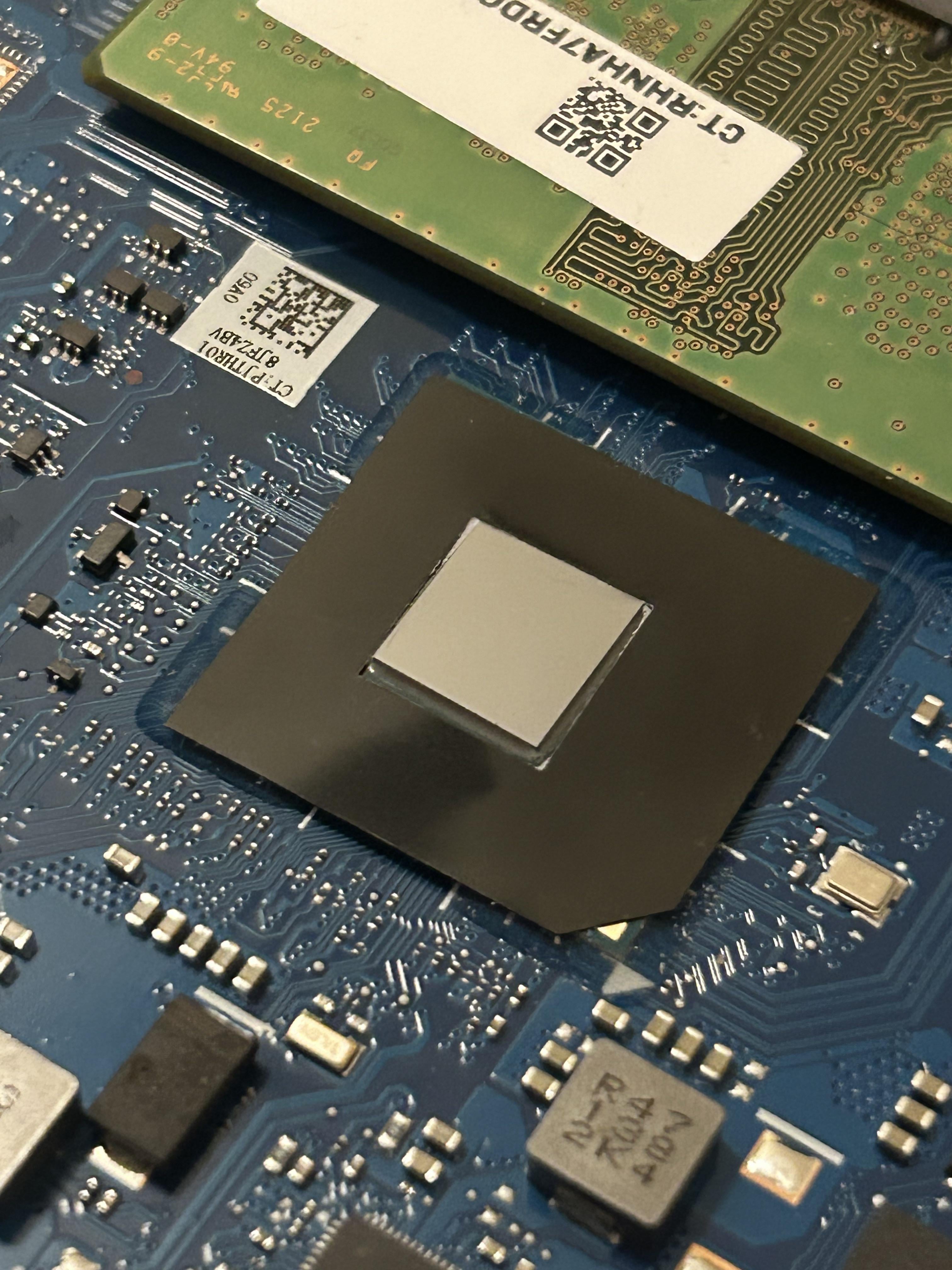
Today I repasted my intel Celeron. Bought an 8GB Samsung 3200 AA stick of Ram (double the original 4GB) is there anything else I can do to upgrade this laptop? Without comments like “buy a better one”
that’s basically it, ram and storage. You may need to add more ram if you can, 8gb doesn’t get you far. You can add a ssd with more storage too.
TheRealSmolt
No, I think that corpse is as dressed as it can be.
ICastCats
Put a light version of Linux on it.
But really this is like keeping an old mass manufactured car going. You’re doing it for the sport of it that’s okay, but that’s what you’re doing.
Berfs1Sales
You probably would have gotten more for your money if you had spent it on a used but newer laptop with more cores.
Background_Future127
ssd if you havent. also swaping the os to linux if your running windows
sunrise2209
steal a better one
I_Stay_Home
SSD if on HDD is the biggest upgrade you could probably make.
pitashen
Depending on what you want to do with your pc, if nothing you do is CPU/GPU intensive, then bumping up ram and install a SSD will do quite a bit. 8gig ram might be enough but I would personally prefer more. But it is def. much better than just 4gig.
HahaMin
Don’t spend any more on this laptop. That’s as good as it can be.
Save up for a not too long ago refurb thinkpad or dell latitude. Get at least 8th gen i5 cpu, since that’s the time when intel laptop comes with 4 cores.
Snoo_57859
BBO
G9_G999
If you don’t have an SSD, put one in, otherway the laptop is bad sory 😂
MrInitialY
SSD if it hasn’t got one yet would speed up this old hardware quite a bit. Basically your best config is fresh paste, new fan to keep it quiet as much as possible, SSD and a max possible amount of RAM. After that only changing to a newer model
Fnittle
Nope, throw this POS in the garbage or keep being delusional. Everything with Celeron on it should only be allowed in calculators.
RaptorPudding11
Don’t waste money on a Celeron. At least get an i3 or an i5. Even a used laptop from the past few years would stomp the performance of that thing. I had an HP Stream, even with a really lightweight XFCE distro of Linux that thing would crawl to a halt after loading.
It might be possible to clone the version of windows you are using using clonezilla to the new laptop drive if you have more than one USB port: you can run clonezilla off a USB flash drive and the new laptop drive in an SSD enclosure. You would probably just need to install drivers for the new laptop.
RadarDash
I think you should evaluate what your goal is before you upgrade anything.
What is the force that is driving you to upgrade, and the changes you made, what do you expect them to do for your computer?
I would recommend your goal being tied to a function, and what you want the upgraded to improve about the function.
Merwenus
Get a core i5 sticker.
IcyCharge1984
Think about getting a new one
NotTayto
Atlas OS will let you selectively strip windows processes to clean up a decent bit of cpu and ram usage.
Seminoso
Not possible to save that potato of a laptop
OliverSniper
You could ad an SSD and there are “de-bloaters” for windows 10 on GitHub and other places, I got a USB at home which I labeled “make windows great again” it has de-bloaters and scripts on it that strip down windows 10 as much as possible (that I could find and test)
I revived my decade old Lenovo B51 that I use if I wana go to study in the library that way.
I tried Linux Mint but it would crash all the time when I had my WiFi enabled and I couldn’t be bothered to keep experimenting with multiple distros if I have something that “just works”
Smith6612
Make sure the memory is configured in dual channel mode. That will give the Celeron a little more oomph.
Other than that, debloating your system as much as possible will get you the most out of the CPU. As others suggested, Linux is much more lightweight than Windows for day to day use.
Suspicious_Bet1359
This computer was always e waste. You’ll never improve it.
Jackmoved
Ram and SSD is all you can really add to laptops. While it’s open, blowout dust bunnies.
Deranged_Coconut808
buy a waaaay better one.
thespirit3
Repasting is a complete waste of time and effort. Memory and SSD upgrade will make the most difference.
I say this as someone who regularly uses ancient machines. I’m still running an Intel Atom eeePC 🙂
KTTalksTech
Install Intel XTU and see if you can lower core voltage and increase boost duration. This might make the laptop a little less horribly slow. Just watch a tutorial on how to lower your voltage without making the CPU unstable first
burnitdwn
It sucks how bad Intel killed the celeron name. I used to LOVE my celeron 300a at 450mhz. It was better than a pentium 2 400 and cost like $150 when the pentium 2 was around $800.
thedreaming2017
I would remove windows 11 and install Linux Mint XFCE. I looked up the specs on the laptop and it’s supposed to run windows 11S but it’s only comes with 4GB of ram. Bumping it up to 8GB was a good move. You only have about 64GB of storage to work with and can’t slap anymore on it so switching to a light linux distro will let you use the laptop and have some more space on it to store files. Other than that, I don’t know what HP was thinking because it’s a seriously underpowered machine with just the bare specs to run windows 11 but not enough to actually run any programs under it.
yum_raw_carrots
Did similar with wife’s old laptop for the kids. Was unusable. Bought the best cpu the motherboard could handle off eBay, same with ram. Replaced hdd with ssd. It’s now very, very usable. Spent less than £100
PaleShadowNight
That thing is more fucking useless then a wet forty seconds long fart accompanied by the largest shart you’ve ever dropped during a hot date going well.
theRealNilz02
Buy a better one.
Sett_86
Please don’t put any more money into a Celeron
Moquai82
Maybe check the mechanical parts (blower fan), eventually identify them and reorder them at ali express or so.
And add an SSD if not already happened.
New power pack would be better, too.
Beside this try to look out for genuine spare parts of the whole machine at ebay, aliexpress (for as-good-facsimiles) and so on.
With that machine you have to act like an mechanic for an oldtimer car to keep it in good condition.
saidgheldane36
SSD
rocketkiddo7
Perhaps a SSD, NVMe if possible, otherwise a regular SATA SSD will do the trick

36 Comments
no
that’s basically it, ram and storage. You may need to add more ram if you can, 8gb doesn’t get you far. You can add a ssd with more storage too.
No, I think that corpse is as dressed as it can be.
Put a light version of Linux on it.
But really this is like keeping an old mass manufactured car going. You’re doing it for the sport of it that’s okay, but that’s what you’re doing.
You probably would have gotten more for your money if you had spent it on a used but newer laptop with more cores.
ssd if you havent. also swaping the os to linux if your running windows
steal a better one
SSD if on HDD is the biggest upgrade you could probably make.
Depending on what you want to do with your pc, if nothing you do is CPU/GPU intensive, then bumping up ram and install a SSD will do quite a bit. 8gig ram might be enough but I would personally prefer more. But it is def. much better than just 4gig.
Don’t spend any more on this laptop. That’s as good as it can be.
Save up for a not too long ago refurb thinkpad or dell latitude. Get at least 8th gen i5 cpu, since that’s the time when intel laptop comes with 4 cores.
BBO
If you don’t have an SSD, put one in, otherway the laptop is bad sory 😂
SSD if it hasn’t got one yet would speed up this old hardware quite a bit. Basically your best config is fresh paste, new fan to keep it quiet as much as possible, SSD and a max possible amount of RAM. After that only changing to a newer model
Nope, throw this POS in the garbage or keep being delusional. Everything with Celeron on it should only be allowed in calculators.
Don’t waste money on a Celeron. At least get an i3 or an i5. Even a used laptop from the past few years would stomp the performance of that thing. I had an HP Stream, even with a really lightweight XFCE distro of Linux that thing would crawl to a halt after loading.
It might be possible to clone the version of windows you are using using clonezilla to the new laptop drive if you have more than one USB port: you can run clonezilla off a USB flash drive and the new laptop drive in an SSD enclosure. You would probably just need to install drivers for the new laptop.
I think you should evaluate what your goal is before you upgrade anything.
What is the force that is driving you to upgrade, and the changes you made, what do you expect them to do for your computer?
I would recommend your goal being tied to a function, and what you want the upgraded to improve about the function.
Get a core i5 sticker.
Think about getting a new one
Atlas OS will let you selectively strip windows processes to clean up a decent bit of cpu and ram usage.
Not possible to save that potato of a laptop
You could ad an SSD and there are “de-bloaters” for windows 10 on GitHub and other places, I got a USB at home which I labeled “make windows great again” it has de-bloaters and scripts on it that strip down windows 10 as much as possible (that I could find and test)
I revived my decade old Lenovo B51 that I use if I wana go to study in the library that way.
I tried Linux Mint but it would crash all the time when I had my WiFi enabled and I couldn’t be bothered to keep experimenting with multiple distros if I have something that “just works”
Make sure the memory is configured in dual channel mode. That will give the Celeron a little more oomph.
Other than that, debloating your system as much as possible will get you the most out of the CPU. As others suggested, Linux is much more lightweight than Windows for day to day use.
This computer was always e waste. You’ll never improve it.
Ram and SSD is all you can really add to laptops. While it’s open, blowout dust bunnies.
buy a waaaay better one.
Repasting is a complete waste of time and effort. Memory and SSD upgrade will make the most difference.
I say this as someone who regularly uses ancient machines. I’m still running an Intel Atom eeePC 🙂
Install Intel XTU and see if you can lower core voltage and increase boost duration. This might make the laptop a little less horribly slow. Just watch a tutorial on how to lower your voltage without making the CPU unstable first
It sucks how bad Intel killed the celeron name. I used to LOVE my celeron 300a at 450mhz. It was better than a pentium 2 400 and cost like $150 when the pentium 2 was around $800.
I would remove windows 11 and install Linux Mint XFCE. I looked up the specs on the laptop and it’s supposed to run windows 11S but it’s only comes with 4GB of ram. Bumping it up to 8GB was a good move. You only have about 64GB of storage to work with and can’t slap anymore on it so switching to a light linux distro will let you use the laptop and have some more space on it to store files. Other than that, I don’t know what HP was thinking because it’s a seriously underpowered machine with just the bare specs to run windows 11 but not enough to actually run any programs under it.
Did similar with wife’s old laptop for the kids. Was unusable. Bought the best cpu the motherboard could handle off eBay, same with ram. Replaced hdd with ssd. It’s now very, very usable. Spent less than £100
That thing is more fucking useless then a wet forty seconds long fart accompanied by the largest shart you’ve ever dropped during a hot date going well.
Buy a better one.
Please don’t put any more money into a Celeron
Maybe check the mechanical parts (blower fan), eventually identify them and reorder them at ali express or so.
And add an SSD if not already happened.
New power pack would be better, too.
Beside this try to look out for genuine spare parts of the whole machine at ebay, aliexpress (for as-good-facsimiles) and so on.
With that machine you have to act like an mechanic for an oldtimer car to keep it in good condition.
SSD
Perhaps a SSD, NVMe if possible, otherwise a regular SATA SSD will do the trick