
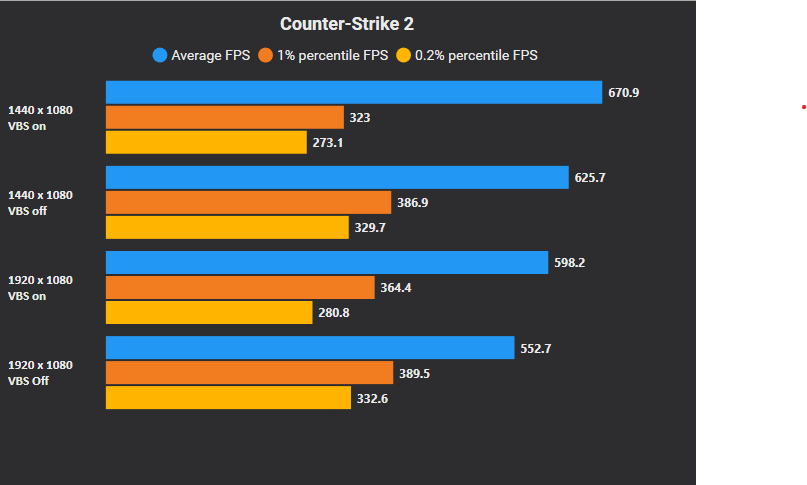
Got into the rabbit hole of getting better frame times and a more stable experience since having rubberbanding / micro lag issues for a while now.
Specs: 9800x3d 4090
Did some testing on VBS on vs off on 16:9 and 4:3 1080p
I was expecting VBS being enabled lowering my avg fps, but it actually increased on both resolutions within multiple tests. Meanwhile 1% got alot better with vbs off.
Which setup would you guys use?
Also saw a youtube vid (https://www.yo utube.com/watch?v=pwCRpc7jVxQ) explaining the positive effects of setting fps_max 0 in cs + using NVCP Frame Cap.
Tested this aswell and got similar 1% gains as in the vid, but sadly the game started to give me even more rubberbanding / microlags than before.
Any input is much appreciated!
8 Comments
Following
VBS is virtual based security?
I found older drivers helped my setup. The CapFrameX results and discussion are here.
https://www.reddit.com/r/GlobalOffensive/s/vtZFAf8psg
Reminder
Each system performs differently, your benchmark recommends you to keep it enabled.
Don’t overthink it. This game is poorly optimized compared to other esport titles. The best thing that you could do to improve your frame times is to add fps_cap 0 in your autoexec, disable NVIDIA reflex in-game and via the launch option, and limit your fps via the NVIDIA control panel. Personal benchmarks should prove my point.
The reason you see VBS on higher average might be because as a side-effect it limits the trashing done by steam ipc (inter process communication): valve anti cheat, valve anti nosteam (drm), valve rich presence & friends updates, valve games updates etc
It depends on the number of active friends and the library size – it happens less for fresh accounts, even less under `-insecure` and not at all under a proper steam emulator
It’s also why the game is a bit more stable under linux
VBS is more like VAC – not only a sad joke that does not stop any of the dozens of active malware nets, but even present a vulnerability in itself to make malware more evasive, all the while it trashes legitimate performance
I would not count on that increased avg fps to hold over time, and it’s worthless anyway if it comes at the expense of 1%L
Finally, stop trusting capframex, it only paints half the picture, missing actual input latency
Don’t cap in nvidia control panel, fps_max 0 in-game, reflex on (+boost for an underutilized 4090)
If you really need to cap, do so in-game so that you can also benefit input-wise
With that hardware I would even try VSync Fast as a cap instead (as long as avg is above 2x refresh)
Got the same rig, the same problem and the same rabbit hole.
Following this.
Came to the same conclusion as this gentleman and scholar suggested, above… For a beast rig like this, I found player models a bit less choppy if they don’t tear , so I keep vsync and gsync on (FAST SETTING) and reflex boost. Eliminates most of the additional input lag and you get fluidity comparable to full vsync.
I do fps_max -1 and cap it in nvcp at like 800.