
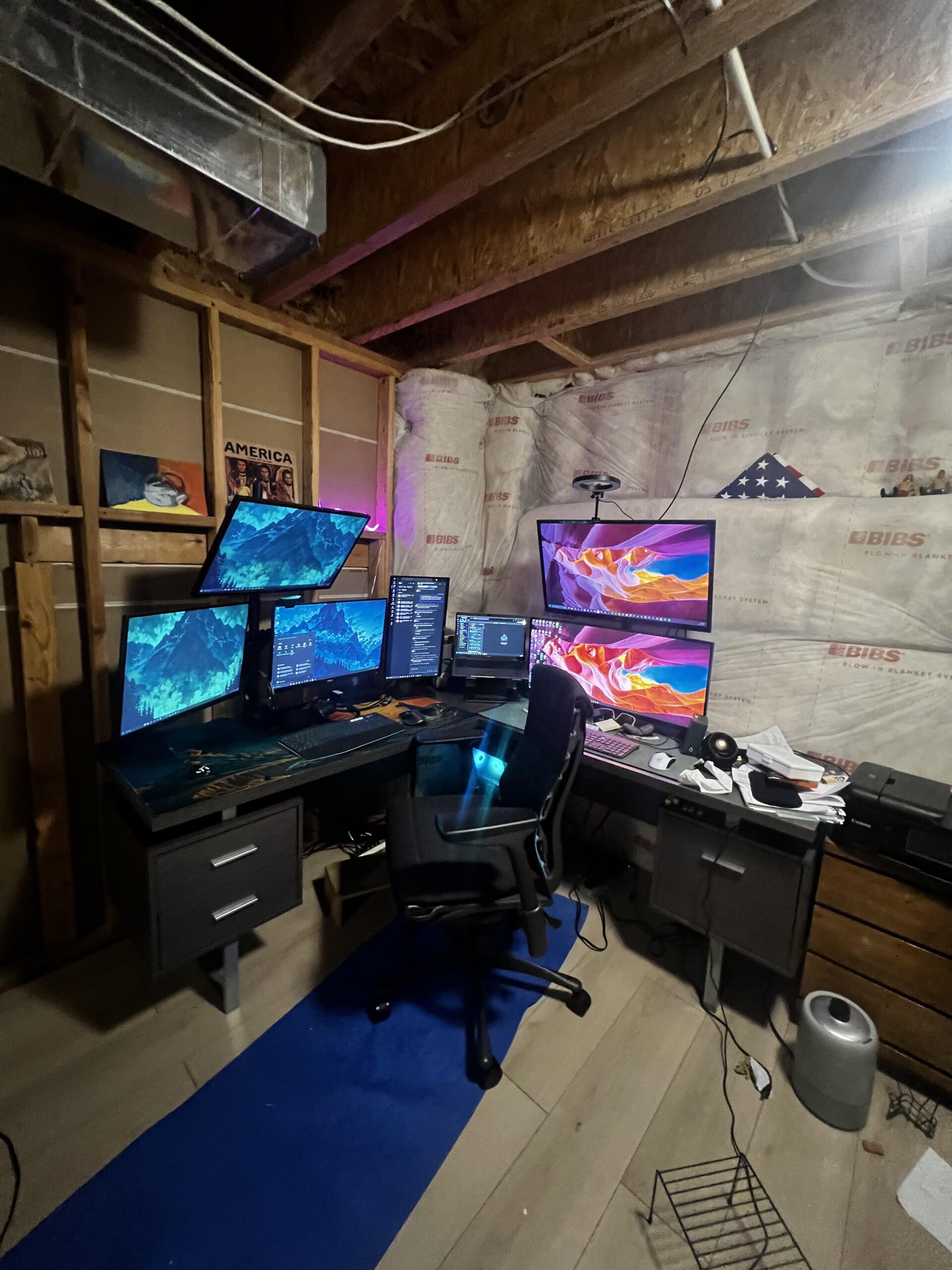
Hi everyone, I am trying to get this setup to be more ergonomic and strain my neck less, make me more productive without spending too much money. Less than $300 would be ideal.
– On the left, the three 27” monitors on the right vivo stand are all connected to my work laptop via a dell docking station;
– in the corner/middle, my personal/school laptop is connected to my vertical 22” dell monitor using the stock stand;
– 34” dell UW and 32” on the right in a stacking vivo stand are connected to my gaming pc.
Besides the UW, all of the monitors were very cheap to me.
– Desk is 72 inches x 72 inches
– Chair is Herman miller Logitech embody
– chair mat is an old yoga mat, I need to replace with something better
– peripherals: razer lightweight gaming mouse, logi mx master 3, mx craft keyboard, mx k850 keyboard,
I think I might need to get a good footrest and a good KVM switch.
My issues:
– chair rolls around too much, desk and chair are too high for my short legs
– it seems like I never have my screens/windows in the right place when I need them
– my eyes and neck are straining a lot as I work, I spend 10+ hours here most days.
What do I need to change to make this space more comfortable, practical, and ergonomic?
23 Comments
Spend more time outdoors
I would start by adding more monitors and keep stacking them. That’ll surely help. /s
U live in a bunker?
Yeah, replace the yoga mat with a carpet will solve your chair rolling issue. Also, add a feet rest. I also have stacked monitors, you should have you eyes where both monitors meet and there is no gap, they touch each other.. I do 12+ hours days without issues.
What do you mean you screens/windows are not in the right place?
An Apple Vision Pro
Less monitors? Lol
360° desk and fill the first row with monitors until you close the circle
Don’t have them? 🤷
But why?
You should invest in a kvm.
Have less monitors and take advantage of virtual desktops
Get rid of the horizontal stacks. I’ve had to, it’s a lovely idea but it screws your neck.
If you have varifocals do not EVER wear them for computing. Ever. Get some single vision lenses. Also a KVM and get rid of most of it.
Virtual desktops.
Get 2-3 ultra wides
Maybe try centering them and not bending your neck into an L shape
Putting in a floor but no walls is wild.
Cool with the monitors, but is 3 computers needed in any normal way?
Get a second head installed
7 monitors if you add the laptop display.
Ditch the stacked monitors and just put as many as you can in a long curved row. Spin your chair not your neck
This might be slightly more than your budget… and require weeks of setup, on a complete gamble.
[https://talonvoice.com/](https://talonvoice.com/)
[https://gaming.tobii.com/product/eye-tracker-5/](https://gaming.tobii.com/product/eye-tracker-5/)
Save some more money and invest in good stuff for your setup. Ergonomic investment unfortunately isn’t cheap, but VERY much worth it in the long run.
At a minimum I would get a height adjustable desk (ikea desk with third party risers are good…those together will be about your budget). Then I would look at monitor arms (ergotron on FB marketplace is a good spot). Then a chair (B4OD.com…i believe that’s what it’s called). Then accessories. You have a massive setup that is no doubt expensive. Take that same energy into your ergo setup and your body will thank you later, trust me.
Planet fitness is $10 a month.