
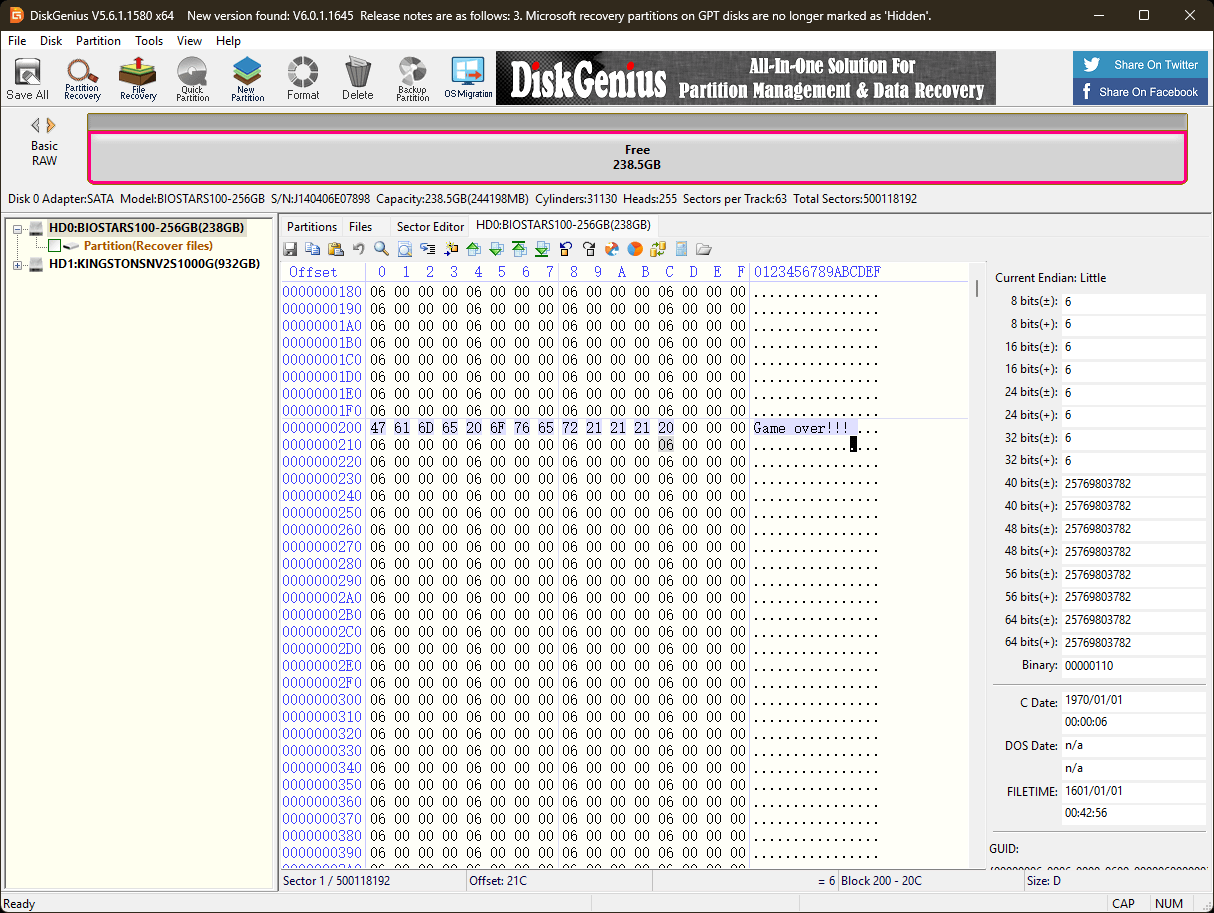
I got this Biostar S100 256GB from my friend, figured if I could help him retireve data or maybe bring it back to life by troubleshooting it. I wasn't able to convert it to MBR or GPT partition and that was odd. Got into DiskGenius to figure out what could be the problem until I stumbled on the hex code. Every sector is overwritten with "Game Over!!!" and it was quite odd to me, figured out it was probably a malware. The question is if its possible to bring this SSD back to life somehow.
9 Comments
You could try reflashing it but that’s an entire headache
Do a secure erase through bios?
What went wrong in the first place?
What does SMART say?
Secure erase on Bios.
If not, maybe a reflash could fix it.

Rip
use diskpart to clean the disk?
Looks like KillDisk. Since this is a ssd your first step should be to download the manufacturer tool (Samsung magician etc) and use the secure erase feature which will just reset the nand. If it’s a sata ssd you can prob use hdparam with the secure-erase switch (I’ve never used it personally).
Otherwise you can boot into a Linux live cd, use dd to zero out the drive and then partition the drive using gparted or fdisk. Keep in mind you’ll shorten the ssds life this way.
Any data is 100% gone. Maybe some shreds are left somewhere that a data recovery tool could piece together but I doubt it.
In terms of saving the hard drive, as others said, disk part, or it might be worth booting to linux from a USB and using linux tools if you can’t get it to recognize properly in windows
EaseUS data recovery software.. get trial to see if it can find anything 1st