No. Figure out why your PC keeps restarting. Monitor thermals. Record errors if any
Killawut
Right. But if it restarts again, try duct taping the freezer to the side too.
Freyja-and-Felines
Okay so kinda similar thing here. I had the same problem of my pc restarting for unknown reasons. Temps were all fine but I took the back panel off to check wiring and left it off since I figured I’d be back in there and maybe it’ll help airflow since I have a fan near it (for myself). I’ve done a bunch of other stuff (updating bios is what I believe fixed it) but also since keeping the panel off it hasn’t done a random restart and I’m kinda scared to put it back on now 😅
Ferchitoqn
Check your cpu thermal past or cpu makes good contact with his cooler, check windows task manager (or aida64, msi afterburner) and check temperatures of cpu and gpu
KiraroYuukiNya
Cooling Trick that Noctua doesn’t want you to watch.
Visual-Win-1778
I had this same issue and it’s cuz my AIO cooler was fried and my cpu was hitting godly temperatures
BudgetBuilder17
I know some one who was not very PC knowledgeable. And come to find out he was playing a game that kept crashing due to lack of VRAM. Game required 4gb and he has 4gb vram.
Panoramix97
You wrongly installed the cooler.
Repaste and remount it
Even if stock cooler is bad it should handle opening a game without spiking to 90c, assuming all stock bios
Problem is the mounting on cooler
New-Audience2639
Do not do this. You are probably cooking your CPU and doing irreversible damage. Remove your cooler, repaste, make sure it’s mounted properly and tight, make sure the cooler has power and if it continues it’s likely you have a bad cooler and need to replace it immediately. Do not run your PC like this.
RobinTube_MC
Close your side panel. Pressure improves cooling.
BleuTime
i had this problem a while back, but just at complete idle. CPU would hit 89 degrees, and shut off, even in the bios
I found out that it was my AIO getting a air bubble that stopped the pressure, so I bought a new one and out it right in. That solved the issue
Remember thermal paste, of course
Less-Holiday-999
if its skyrocketing to high temps (after just OPENING a game) then the cooler is likely installed incorrectly or needs to be repasted
Phoenix4280
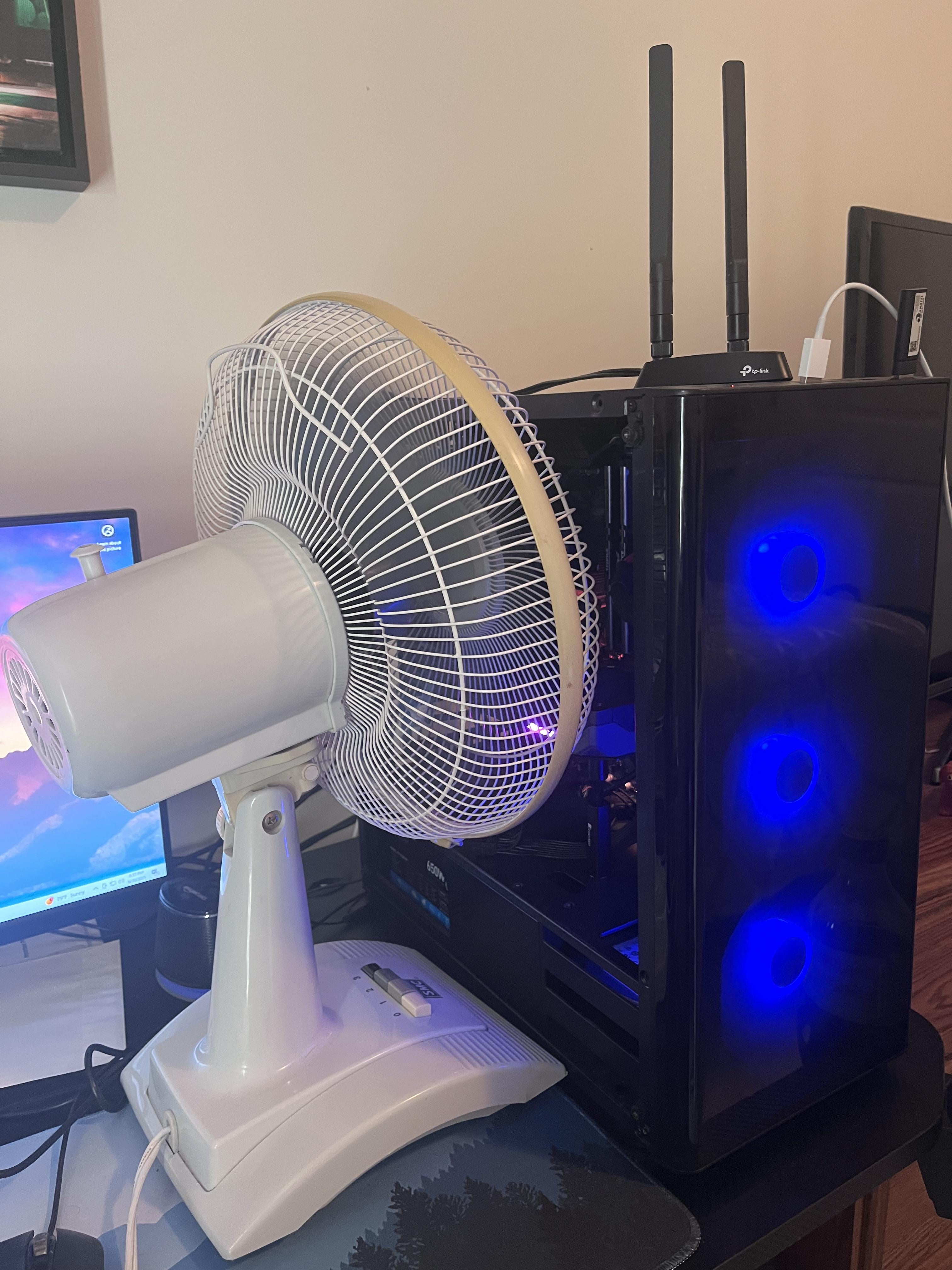
Is that plastic covering your front fans? I can’t tell from the picture.
fazlez1
I had to do this a long time ago only to find out the fan on the power supply wasn’t spinning. I touched the top of the tower at one point and pretty much burned my hand. I can’t remember if it was clogged or not, but replacing the power supply fixed my problem.
THEJimmiChanga
Op if you swapped in the new parts, you fucked something up plain and simple. Wraith cooler is not sufficient for a 5900x but even then it shouldn’t be restarting immediately into starting a game. It’ll thermal throttle causing frame spikes and poor performance whole that little wraith fan runs at 100, but it shouldn’t be restarting immediately. You shouldn’t need a full blown box fan 4 inches from your hardware
RDOG907
Replace that stock wraith cooler ASAP
1. Pull and repaste the cooler.
2. Check to make sure the cooler is making good contact. You should basically have it tightened down until the philips torques out of the socket with a minor amount of effort.
3. Make sure the cpu fan is plugged into the cpu fan port and set the curve to max out at 70C same with the case fans.
4. You could undervolt the cpu possibly until you get a new cooler.
zone55555
Might want to fill that cavity with icepacks.
apachelives
Case looks like one of those ovens that has zero air flow
KeithDavisRatio
It’s probably your power supply. The temperature spike on GPU or CPU happens right when it restarts. Your PSU can’t deliver power correctly under load and triggers the failsafe. Replace the PSU before you lose your SSD storage or other components. This happens even with 7-10 year warranty PSUs.
omaGJ
This *does* work but it sounds like the problems youre having this will not fix.

21 Comments
What am I looking at…
No. Figure out why your PC keeps restarting. Monitor thermals. Record errors if any
Right. But if it restarts again, try duct taping the freezer to the side too.
Okay so kinda similar thing here. I had the same problem of my pc restarting for unknown reasons. Temps were all fine but I took the back panel off to check wiring and left it off since I figured I’d be back in there and maybe it’ll help airflow since I have a fan near it (for myself). I’ve done a bunch of other stuff (updating bios is what I believe fixed it) but also since keeping the panel off it hasn’t done a random restart and I’m kinda scared to put it back on now 😅
Check your cpu thermal past or cpu makes good contact with his cooler, check windows task manager (or aida64, msi afterburner) and check temperatures of cpu and gpu
Cooling Trick that Noctua doesn’t want you to watch.
I had this same issue and it’s cuz my AIO cooler was fried and my cpu was hitting godly temperatures
I know some one who was not very PC knowledgeable. And come to find out he was playing a game that kept crashing due to lack of VRAM. Game required 4gb and he has 4gb vram.
You wrongly installed the cooler.
Repaste and remount it
Even if stock cooler is bad it should handle opening a game without spiking to 90c, assuming all stock bios
Problem is the mounting on cooler
Do not do this. You are probably cooking your CPU and doing irreversible damage. Remove your cooler, repaste, make sure it’s mounted properly and tight, make sure the cooler has power and if it continues it’s likely you have a bad cooler and need to replace it immediately. Do not run your PC like this.
Close your side panel. Pressure improves cooling.
i had this problem a while back, but just at complete idle. CPU would hit 89 degrees, and shut off, even in the bios
I found out that it was my AIO getting a air bubble that stopped the pressure, so I bought a new one and out it right in. That solved the issue
Remember thermal paste, of course
if its skyrocketing to high temps (after just OPENING a game) then the cooler is likely installed incorrectly or needs to be repasted
Is that plastic covering your front fans? I can’t tell from the picture.
I had to do this a long time ago only to find out the fan on the power supply wasn’t spinning. I touched the top of the tower at one point and pretty much burned my hand. I can’t remember if it was clogged or not, but replacing the power supply fixed my problem.
Op if you swapped in the new parts, you fucked something up plain and simple. Wraith cooler is not sufficient for a 5900x but even then it shouldn’t be restarting immediately into starting a game. It’ll thermal throttle causing frame spikes and poor performance whole that little wraith fan runs at 100, but it shouldn’t be restarting immediately. You shouldn’t need a full blown box fan 4 inches from your hardware
Replace that stock wraith cooler ASAP
1. Pull and repaste the cooler.
2. Check to make sure the cooler is making good contact. You should basically have it tightened down until the philips torques out of the socket with a minor amount of effort.
3. Make sure the cpu fan is plugged into the cpu fan port and set the curve to max out at 70C same with the case fans.
4. You could undervolt the cpu possibly until you get a new cooler.
Might want to fill that cavity with icepacks.
Case looks like one of those ovens that has zero air flow
It’s probably your power supply. The temperature spike on GPU or CPU happens right when it restarts. Your PSU can’t deliver power correctly under load and triggers the failsafe. Replace the PSU before you lose your SSD storage or other components. This happens even with 7-10 year warranty PSUs.
This *does* work but it sounds like the problems youre having this will not fix.