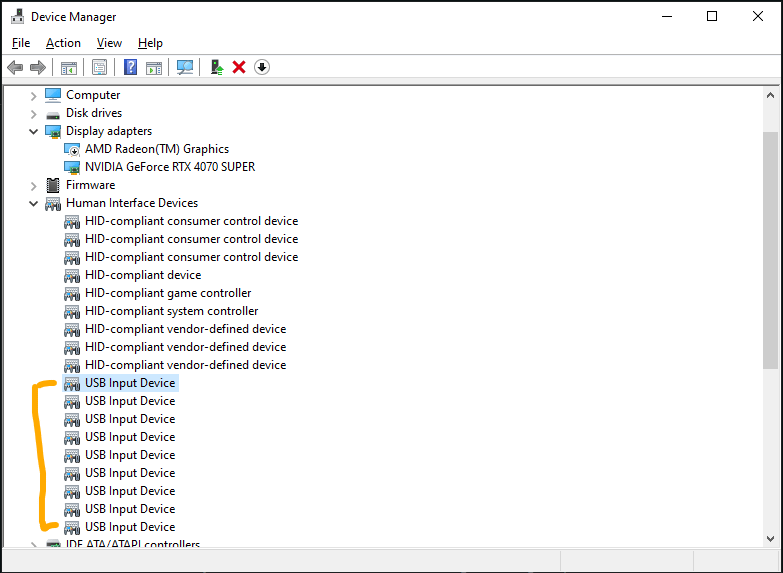
Also, does it shows the all USB ports the motherboard has? or USB ports that somthing is plugged to them? because i have only 4 devices that are plugged to USB.

Also, does it shows the all USB ports the motherboard has? or USB ports that somthing is plugged to them? because i have only 4 devices that are plugged to USB.
24 Comments
Unplug your mouse and refresh the window. The one that disappears is your mouse.
I would use USBDeview [https://sourceforge.net/projects/usbdeview/](https://sourceforge.net/projects/usbdeview/) it will show a green box circle next to plugged in devices, sort by that, unplug device.
Go through the properties of every USB device and find which one is the mouse.
It’s tedious but hey.
try unplugging all other USB devices and then disabling the left over tags by going into property.
https://i.redd.it/csj9kvi6ho8f1.gif
Unplug them all, plug in mouse, rename it
This command in powershell gives a bit more details about the USB devices
Get-PnpDevice -PresentOnly | Where-Object { $_.InstanceId -match ‘^USB’ }
example:
https://preview.redd.it/qelldk9lio8f1.png?width=1458&format=png&auto=webp&s=dfe61587fa59079b32edf2ed77552884134c2e4e
Edit: nevermind, u/Dodel1976 solution is better.
Eh, normally it would just be listed under mouse.
https://preview.redd.it/3e3xkbf3ko8f1.png?width=324&format=png&auto=webp&s=47a9f0614a5b554d28a708a33f36dabd2e8f9215
Right click, deinstall driver. Repeat until mouse stops moving.
/s of course
Ask your mouse politely “WHO ARE YOU SIR?”
That should be enough
Use usbdeview.
Tell Microsoft to include some device details in these strings
USBDView by nirsoft
Are you sure your mouse isn’t in the “Mice and other pointing devices” section?
basically, open every one and note down one of the unique hardware id’s. Unplug your mouse and see which one disappeared by comparing the hardware id’s lol
What’s the issue?
While the device is highlighted, sort by connection instead of type.
a program called “usbtreeviewer” – shows port speed, device names, etc.
(pls Microsoft copy macOS’ system information app thx.)
https://www.uwe-sieber.de/usbtreeview_e.html
Some cheese might just do the job
None of them are your mouse. All of them the ports managed by your computer. Mouses are listed differently as others are already pointed out.
Russian roulette, disable one by one.
“That’s the neat part… you don’t!” – Microsoft
There’s a mouse section
Real answer:
Go to view at the top ,change to by container. Look for your mouse in the new categories, should be labeled whatever mouse you have, or something like generic mouse (not “virtual” mouse). Expand or click properties and you can see all the HID devices and the usb device for it.