I’ve read up and down the manual and watched every YouTube video. Can someone confirm if my brand new AIO is dead or if I’m doing something wrong?

I’ve read up and down the manual and watched every YouTube video. Can someone confirm if my brand new AIO is dead or if I’m doing something wrong?
44 Comments
Did you remove the plastic piece that covers the part that touches the CPU? Did you paste the CPU properly?
Not sure if it’s just the angle of this photo but that does not look properly seated like, at all? One side looks clearly higher than the other.
We’d need way more info either way – what’s not working? Is it powering on?
Typically the fan header goes to the one labeled pump since it’s supposed to run 100% all the time. And also doesn’t these AIO also have a usb cable attached to them as well?
Edit: check if your fan header for the pump is actually running 100%, will need to do that in BIOS.
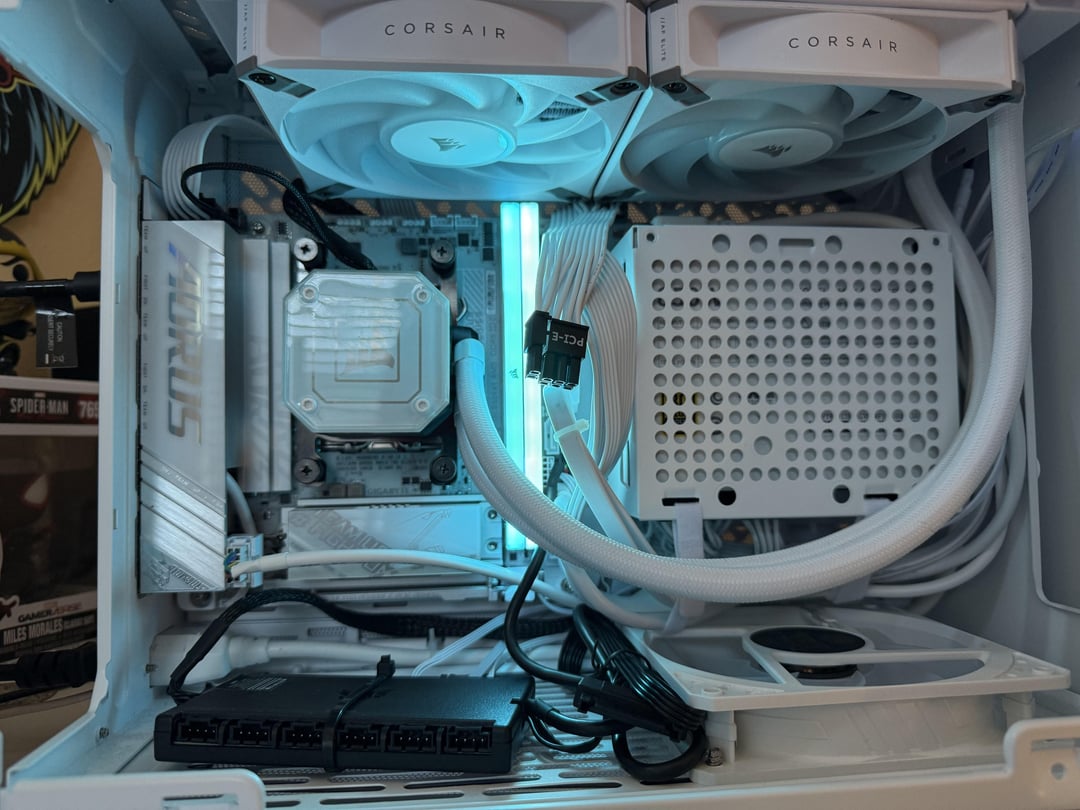
Pardon my temporary cable management. I’ve genuinely tried to find the issue all day. I’ve read the manual so much I can cite it verbatim, I’ve watched every YouTube video I could find.
I’ve just uninstalled and reinstalled the AIO for the 4th time, repasted the CPU for the 2nd time (Arctic Silver 5 Thermal Paste), yes the plastic piece was removed from the cooler prior to installing on CPU.
I noticed that the radiator fans work while plugged directly into the motherboard, but not in the black AIO controller shown in pic on the bottom. I ensured that every connection is securely plugged in all the way to the controller, It’s still not working. So posting here is genuinely my last attempt before I contact Corsair.
The motherboard is a X870I Aorus Pro Ice (Mini ITX)
AIO is iCUE H100i Elite Capellix XT
That the elite capellix?
Someone else said it looks uneven, and I agree. Does it light up at all? Does it light up red?
If you tightened both right screws before the left, it might be sitting uneven.
More importantly, mine lit up red and didn’t flow. I had a lot of trouble figuring out that the bigger plug that goes into the top of the hub wasn’t seated properly and was causing the issue. So maybe check all of the hub plugs one more time.
Couple of things to verify (sorry if these insult your intelligence, not intended):
– did you remove the protective film from the block?
– did you leave the pre-applied thermal paste undisturbed?
– did you place the block on the CPU in “one move” without further wriggling, twisting or removing again before fastening
– if you did disturb the contact between block and CPU did you properly re-apply thermal paste?
All those ensure a proper thermal connection for the heat to transfer from CPU to AIO (and same for air-coolers)
Also, can you hear the pump running (soft smooth hum from the block) and coolant flow (hard to detect in an AIO though)
Will the fans run when your pc is on?
also try a different port for ur cooler’s pump and fans
Not sure if this is the case, but I once had an AIO that wouldn’t sit completely flat in a certain orientation on the particular mobo I had.
I rotated the pump 90° or 180° and it worked fine afterwards.
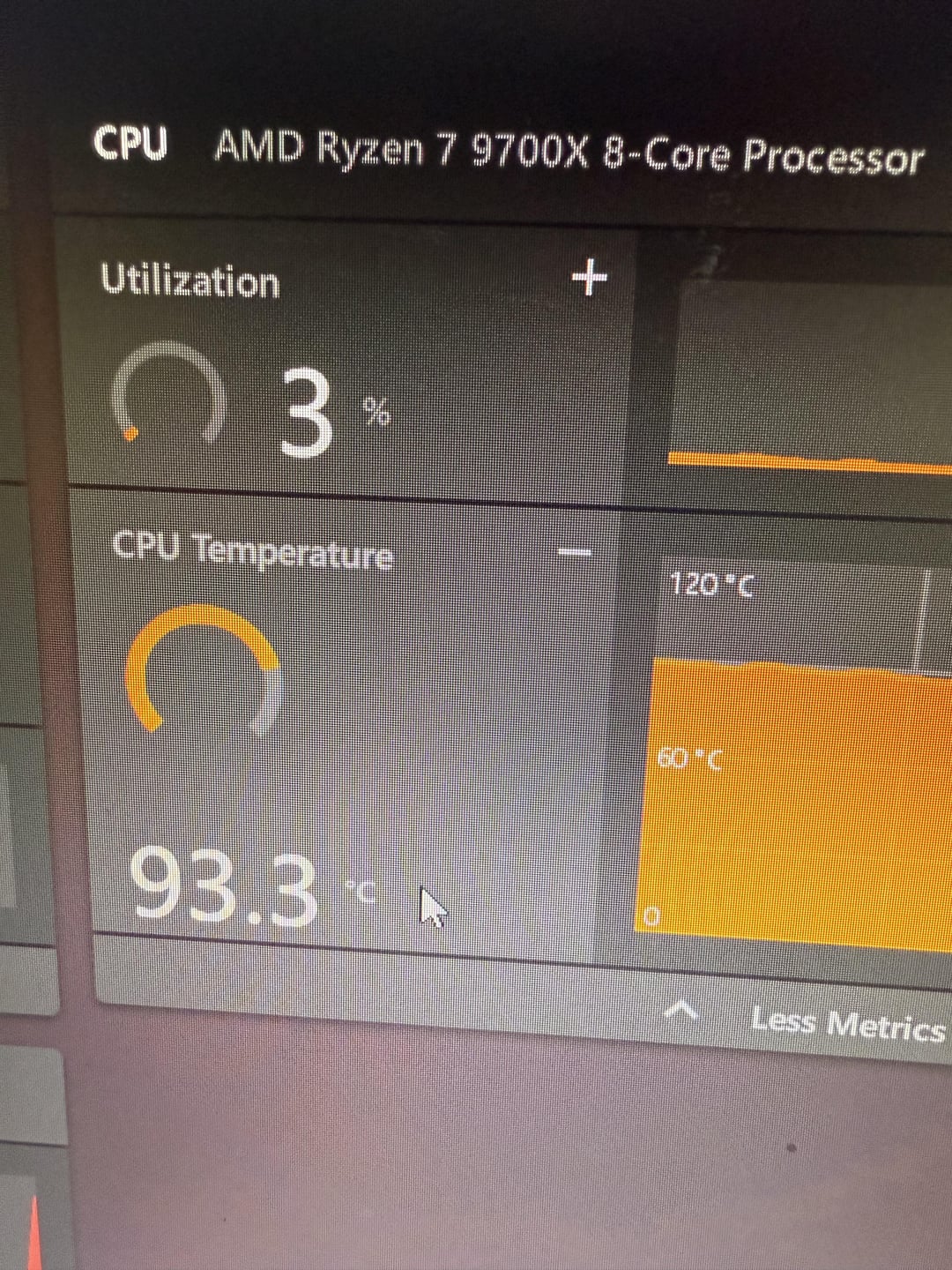
I suspect if it’s properly seated and the AIO was defective, you would get OK temps until under load.
Those terrible cable extensions, get rid of them trust me
Your pump isn’t plugged in correctly. First Pic top right of your pump is where your supposed to be plugged in at.
Your AiO pump cable is in the wrong spot. Put it in the one that says “AIO PUMP”, or if your board doesn’t have one set the header to full speed in the BIOS.
Most of the time it’ll be the contact between the block and cpu, that said, DOA aio’s aren’t unheard of. If your aio makes and sloshing type sounds, the fluid is likely lower than it should be and I’d consider it dead.
Connect the pump header to “cpu fan” header on mobo and set that header to run at 100% 24/7 in the bios
bro the sata power isnt plugged in
Is the controller connected to power and is the USB cable connected to the motherboard
The aio pump does not look like it’s sitting right.
First mistake is reading directions. Believe in yourself. You are a builder.
This is the [manual](https://www.bhphotovideo.com/lit_files/1173743.pdf) for my motherboard. If you look at page 20, is the 2nd picture saying to not use the CPU_FAN slot for the pump?
Air coolers are king.
Just use an air cooler. Way cheaper and just as effective.
Unless you’re a chill and don’t mind everything barely working. I’d highly recommend DONT BUY CORSAIR.
I don’t see a PUMP_FAN header. Plug the AIO pump into the CPU_FAN header and set it to run at 100% all the time in BIOS.
(This assumes the AIO has a separate pump connector.)
Off topic I can’t see my cpu temp in my amd software like the one shown in pic, where can I enable it? 🙂
I hope you figure it out. But don’t overstress yourself. If it’s still within return window (since you said it’s new), just send it back for a replacement. Imo, return it and grab an air cooler and never worry about this type of thing ever again.
I’d say return and refund if you still can. I prefer arctic liquid freezer. I have arctic 3 and it was easy install and my ryzen 7700x idling around 39-45
Not sure if I got the model right, but read this part of the AIO manual carefully:
https://preview.redd.it/4fbn3pbbm68f1.jpeg?width=1320&format=pjpg&auto=webp&s=c9dadf4e3a5d6dcd86047fe8f6abfc5e64022f79
I also don’t think it’s mounted correctly, but might just be the angle of the photo. It looks crooked/off, but focus on at least getting power to the pump first and go from there.
I have one of these – don’t listen to anybody telling you to move the cable off the fan header, these use a tach cable to prevent the cooler not detected error and it’s meant to attach to that specific header.
Pump speed is controlled by the commander core, which you still haven’t plugged in fully. The USB header you have plugged in takes care of communication, you also need sata power on the commander core for it to work(flat black plug that’s still twist tied to the USB header).
The very first time I bought Corsair AIO it had a dead pump right out of the box. Same thing like yours, temps just went up and never went down. I exchanged for another unit and the damn thing had a leak from the factory. There was water/mineral oil/coolant all over the inside of the plastic wrap. (Not sure what coolant they use) This was from a local Bestbuy. This happened around 2012.
“Bro I’m giving up”
Pump is crooked as shit and not plugged in…
1- never let your tubes go below the pump. Tuck them up .
2- did you plug it into the Corsair commander? If I’m looking at the right model, this one doesn’t have its own power and relies on a Commander to power it. Is the commander plugged into a USB2 header on the motherboard?
I can’t say I’m too surprised. Modern day Corsair products are unfortunately nothing like they used to be when it comes to quality. Their QC also seems to be much worse now which doesn’t help matters any. If you’re dead set on going with AIO water-cooling then I recommend picking up a **ARCTIC Liquid Freezer III**, they are among the top performing AIO’s currently available and are very reasonably priced.
Sorry to see you received a DOA product, it does happen from time to time but at least a refund or exchange can be done.
The bottom case fan is spinning and your ram is lit up. So I’m assuming you’re powered on here. Did you forget to connect the rad fans to power / a header on the board? Your rad fans should be spinning regardless of temperature.
Also Someone mentioned it doesn’t look like you have the AIO pump connected to power properly. I second that.
My gf has this one, if I remember correctly, it needs its own power source, if the center of it is not lighting up it has no power. I think it plugs into a hub that it comes with that is powered via SATA. From your screenshot the hub isn’t being powered (black cable right by your bottom fan), connect the SATA cable to it from your power supply and the pump will turn on.
This AIO is old and has been discontinued. You likely got a dud or one that was used to death and cleaned and resold as new
Plug you pump into the top right of the board
Your fans aren’t moving in that pic, is the PC on ?
Lol why all this water danger hassle, when my r9 3900 is doing fine under a deepcool an600, also in an itx-sized 12L case? 45C idle, 70C load, 85C max in cinebench 2024). And its consuming upto 115W, which is awesome efficiency for 2019, but definitely worse than 9000 series ryzen lol
aios are overrated
Air cooler 4 life
Sorry for slight off topic but what program is pic 2
this is why i always have and always will go with big tower coolers, i got my big chungus cooler for 35 bucks on amazon they listed it wrong.
Man that cpu would run fine with just an air cooler and youd save yourself 50 bucks, the hassle, and the risk of water damage. Just sayin.
You didn’t plug in the fan or pump?