
I'm not sure who to go to for this, I've looked everywhere and have done everything. I have a ROG Strix 16 2024 and I added a new 2TB Samsung 990 Pro SSD card to it and suddenly all of my games can't run without stuttering heavily. I swapped where the SSD cards were, and that didn't help anything at all, I tried lowering the graphics and that didn't do anything, I even tried moving one of my games (FH5) over to the computes original storage and it's still not working. All of my games were running smoothly before this.
24 Comments
What was the previous ssd model/brand?
[deleted]
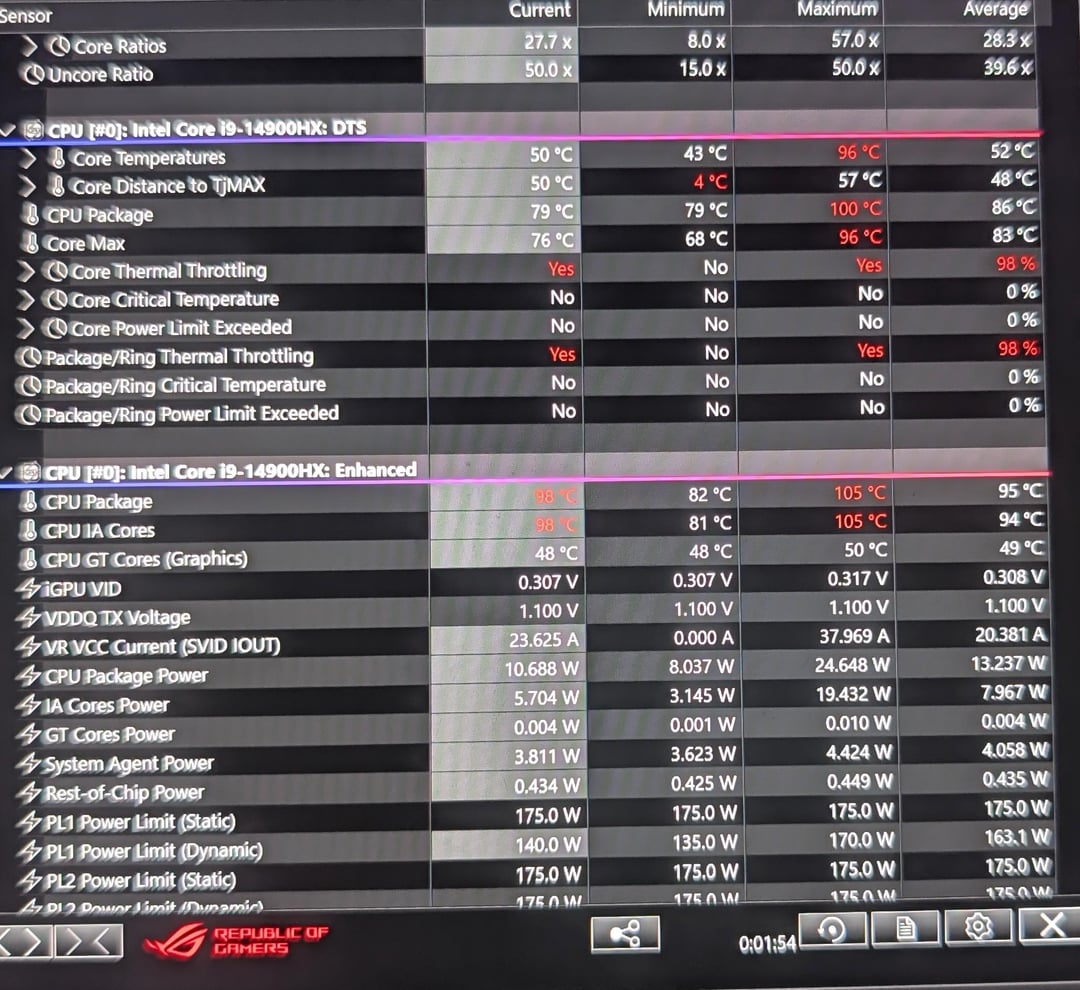
of course your game is stuttering your laptop is overheating and it’s throttling your performance, you must’ve done something wrong, i’d say take it to a repair shop to prevent you from breaking anything else
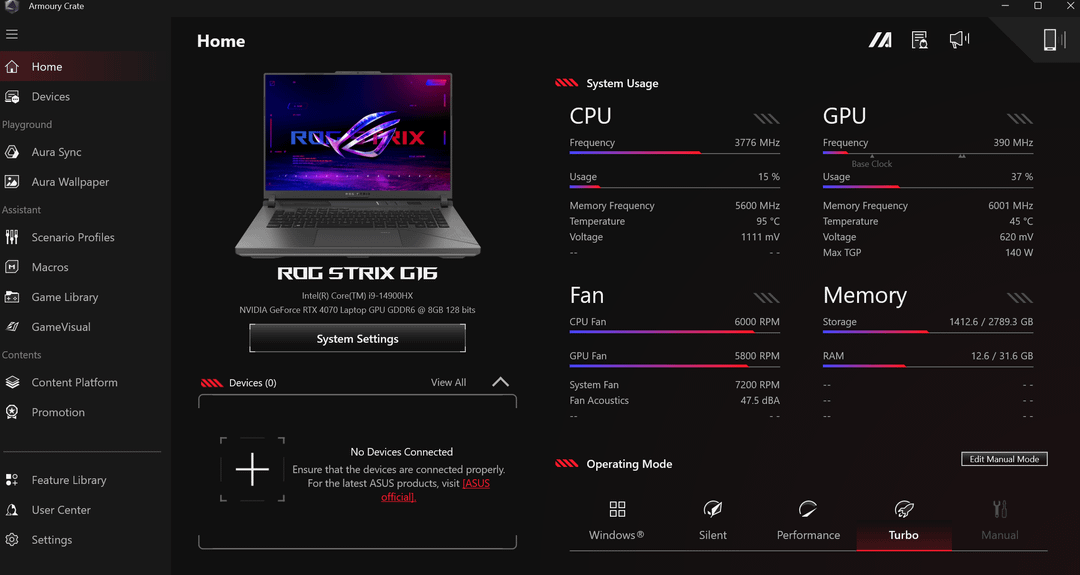
I feel like your bigger issue is the fact your CPU is sitting at 95 degrees with 15% usage.
If your disk usage is at 100 percent it’s a windows bug I haven’t seen to find a fix for I’ve seen it happen to nvme ssd and hdd and on about 10 different PCs reinstalled windows went away
CPU is thermal throttling
Did you disconnect a fan by mistake ?
You’ve messed up somewhere. Looking at those temps your CPU is no longer contacting the heatsink. It’s not the SSD that’s the problem, there’s a problem with your reassembly
Pulled the new drive and see if all works smooth, sounds like defective controller in the new one?
But device manager showing anything? Looking for caution icons indicating something off.
I’ve never had a Samsung NVMe, but if wacko on install, long shot incompatible with motherboard or bios fix maybe, but otherwise it is defective and probably its controller and not user fixable in that case.
Could try Kerish Doctor and see if Full Scan scares up anything: [kerish.org](http://kerish.org) for that utility suite, free 15 day full trial so no issue testing that unless you did before and the time ran out, LOL then there are others.
Longer shot check for viruses and such while at it.
Are you sure it isn’t from your CPU trying to recreate Chernobyl?
I lean on drive being bad, it’s a top tier drive unless somehow incompatible or chipset drivers need updating for new tech, which long shotty again, I just put in a superior drive, but same size today and just making that C: that systems main backup and had zero problems, a P3 Plus replaced with SK Hynix P41 Platinum.
When you installed your SSD, you might’ve messed with the laptop’s cooling a bit. Probably a good idea to check if the screws are tight and everything’s making proper contact.
Even better, just swap out the thermal paste. I used the Thermalright Heilos V2 pad on my laptop, and temps dropped like 20°C
You said it was on the floor. Do you have carpeting? Is it possible you’re just accidentally blocking the fans?
I have a Zephyrus M16 with the intel and if I set it on the bed or any where that’s not a hard flat surface it blocks up the fans on the bottom and will cause issues bad, especially on Turbo mode.
>Computer is hot enough to melt the table it’s sitting on
“Help, my storage doesn’t work.”
Controller drivers
Your SSD is not the issue,.your 95C CPU idle temp is.
1. When you put in the new ssd, did you have to take it all apart like the pick in the comments? Or was there a special compartment just for the hard drives to be swapped?
2. Give the Temps when you are using the laptop on a table. Not the carpet.
Everyone is saying you did something to the cooler, but socketing a NVME in your notebook doesn’t have absolutely nothing to do with the cooling components, so to be clear, you took the bottom panel off, installed the new SSD and closed it again without touching anything else?
Be honest, it’s not bad if you did, but we need to know so we can help you better.
Otherwise if you didn’t touch anything and all the screws that tighten down the coolers are still tight, the problem lies somewhere else.
Especially since I read in another of your comments that the PC is only one year old, not enough time to have dry thermal paste.
Do all 3 fans spin? Your screenshot only shows two fan speeds. You may be able to open it upside down partially to reach the power button and double check all 3 with the bottom case off. If you’re running turbo all the time you might not hear a fan that may not be running due to a loose connection or obstruction.
Did you disconnect any of the small connectors near either nvme because the one going to the fan in the middle bottom looks like the connector is not matching the mark that’s there.?
Did you unplug the CPU fan when you opened it up to install the SSD?
Just take your laptop to a repair shop and talk to them about the SSD change and show them the picture of the high temps.
They can look into this for you
What I can think of is maybe stupid and probably can’t affect your thermals but if you only changed the SSD and haven’t touched anything else ,is it possible that you mixed up the screws when putting the laptop together? Since they are usually different lengths maybe it could cause an issue.
OP a real one for including everything we need to diagnose this without us having to chisel info out of ’em.
1) what happened leading up to the problem.
2) screenshots/pictures giving us as much info as possible.
🙌🙌🙌
Wonder if I can get that ROG software on my nearly decade old ROG laptop.