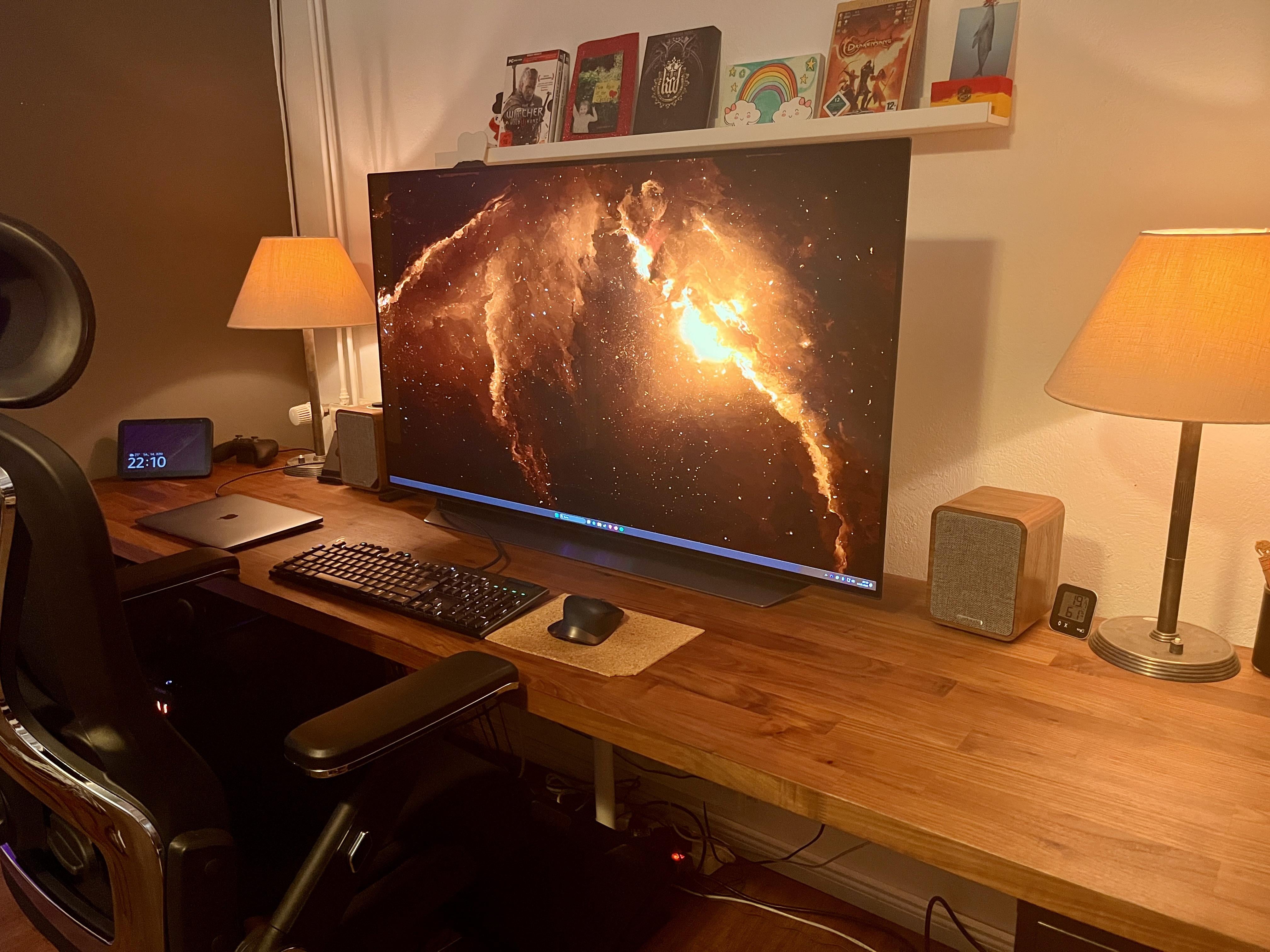
32” is fine, 42” I also get because I think that’s the smallest OLED TV that’s been available (before this gen), but 48” is just absolutely bonkers on that desk setup with little depth.
lorsnax0
A nice set up. Maybe some kind of wall mount or desk clamp mount will let you push the monitor back more.
Clash836
What kind of speakers are those?
YT_ToxicNinjaGaming
I went from 2 fancy monitors to a 46” Sony tv and never looked back.
lookslikeyoureSOL
Not big enough
ResolveNo3113
I use a 75 inch but I don’t sit at the desk , maybe 4-5 feet away and sit on a recliner with keyboard in my lap and mouse on arm rest.
Battler1445
Just open smaller windows, problem solved
dirt_mcgirt13
I have a pretty deep desk, 48” feels ok especially for console where you can sit back a bit… would like to try 42” but everything is so expensive just to try it out!
DoiMudda
Can you hang it in the wall behind the desk? The extra few inches/centimeters might bring it into the sweet spot. Plus it looks clean and awesome. (I have the 55″ G4 hanging on the wall – love it!)
Glonoin
Go big or go home.
The next question is – can you find suitable side monitors to put at angles to give a full wrap-around display : )
DaveTheNihilist
Damn, and I thought my 32” was big for a desk setup.
ritz_are_the_shitz
If you wall mounted it to get another 6 inches, it might be okay
DocWallaD
I use a 43″ Sony TV 🤷
Mcfrumpy
I like the set up! For me it would be too big at that distance (I assume your desk is 25 inches deep like mine). I have a 45 inch ultra-wide and noticed I have to move my head to look around. I plan on wall mounting my to push it a little farther back.
Sounds like you’re happy with it which is all that really matters!
PS. Love the lamps!
Alternative_Act_6548
you need a deeper desk, or support the monitor with a TV stand behind the desk. I have a 36″ deep table top with a 43″ monitor, the monitor is supported off the desk, a 48 would be fine I’d just move the desk out a bit …doing this also frees up a ton of desk space…
I assume you’ve looked into window management software since you’re using such a large screen? I’ve used Magnet on mac before which worked well. Fancyzones seems to be the one to use for windows. [Here’s a video showing it off a bit (5:33)](https://youtu.be/BLCCZQxQ3mM). It’s nice to essentially create a 1080p or 1440p screen ”inside” your big one.
SQUIDWARD360
It’s not too big. Your desk is too small
Bradp1337
IMO anything above 32″ is to big for a desk set up unless it is curved.
UncleBuckReddit
Just got a 45 inch OLED 5k/2k ultrawide and it is perfect
LonelyBuddhaa
Sit further
HoodsFrostyFuckstick
Can you link the wallpaper?
TrippySubie
Used my CX 48” for a coupe years as a monitor before going with an ultrawide

22 Comments
32” is fine, 42” I also get because I think that’s the smallest OLED TV that’s been available (before this gen), but 48” is just absolutely bonkers on that desk setup with little depth.
A nice set up. Maybe some kind of wall mount or desk clamp mount will let you push the monitor back more.
What kind of speakers are those?
I went from 2 fancy monitors to a 46” Sony tv and never looked back.
Not big enough
I use a 75 inch but I don’t sit at the desk , maybe 4-5 feet away and sit on a recliner with keyboard in my lap and mouse on arm rest.
Just open smaller windows, problem solved
I have a pretty deep desk, 48” feels ok especially for console where you can sit back a bit… would like to try 42” but everything is so expensive just to try it out!
Can you hang it in the wall behind the desk? The extra few inches/centimeters might bring it into the sweet spot. Plus it looks clean and awesome. (I have the 55″ G4 hanging on the wall – love it!)
Go big or go home.
The next question is – can you find suitable side monitors to put at angles to give a full wrap-around display : )
Damn, and I thought my 32” was big for a desk setup.
If you wall mounted it to get another 6 inches, it might be okay
I use a 43″ Sony TV 🤷
I like the set up! For me it would be too big at that distance (I assume your desk is 25 inches deep like mine). I have a 45 inch ultra-wide and noticed I have to move my head to look around. I plan on wall mounting my to push it a little farther back.
Sounds like you’re happy with it which is all that really matters!
PS. Love the lamps!
you need a deeper desk, or support the monitor with a TV stand behind the desk. I have a 36″ deep table top with a 43″ monitor, the monitor is supported off the desk, a 48 would be fine I’d just move the desk out a bit …doing this also frees up a ton of desk space…
[https://www.amazon.com/dp/B074TB5MG5?ref_=ppx_hzsearch_conn_dt_b_fed_asin_title_6](https://www.amazon.com/dp/B074TB5MG5?ref_=ppx_hzsearch_conn_dt_b_fed_asin_title_6)
I assume you’ve looked into window management software since you’re using such a large screen? I’ve used Magnet on mac before which worked well. Fancyzones seems to be the one to use for windows. [Here’s a video showing it off a bit (5:33)](https://youtu.be/BLCCZQxQ3mM). It’s nice to essentially create a 1080p or 1440p screen ”inside” your big one.
It’s not too big. Your desk is too small
IMO anything above 32″ is to big for a desk set up unless it is curved.
Just got a 45 inch OLED 5k/2k ultrawide and it is perfect
Sit further
Can you link the wallpaper?
Used my CX 48” for a coupe years as a monitor before going with an ultrawide