If you don’t know what you are looking at, then you have two options:
1. Switch back to 6000.
2. Watch some Buildzoid videos and learn what you are looking at.
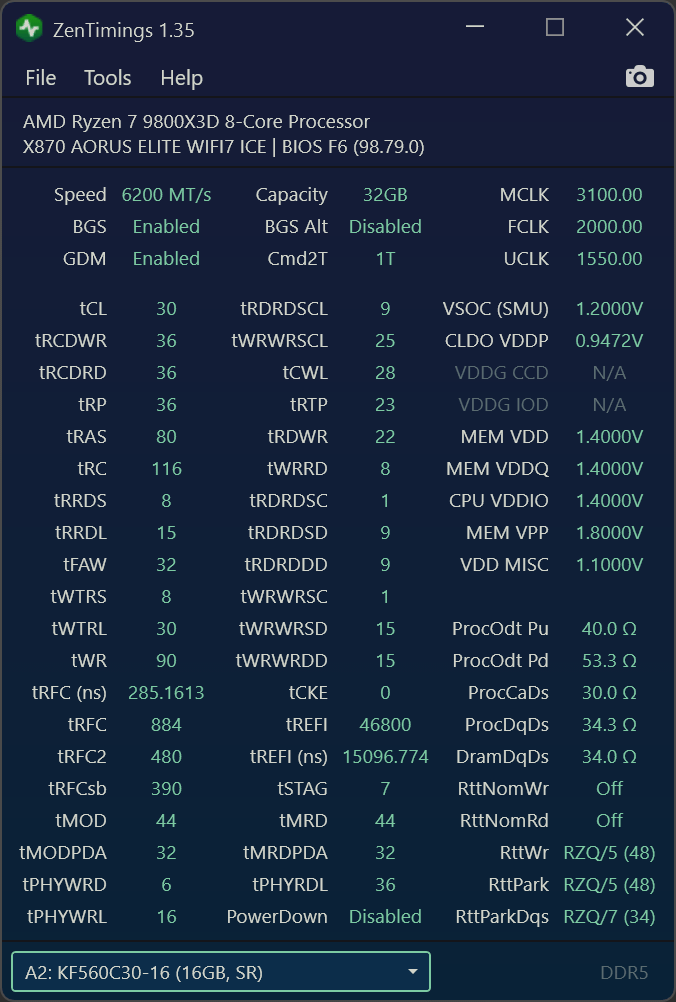
If you want more than 6000 on the memory you must set uclk:mclk mode to 1:1 manually. Otherwise there is no point (unless you go 8000) because 1:2 reduces performance. This ratio indicates the memory controller’s frequency (uclk) and the memory frequency (mclk). Above 6000 it defaults to 1:2 for stability reasons. Set it back to 1:1 and stress test with Y cruncher VT3.

4 Comments
Why is it in 2:1 mode.
If you don’t know what you are looking at, then you have two options:
1. Switch back to 6000.
2. Watch some Buildzoid videos and learn what you are looking at.
Original speed;
https://i.imgur.com/AxjpObk.png
If you want more than 6000 on the memory you must set uclk:mclk mode to 1:1 manually. Otherwise there is no point (unless you go 8000) because 1:2 reduces performance. This ratio indicates the memory controller’s frequency (uclk) and the memory frequency (mclk). Above 6000 it defaults to 1:2 for stability reasons. Set it back to 1:1 and stress test with Y cruncher VT3.