
When AM5 first launched, I often saw reports about issues running four sticks of DDR5 memory. But now, with new BIOS updates, more mature DDR5 kits, and the X870E chipset paired with the 9950X3D, I decided it was time to upgrade and give it a try.
Now I’d like to share my results. Sorry if my English isn’t perfect – just in case there are mistakes.
Specs:
- AIO: Liquid Freezer III 420
- CPU: Ryzen 9 9950X3D (Box)
- MB: MSI X870E Edge Ti (BIOS 7E59v1A4)
- RAM: 192GB (F5-6400J3239F48GX2-RM5RW x2)
- CASE: DIY OpenBenchTable, with direct airflow over the RAM
- Temps during MemTesting: DIMMs 1#/4# – 43°C, DIMMs 2#/3# – 46°C
By default, the motherboard boots RAM at 3600 MHz. XMP doesn’t work – classic. But that’s not a problem. Using the “Memory Try It!” profiles in 1:1 mode, I could even boot at 6400 MHz (though unstable), and 6200 MHz seemed stable but required high default voltages. I chose to stay at 6000 MHz, manually tightened timings, and lowered SoC voltage (and possibly lower DRAM voltage in the future).
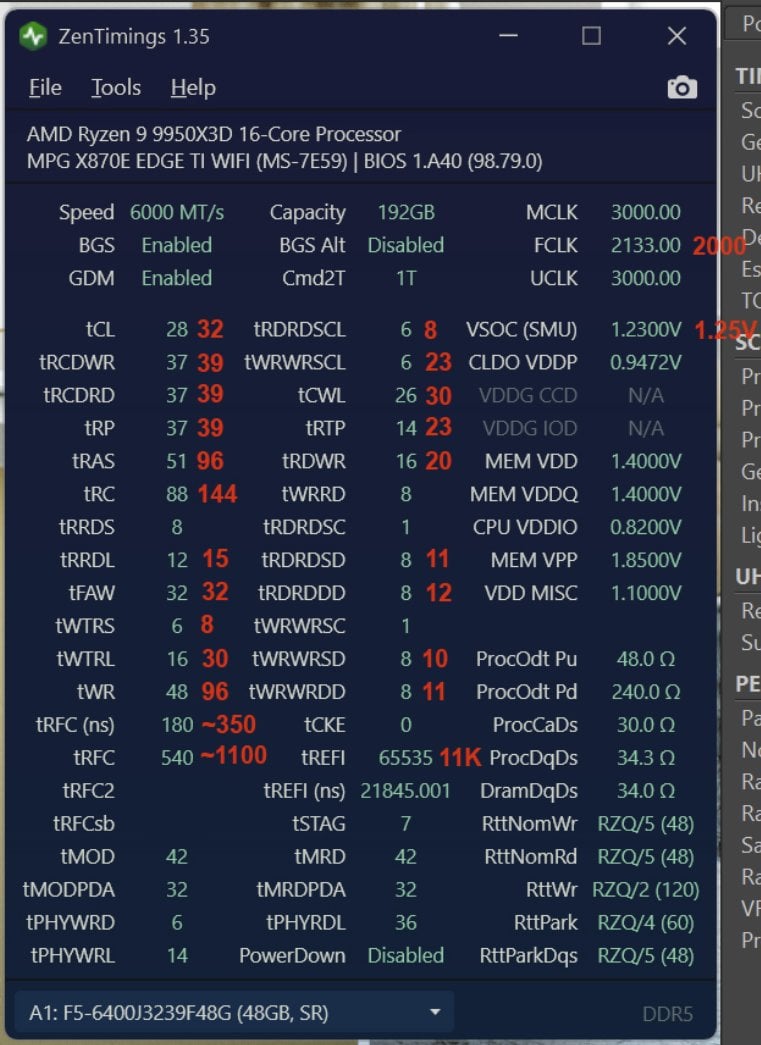
1.) ZenTimings Screenshot — LINK
In the ZenTimings screenshot, I’ve marked the motherboard’s automatic timings in red color (6000 MHz “Memory Try It!” profile). The rest are my manual settings.
2.) AIDA64 Cache Mem Bench — LINK
Probably not the best Latency result, but not a tragedy.
3.) Thaiphoon Burner — LINK
Not sure, i think i'ts – Hynix M-Die.
- tRFC below 520 didn’t work.
- tRTP at 12 brings tRAS and tRC lower (due to formula) and caused minor instability (~1 error every 30 mins in memtest).
- I might try tRRDS at 4-6, tWTRS at 4, and tRFC1 at 520 in the future, but for now, I’m sticking with my current timings.
Memtesting so far:
- TM5 (custom CFG, unlimited cycles):
- +1usmus_v3: ~5 hours
- +Anta777Extreme: ~8 hours
- Prime95 (Large FFT): ~5 hours
- Y-Cruncher (111GB test): ~5 runs
- Linpack Extreme: 830 GFLOPS, 20/20 passed with 1.0 difference
- Currently testing with Karhu
- I also do full cold boots sometimes with “Memory Context Restore” off, just to double-check training. So far – zero errors and zero WHEA errors.
This PC is mainly used in scenarios that are not super sensitive to RAM instability (3ds Max + Corona Renderer / Unreal Engine 5 – large-scale architectural visualization), and also for gaming (1440p + RTX 4090). Still, I wanted to test it properly for memory errors. Seems stable for me, for now.
Next step: I’ll try lowering DIMM voltage to 1.35–1.38V and SoC to 1.20–1.21V.
AIDA64 Results:
I’ve seen other 9950X (non-X3D) + 192GB setups (on X670E Hero) with looser timings but lower latency (60 ns). Not sure why, but even with "MSI Latency Killer" enabled in BIOS, I’m only getting 64–65 ns. Without it – 69–70 ns. Not a tragedy ! Btw, default auto-timings gave me ~71/69/69 GB/s bandwidth with 87 ns latency and and ~775 GFLOPS.
Thank you for your attention. Maybe this information will help someone.
2 Comments
Great job! Once everything is stable at lower MEM VDD, I’m curious if we do need MEM VDDQ and CPU VDDIO at the same voltage as MEM VDD.
I have the a DIMM with the same dual rank 96GB kit in mine and am very stable at CPU VDDIO at 1.17V and MEM VDDQ at 1.23V for MEM VDD of 1.31V.
I also *highly* recommend running Furmark while running either Anta777Extreme or Y-cruncher VT3 for an hour or two. I had a “stable” 7200 MT/s set up that passed hours of Anta77Extreme with the dual rank 96GB kit that would immediately error out the moment the motherboard and CPU had additional signalling overhead.
Finally, you could get a nice performance bump if you can run tRDRDSD and tRDRDDD at 6.
Edit: I would leave vSoC as the last adjustment. vSoC instability is very fickle and annoying to catch.
Seems promising.
Agreed with the other commentor – I would be testing Y-cruncher VT3 in general for 2-4, hours.