4080 user here. Nothing worked for me. Spent nearly 8hrs troubleshooting including installing 3rd party programs, using different drivers, total reinstallations, etc.
I just gave up and uninstalled. Warzone is over for me. No game is worth that much effort to make it playable. Good luck to you sir!
modus123
Are you on windows 11? There is a new preview update that supposedly fixes this. Might be optional since it’s still in preview.
not gonna lie, you might wanna get an xbox series x or ps5 if you want to continue playing warzone
Crazy_J19
I had this bug for far too long.
The fix? Reverte to old Nvidia drivers.
piciwens
Specs?
Try deleting cod players documents folder and rebuild it when opening
Fas7Eddi3
I used to have this issue as well as a few friends. We changed our ram and it hasn’t happened since.
No_Round_7336
If you have the NVIDIA driver update from May 19th, that’s your problem. Install the one from April 30th.
Interesting_Crab_600
Remove any overclocks you have on CPU or GPU. Fixed it for me game doesn’t like overclocks.
JesTeR1862
Mine does this when I use my KVM switch to switch between my gaming pc and work pc lol. Guess its karma for playing during work hours.
Careful-Ingenuity703
Get an Xbox
GnomieJ
5080 here and newest drivers make me crash like this as well. I rolled back and installed March’s drivers and that fixed it for me.
EastGrass466
The only thing that stopped this for me was lowering all my graphic settings to bare minimum, including lowering my resolution from 1440 to 1080p
Probot33
I have a 4090 and since launch I’ve been running the game on max settings except for a few things I knew were killing the performance and frame-rate. I’d get this crash every hour or so, but it was playable. Annoying, but tolerable.
Then things changed when the Season 4 update dropped last week. Then I started getting crashes about every 10 minutes. A single Battle Royale match would see me crash and reconnect at least 2 or 3 times nearly every time.
Then I came across the video below. I tried it as a last resort because I had seen some people cite success with following his exact setup. I was preparing myself for disappointment. But I’m happy to say, after doing this on Saturday night, I haven’t had a crash for the last 4 days, and I’ve been camo grinding and playing for a few hours each night.
I know everyone’s mileage may vary, but I’m happy to share that after 6 months of trying, this is the first process that actually worked for me. Sure, the game looks a little less impressive, but it’s not crashing and it bought me another 60 fps or so by following his guide. Whatever you end up doing, best of luck to you!
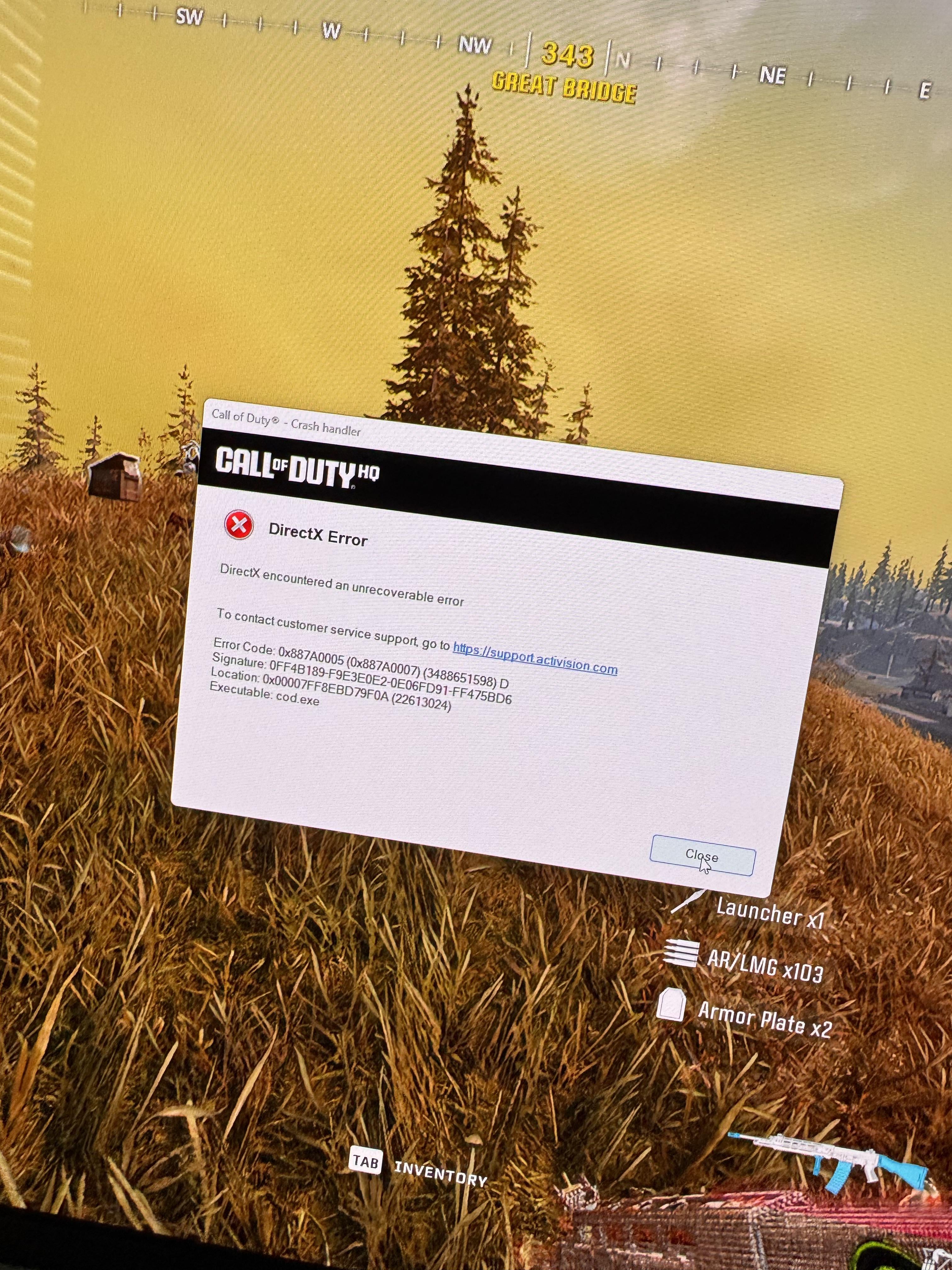

21 Comments
Mine is like that too
Ez just do this.
if your having lower fps or stutters, just do this after every big Warzone update:
Delete the “Call of Duty” folder in your Documents folder.
This will reset a few in-game settings, but it’s worth it to clean up potential conflicts.
Update your motherboard BIOS if you haven’t already.
BIOS updates often improve system stability and performance.
Disable unnecessary startup programs.
Use Task Manager → Startup tab → Disable everything non-essential.
Uninstall any third-party antivirus or firewall software.
Windows Defender is enough and avoids conflicts with the game.
Update your GPU drivers properly:
AMD users: Install the latest drivers. After installing, reset the settings in AMD Adrenalin to default (Factory Reset).
NVIDIA 3000 series: Stick to the December 2023 driver — it’s the most stable.
NVIDIA 4000/5000 series: Use the March 2025 driver.
For older GPUs: Roll back to the last stable driver you know worked.
Always use DDU (Display Driver Uninstaller) to clean old drivers before installing new or older ones.
In-game settings after deleting the COD folder (important):
Set Display Mode to Fullscreen Exclusive.
Use your monitor’s native resolution — do not upscale or downscale.
Set Graphics Quality to your preference, but enable FidelityFX CAS at 80% sharpness.
Texture Resolution Normal
Texture Filter Anisotropic Normal
Everything else on Quality options set it to Low or Off
Limit in-game FPS to 163 (or just under your monitor’s refresh rate if different).
Set Texture Streaming to Low or Minimum.
Wait for shader compilation to complete before jumping into a match.
Move VRAM Target or whatever the setting is called to 50%, and lower the texture quality accordingly
Newest nvidia drivers make me crash on 4090. I’m back on 546.29 which is their recommended driver, 0 crashes and smoothest game has felt for me.
https://support.activision.com/articles/updating-video-card-drivers-on-a-pc
4080 user here. Nothing worked for me. Spent nearly 8hrs troubleshooting including installing 3rd party programs, using different drivers, total reinstallations, etc.
I just gave up and uninstalled. Warzone is over for me. No game is worth that much effort to make it playable. Good luck to you sir!
Are you on windows 11? There is a new preview update that supposedly fixes this. Might be optional since it’s still in preview.
Fix 6
https://www.drivereasy.com/knowledge/how-to-solve-call-of-duty-warzone-crashing-on-pc/#h-windows-11
I just factory reset my PC. And BAM fixed
Fwiw, Xbox crashes regularly now too
not gonna lie, you might wanna get an xbox series x or ps5 if you want to continue playing warzone
I had this bug for far too long.
The fix? Reverte to old Nvidia drivers.
Specs?
Try deleting cod players documents folder and rebuild it when opening
I used to have this issue as well as a few friends. We changed our ram and it hasn’t happened since.
If you have the NVIDIA driver update from May 19th, that’s your problem. Install the one from April 30th.
Remove any overclocks you have on CPU or GPU. Fixed it for me game doesn’t like overclocks.
Mine does this when I use my KVM switch to switch between my gaming pc and work pc lol. Guess its karma for playing during work hours.
Get an Xbox
5080 here and newest drivers make me crash like this as well. I rolled back and installed March’s drivers and that fixed it for me.
The only thing that stopped this for me was lowering all my graphic settings to bare minimum, including lowering my resolution from 1440 to 1080p
I have a 4090 and since launch I’ve been running the game on max settings except for a few things I knew were killing the performance and frame-rate. I’d get this crash every hour or so, but it was playable. Annoying, but tolerable.
Then things changed when the Season 4 update dropped last week. Then I started getting crashes about every 10 minutes. A single Battle Royale match would see me crash and reconnect at least 2 or 3 times nearly every time.
Then I came across the video below. I tried it as a last resort because I had seen some people cite success with following his exact setup. I was preparing myself for disappointment. But I’m happy to say, after doing this on Saturday night, I haven’t had a crash for the last 4 days, and I’ve been camo grinding and playing for a few hours each night.
I know everyone’s mileage may vary, but I’m happy to share that after 6 months of trying, this is the first process that actually worked for me. Sure, the game looks a little less impressive, but it’s not crashing and it bought me another 60 fps or so by following his guide. Whatever you end up doing, best of luck to you!
https://youtu.be/67R8b_uPWbM?si=9cD1jnAD-ARSGnjS
I downgraded my GPU drivers and it stop pedo crashing