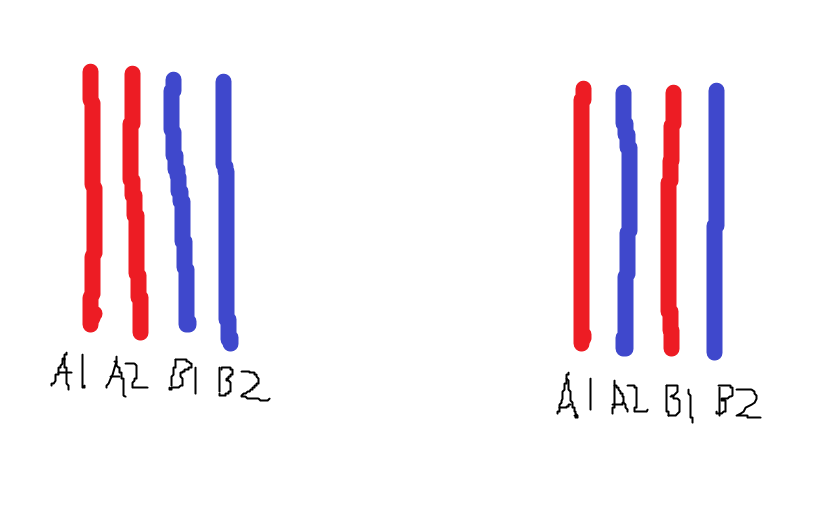
I was told keeping the same kits on the same channel(left) would be best. But most of the people I asked told me the right is better without any reasoning. An explanation would be nice.

I was told keeping the same kits on the same channel(left) would be best. But most of the people I asked told me the right is better without any reasoning. An explanation would be nice.
6 Comments
RTFM 🙂
If you are using 4 sticks of ram, place one kit on a1a2 and second kit on b1b2
If the kits are identical, you can put the sticks in any slot you want in any way you want.
If the kits are different (even if the kits are the same brand and model but different speeds), you want to keep the layout A1 + B1 and A2 + B2.
My mans came with the visual aid and everything. Right is correct. You generally shouldn’t be mixing kits especially if they have different ICs/timings/manufacturers but IF you insist upon this path the right configuration is the correct one because you want each channel to have an equivalent set up. You wouldn’t want one channel running a CL28 6000 MTs kit but then have a CL38 8000 kit in the other. Think of it as homogenizing your channels as best you can. A sort of technological equilibrium if you will.
Generally, motherboards are installed in the A1 B1 A2 B2 order. Some processors change this order. You need to look at the motherboard support list.
I have not seen any systematic testing that confirms which one is better.
I would argue the left one makes the most sense as 2x dimms on the same channel share the same electrical circuitry, and a kit sold as a pair is likely to be manufactured on the same date and have matched electrical characteristics.
The right one is the common recommendation, but I believe that is mostly from the fact you want kits with the same chips, timings/SPD/XMP/EXPO in a dual channel configuration, and that advice ensures that.
If manufacturing tolerances is low enough it probably doesnt matter at all how they are inserted, but doing the left gives the best theoretical chance of having best signal quality/integrety on the electrical paths from CPU to dimm as its more likely for modules from the same kit to have identical electrical characteristics.
With 4 identical memory sticks having same chips, timings/SPD I would go for the left.
If trying to use different kits or different revisions of the same kit I would do the right.
I’m using the left with 9800X3D and it does 6000MHz CL32 with no issues using 4x16GB @ 1.35v. Did not have time to push it to find the ceiling.
Did not test the right.