
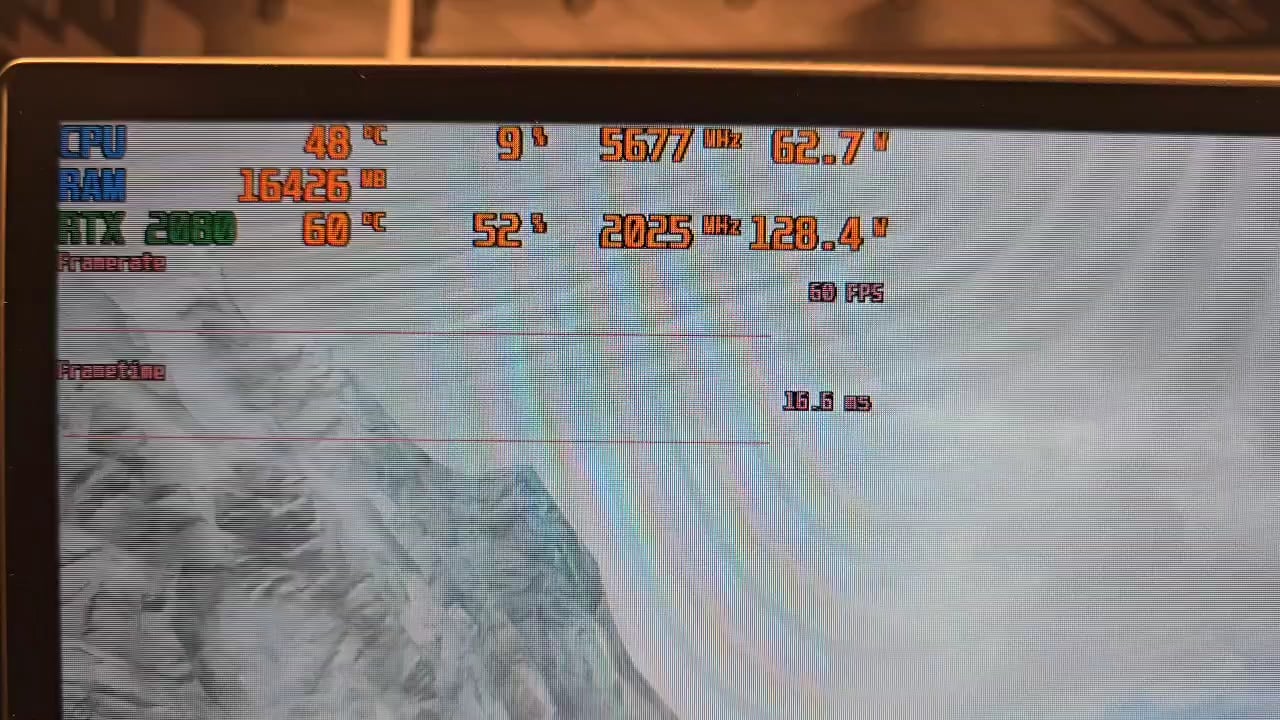
As you can see in the provided video im trying to play Skyrim SE on a rather good stacked PC. I've got an i9 14900k, 32GB RAM with 7200 MT and a ASUS RTX 2080 (Upgrade pending) on a WQHD 32" 144hz screen from ASUS. I can't understand why i get 1 FPS when moving my mouse. I've tried to lower the pollrate from 1k Hz to 125 Hz but that didn't work either. There should not be a single bottleneck in that system to not be able to play a game that old.
43 Comments
i9 14900k? please tell me your BIOS is up to date?
What are you using to display that overlay?
Have you tried plugging the mouse into a new USB?
Modded skyrim?
It can eat up the 8GB of vram of the 2080.
It’s a Skyrim issue, there’s tons of documentation online about it.
Any mods? What is you VRAM usage?
I had this issue in Hell Let Loose, fixed by lowering the mouse polling rate
What mouse do you use? I have seen similar behavior on PCs with slower CPU and 8000 polling rate set on mouse. Some games behaved the same no matter what because they couldn’t handle poling rate so high i guess.
Skyrim Special Edition was built when 60 FPS was the norm. Its engine isn’t designed to handle the extremely high frame rates modern hardware can produce. Even though your system is very powerful, the engine can behave unpredictably when it’s asked to process frame times that are far lower than what it was built for. This can cause issues like dropping to 1 FPS when you move your mouse.
Your mouse poll rate isn’t the main issue here. The problem stems from the fact that the game’s physics engine calculates things based on the delta time between frames. With modern hardware pushing FPS way above 60, the engine ends up with a very small delta time. When you move the mouse, the game may clamp or mishandle these inputs, leading to an extreme drop in frame rate.
Here are the key points and potential fixes:
1. **Frame Rate Limiting:**
Cap the FPS to around 60. This prevents the engine from getting frames that are too quick, which can destabilize the physics calculations. Use tools like RivaTuner Statistics Server or set a limit via Nvidia Control Panel.
2. **INI File Tweaks:**
– In your `SkyrimPrefs.ini`, set `bMouseAcceleration=0` to disable any smoothing or unwanted mouse acceleration.
– Adjust the `fMaxTime` parameter (try setting it to 0.03 or 0.05) to clamp the maximum delta time used by the engine. This can help stabilize the momentary energy of mouse movements.
– Experiment with V-Sync settings both in the game and your GPU’s control panel. Sometimes switching V-Sync off or using alternatives like Nvidia’s Fast Sync can mitigate stutter related to mismatched frame rates.
3. **Mod and Peripheral Check:**
If you’re using mods that affect game physics or the UI, disable them temporarily to see if the issue persists. Also, verify that there aren’t any peripheral software conflicts, even if you are on a wired mouse.
In short, the problem isn’t a bottleneck in your hardware but rather a mismatch between the game engine’s old design and your modern high-performance system. Reducing the FPS and adjusting the configuration files are the primary ways to get around this limitation.
If your mouse is new and has 4 or 8k polling rate, try to set it to 1 or 2k
Is your mouse at 8k ? Reduce it to 1k
Try using process lasso and run it only on P CORES.
You can try turning off features till you find what’s causing it. I would start with raytracing.
isn’t this screen tearing? Have you tried enabling Vsync?
Looks like old game running on newer hardware, should be plenty of community patches that help it run on new hardware
Had the same on Cyberpunk it was some janky Mouse issue try a different one
I had a similar issue when playing cyberpunk 2077 on Linux after ~20 min
I found a rather helping solution. I adjusted the pageing files to manuel settings through windows. My guess would be really the capped out VRAM cause its hitting 7.9GB when moving. I added the pageing files manually and now it is working a bit better.
Here’s what’s happening: Skyrim SE runs on Bethesda’s Creation Engine, which is infamous for being held together by duct tape and hope. This engine is old, single-threaded, and not designed with high-frequency input devices in mind. When you move your mouse, instead of smoothly interpreting your movements, the engine gets bombarded with a flood of input events. Unlike modern engines that handle inputs across multiple threads, Skyrim’s engine essentially queues them up and processes them one-by-one—like a medieval courier manually delivering messages instead of using email. That’s why, even when your system is barely breaking a sweat, you’re seeing these ridiculous frame drops.
You already tried lowering the polling rate from 1000 Hz to 125 Hz—smart move, but no dice. That tells us the problem isn’t just the raw frequency of mouse reports but how the game’s ancient event-processing system reacts to movement at all. It’s like throwing more horsepower into a car that has square wheels—the issue isn’t the power, it’s the way things are built.
Now, a few more culprits could be in play. Overlays and background software like Steam overlay, GeForce Experience, or even proprietary mouse software can inject extra processing steps into Skyrim’s input handling. That can make an already clunky system worse. Windows settings conflicts could also be a factor. Modern Windows versions handle input differently, and features like “Enhanced Pointer Precision” could be adding extra processing weight. Skyrim SE wasn’t designed for that. Mods and UI tweaks might also be interfering. Anything that changes how the interface loads could be causing problems. Try running the game vanilla and see if the issue persists. Display modes could also be a factor. Some players have found that running Skyrim in **borderless windowed mode** rather than fullscreen helps—possibly because it changes how Windows handles input events.
Possible fixes include turning off overlays like Steam and GeForce Experience to see if that clears up the issue, disabling Enhanced Pointer Precision in Windows settings, running Skyrim SE in borderless windowed mode instead of fullscreen, trying a completely vanilla launch with no mods to see if any script-based tweaks are interfering, and checking your power settings to make sure Windows isn’t throttling CPU responsiveness by accident.
Ultimately, this isn’t a problem of raw power. Your system could run circles around Skyrim SE, but the game’s engine wasn’t built with modern hardware in mind. That’s the core issue—you’re dealing with software that bottlenecks itself
Is the game on a HDD or SSD?
Cap fps to 60 and put on v sync
Cap your framerate to 60 or 30 and see what happens
Its Skyrim.
replace mouse paste /s
Does it hapoen in other games? Narrow down where the problem is.
If other games have same issue you know its something about your system
But if it only happens with skyrim, its something to do with skyrim
Is it only skyrim and LoL? Do all other games run ok?
Try locking the game to 60 fps
I know it sounds weird, but do you have a game controller that you can hook up and test with?
I had an issue once where I had a dodgy mouse with a faulty USB connection, and when I moved the mouse, it would basically be the same as disconnecting and reconnecting it again which caused the game to stutter.
When I switched to controller, it disappeared (until I replaced the mouse)
I had this problem with Corsair’s iCue in LoL, needed to stop the program to fix this issue
99% VRAM issue, those stutters only appear when the game loads stuff into the memory
Does this happen if you use a different mouse? It’d be helpful to known if the problem lies with the mouse or the game itself.
I’m running modded Skyrim SE on a 11800H and 3080 mobile, and I haven’t seen this issue so I don’t think it’s a problem with newer hardware being somehow incompatible with Skyrim. If there was a hardware incompatibility, I would guess it may be with your CPU, but I have my doubts because other 14th gen users seem to play Skyrim just fine.
Another user suggested that you may be overfilling your VRAM buffer, but I have my doubts of this. Vanilla SSE uses at most 2 GB of VRA at 1080p, and given the 8 GB on the 2080, you should be well within your VRAM budget. The only way you would be able to exceed this would be with 4k textures, high poly meshes, and 4k screen resolution (I’m being hyperbolic, but you get the idea. High res mods = more VRAM).
You mentioned that you’re using USSEP. Do you have any other mods installed? If you eliminate hardware as the possible culprit, you could try installing SSE Fixes or SSE Engine Fixes to see if those will help.
Is it a single 32 GB RAM?
DDU and revert to an older gpu driver. Your gpu is also bottlenecking your CPU. Current nividia drivers are also shite and most people recommend using older drivers for older cards.
lock fps always on bethesda games
I started playing Skyrim SE on my RX5700 and had pretty bad experience. It tries to lock to 60 fps(i have 170Hz screen) but RTSS frametime would show spikes and drops to 58 fps. I was nowhere near as bad as you showing but it was in starting area when you run from a dragon.
SSE Display Tweaks fixed it for me. It’s mod that unlocks FPS and fixes all 60+ fps bugs. But i have to launch the game through mod manager for this mod to work(i use Vortex by Nexus mods). I tried locking to 60 FPS with RTSS and mod and it’s flat stutter free line. Later i locked to 100 FPS and played game that way. So give it a try maybe it’s shitty Skyrim FPS lock problem.
TLDR: try SSE Display Tweaks mod and launch the game through the mod manager instead of Steam so mod actually works.
had a similar problem on dead by daylight and it was about my mouse’s polling rate, try lowering it
Is your game installed on an SSD connected to your chipset? Chipset also controls your USB devices.
So, possibly 2 things.
1. The newest hardware actually has a harder time with older game engines.
2. If you are multiscreen mouse, may still being used by the other monitor or skrim didn’t take proper control over your mouse. Does playing with a controller do the same thing?
Are you perhaps using a roller ball mouse.
SOLVED! Problem was VRAM Limit exeeding when moving mouse cause it had to render everything around again.
Easy fix, just stop moving your mouse
Turn off vsync
Stop using mouse and switch to gamepad
That is, in fact, far from normal. Does this issue also occur in other games or just Skyrim?