
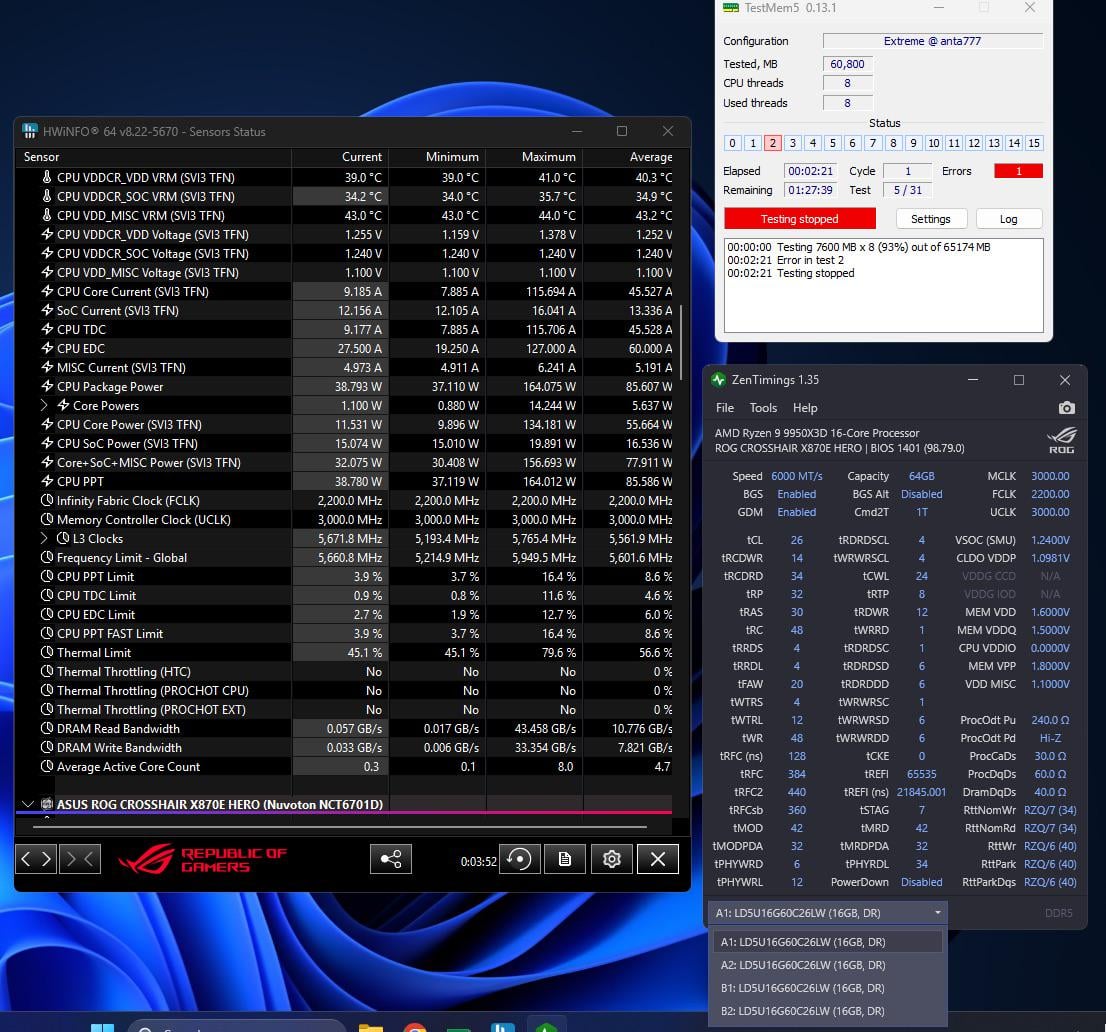
Hello, hope everyone is well. Looking for some advice and guidance with getting my system stable… very new to overclocking so probably way out of my depth with what I am trying to achieve but anyways…. I am going for as low latency as possible which I feel like with the silicone I have which seems pretty good it is achievable other than running dual rank config 16GBx4.
Running stability tests seems to be where errors pop up the issue is my very limited skill set leads me struggling to figured out what voltage or timing or drive strength to change to help stabilise the system.
The screenshot will hopefully be of help to brighter people than I and anyone that responds I appreciate the help.
Just for some extra info, the cpu seems to do pretty well with low voltage – I haven’t seen much difference between running 1.2v SoC and 1.25 with 2200 FCLK but what I haven’t been able to do it get GDM disabled and post even once.
Also PBO all cores -35 with turbo gaming turned on (disabled 2nd ccd)
Thanks again!
2 Comments
Turn off your CO while testing, -35 seems like alot? Idk if you get more headroom by disabling second ccd but are you 100% sure your CO is stable?
Also if the memory test fails this quickly then you are quiet unstable, I honestly lack experience with 4x16DR but I would probably lower FCLK while testing also, and then you should try to relax every timing a bit and test each change or maybe even 2 at the time with like a 5 minute run for quick stability check.
Thats just my 2 cents, maybe someone with more knowledge will know better.
There is only a small chance that CO is actually stable, and I don’t know how you managed to get 16GB sticks that are also dual rank, but you are giving your memory controller the absolute worst scenario possible. Your CPU is only rated for 3,600MT/s in this configuration, so that fact that you are even able to post 6,000MT/s is either a testament to the crazy improvements by AMD to their AGESA code, or a very good memory controller. GDM is probably doing some *heavy* lifting here. Also, there is no logical reason to buy a 9950X3D and actually run it with “Turbo Gaming” mode… just sell it ant buy a 9800X3D if you don’t want the extra cores. You can manually overclock the 9000 series, so it’s not like you get the boost clock advantage that existed with the 7000 CPUs (and even there, you could get around it with eCLK). If you have any issues with core allocation, just use [Process Lasso](https://bitsum.com/) to reign it in.
For the time being, test with no CO – set that to 0 for now and focus on the memory. You can come back to CO later and [find your proper per core values](https://www.reddit.com/r/overclocking/comments/1jhgqox/9950x3d_curve_optimizer/mj85zxt/).
If you can return that RAM or sell it, swap it for a 2x32GB kit. That will be dual rank so still a little more stressful on the memory controller, but nowhere near as stressful as what you are running now. That should run 6,000MT/s with no hassle at all, and with a little effort, you can probably get that up to 6,400MT/s with your CPU. If you *really* want the best performance and don’t need the extra memory capacity, ditch the whole idea of 64GB and get one of the newer 2x16GB CL26 kits. You can manually get those up to 8,000MT/s at CL34 pretty easily, and with a dual CCD CPU, that will smoke a 6,000MT/s by every metric.
If any of that is not an option, in terms of specific timings, you are way tight, even for a two stick single rank setup. Ease up on tRRDS/tRRDL/tFAW and change them to 8/12/32 respectively. Those values are categorically better for your setup, even though they are “higher.” Technically, 8/8/32 may be the best possible performance for you, but 8/12/32 is “safer.” You should also change tWTRL to 24 and loosen your SCL/SD/DD values. Something like 5/8/7 (for both RD and WR on those respectively) would hypothetically be good, but you may need to go looser since your are running 4 sticks. tWRRD should also be 4 with dual rank or 2 DIMMs per channel (and you are running both of those), so that alone may be a sticking point.
If none of that helps, the other big hurdle with DR and a 2DPC setups is signal integrity. You’re going to have to start figuring out the drive strengths and resistances manually to address that, which I haven’t seen a lot of DDR5 specific info for. You may be able to reference DDR4 info on that, but I’m not sure if that carries over directly.