
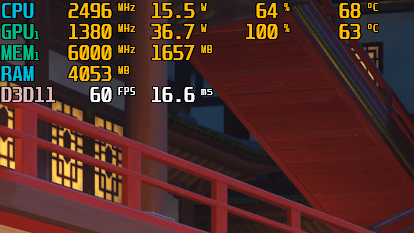
Gaming laptops are notorious for their heat/noise, so I tend to cap the CPU/dGPU at their base clock speeds. It works wonders for usability, but I've noticed that my CPU never exactly hits the 2.5 GHz cap I set for it. Does anyone know why this happens and how to fix it. I'm already aware that it will have no impact on performance, but my OCD makes me hate looking at it whenever I use MSI Afterburner.
For the record, this is an ASUS TUF F15 FX506LHB (i5-10300H + GTX 1650) and I set my caps via "Maximum Processor Frequency" in Windows power plan.
4 Comments
Clock generator is not exactly 100.00 but 99.9 or something. You can offset it by raising the BCLK by a few hundreths until you reach 2500mhz if you are feeling daring.
spread spectrum
Possibly because the BCLK is running at 99.84 instead of 100.00. Its not uncommon to be a bit lower even if you set it to 100. My asrock board also clocks exactly at 99.84 when set to 100.00. Can be fixed by entering a BCLK of 100.16, which may not be possible on a notebook
[Spread spectrum ](https://en.wikipedia.org/wiki/Spread_spectrum). Can be disabled in BIOS (at least on desktop PCs, unsure about modern laptops) but I’d recommend to leave it on. It reduces EMI dramatically with effectively no loss in performance. While you might think that it wouldn’t matter in home environment, I personally had problems with PCIe noise getting transfered over my PCIe soundcard to my headphones. I was troubleshooting for hours until I re-enabled spread spectrum, which reduced it by like 70%.