Removing the GPU makes it a lot safer to transport. Also if you have the luxury of space to store the box your case came in along with the GPU. That makes it very safe to transport.
TheBupherNinja
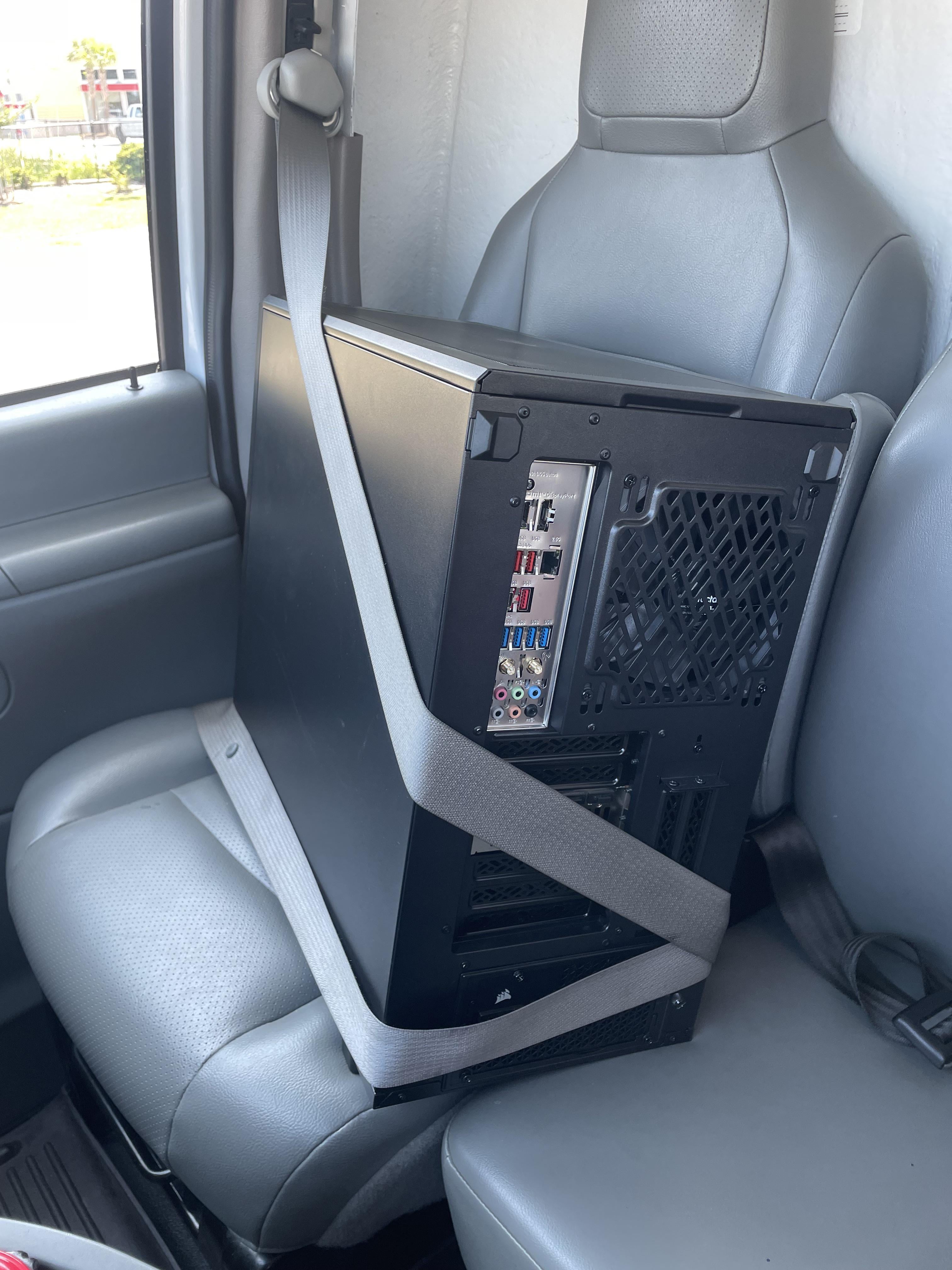
Pc goes on the floor. Can’t fall off the floor, can fall off a seat.
Seat belts are made to hold humans, and computers aren’t human shaped.
DWebOscar
I did this with tempered glass. Livin’ on the edge.
LuckyCross
I hope you removed the graphics card beforehand.
valain
With the weight of the cpu cooler and gpu, i prefer laying it on its side, heavy components “looking up”.
Roman64s
GPU, RAM and tower cooler if you have one, HDDs as well. Always remove them and keep them elsewhere when transporting them this way.
Boss-Smiley
I use the cardboard box plus the two styrofoam pieces I bought it in and put it on my lap.
Slazagna
Absolutely not. This is how you destroy your GPU and mobo.
Snoo-73243
remove the gpu as well
wastedsilence33

The gpu is still in, SHAME
H0vis
I let mine drive.
Kruxf
Incorrect. Having your gpu in a position it can flop up and down with every tiny bump you hit is entirely the wrong way to transport a pc. Sorry bro; bad tip.
SoftwareSource
This is not good man. That gpu is gone if you drive on a non-paved road or hit a bad pothole.
ExccelsiorGaming
Instructions unclear, pc in boat on trailer.
quietlydesperate90
I love how Reddit is full of hyper cautious people who just love to say everyone is doing shit wrong. I’ve done this before and it’s totally fine. Drive carefully and there are no issues.
nmathew
People here freaking out over the GPU still being in place just didn’t understand how snuggly it would be secured with the rat’s nest of cables I’d leave stuffed in there.
BigZaber
Always transport it horizontal mobo vertical cpu cooler and GPU. Even if glass case bottom is metal and strap it up good to go cross country
x7_omega
I put it on the side for moving, so that air cooler load on mb is vertical. Vibration during transport creates peak loads – it is better for them to be supported rather than hanging. Same for heavy GPUs.
Big challenge is moving to another country, with PC going through cargo apes’ paws, also vibration and shocks in flight. I can’t see how one can avoid removing mb in order to reduce risk to zero. Basically, more than partial disassembly.
Gxgear
Welp, at least you’ll have a nice case for a full rebuild at the new address.
crankaholic
Ummmmm no. You should lay the PC down so the motherboard is parallel to the ground. That way the CPU cooler and GPU aren’t putting pressure on anything. Bonus points for making sure the GPU is longitudinal to the car, that way braking forces aren’t transferred to the PCIE slot as well.
interrex41
can we get a guide for moving a small data center in a honda civic?
Grouchy-Network-4848
post like these must be bots
Sanga884
I do this, i used to go back and forth between mine and my mrs when we were dating for a few years, safest way to do it, i wouldnt try bring my UW though, only the old 1920 monitor
Tactical_Taco23
Used to do this all the time when traveling to lan parties
AllMyFrendsArePixels
You think the steel panel will hide the fact that you’re transporting it with the GPU in, but my friend we can still see the PCI slot display outputs.
Did you see the PSA’s saying “don’t transport your PC upright in the car” and like Dunning-Kruger yourself into thinking it’s something to do with the glass panels? Because it’s nothing to do with the material your side panel is made from…
Brawndo_or_Water
More like how to screw your faux-leather seats. That’s gonna leave a mark. I put them on the floor, on its side, GPU horizontal with the road and just don’t curves like a maniac.
bduxbellorum
Dropping in to not you need to pull the seat belt out until it starts ratcheting and then use that to tighten around the box.
quantum_ice
I just moved about 1500 miles away a month ago. I just took the GPU out, put the PC on the floor in front of the passenger seat and wrapped the GPU in an anti static bag and bubble wrap. Worked perfectly.
C4TURIX
I transport mine with the GPU taken out, in it’s original box, on a big pillow.
Agitated_Position392
nope, lay it down so the gpu doesnt jostle
MeanForest
Lay it down flat and the slots in the direction you’re driving. It will slip off the seatbelt if you need to brake hard.
S1DC
I keep the box/packaging my case came in and put my PC in it when I move it.

32 Comments
Removing the GPU makes it a lot safer to transport. Also if you have the luxury of space to store the box your case came in along with the GPU. That makes it very safe to transport.
Pc goes on the floor. Can’t fall off the floor, can fall off a seat.
Seat belts are made to hold humans, and computers aren’t human shaped.
I did this with tempered glass. Livin’ on the edge.
I hope you removed the graphics card beforehand.
With the weight of the cpu cooler and gpu, i prefer laying it on its side, heavy components “looking up”.
GPU, RAM and tower cooler if you have one, HDDs as well. Always remove them and keep them elsewhere when transporting them this way.
I use the cardboard box plus the two styrofoam pieces I bought it in and put it on my lap.
Absolutely not. This is how you destroy your GPU and mobo.
remove the gpu as well

The gpu is still in, SHAME
I let mine drive.
Incorrect. Having your gpu in a position it can flop up and down with every tiny bump you hit is entirely the wrong way to transport a pc. Sorry bro; bad tip.
This is not good man. That gpu is gone if you drive on a non-paved road or hit a bad pothole.
Instructions unclear, pc in boat on trailer.
I love how Reddit is full of hyper cautious people who just love to say everyone is doing shit wrong. I’ve done this before and it’s totally fine. Drive carefully and there are no issues.
People here freaking out over the GPU still being in place just didn’t understand how snuggly it would be secured with the rat’s nest of cables I’d leave stuffed in there.
Always transport it horizontal mobo vertical cpu cooler and GPU. Even if glass case bottom is metal and strap it up good to go cross country
I put it on the side for moving, so that air cooler load on mb is vertical. Vibration during transport creates peak loads – it is better for them to be supported rather than hanging. Same for heavy GPUs.
Big challenge is moving to another country, with PC going through cargo apes’ paws, also vibration and shocks in flight. I can’t see how one can avoid removing mb in order to reduce risk to zero. Basically, more than partial disassembly.
Welp, at least you’ll have a nice case for a full rebuild at the new address.
Ummmmm no. You should lay the PC down so the motherboard is parallel to the ground. That way the CPU cooler and GPU aren’t putting pressure on anything. Bonus points for making sure the GPU is longitudinal to the car, that way braking forces aren’t transferred to the PCIE slot as well.
can we get a guide for moving a small data center in a honda civic?
post like these must be bots
I do this, i used to go back and forth between mine and my mrs when we were dating for a few years, safest way to do it, i wouldnt try bring my UW though, only the old 1920 monitor
Used to do this all the time when traveling to lan parties
You think the steel panel will hide the fact that you’re transporting it with the GPU in, but my friend we can still see the PCI slot display outputs.
Did you see the PSA’s saying “don’t transport your PC upright in the car” and like Dunning-Kruger yourself into thinking it’s something to do with the glass panels? Because it’s nothing to do with the material your side panel is made from…
More like how to screw your faux-leather seats. That’s gonna leave a mark. I put them on the floor, on its side, GPU horizontal with the road and just don’t curves like a maniac.
Dropping in to not you need to pull the seat belt out until it starts ratcheting and then use that to tighten around the box.
I just moved about 1500 miles away a month ago. I just took the GPU out, put the PC on the floor in front of the passenger seat and wrapped the GPU in an anti static bag and bubble wrap. Worked perfectly.
I transport mine with the GPU taken out, in it’s original box, on a big pillow.
nope, lay it down so the gpu doesnt jostle
Lay it down flat and the slots in the direction you’re driving. It will slip off the seatbelt if you need to brake hard.
I keep the box/packaging my case came in and put my PC in it when I move it.