
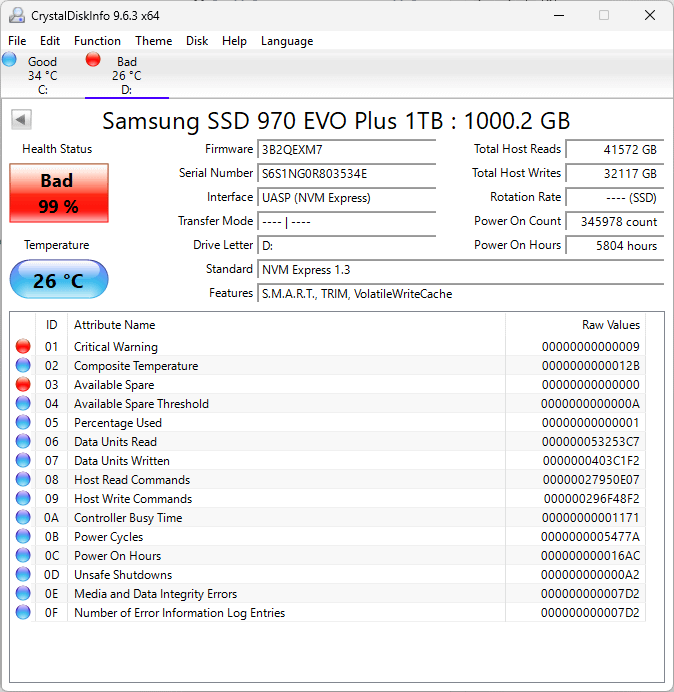
What could cause this?
I came back home and saw my laptop running with fans at 100% showing UEFI screen. I left it just locked in Windows 11, not working on anything. MAYBE Windows auto-updated, regardless of all the efforts to disable this bs. Asus G14 GA401QC laptop.
Currently the SSD is read-only and turns off very often during copying files from it. I suspect that the storage blocks were worn off somehow and it triggered some thing that caused constant and very frequent drive or controller reboots. Which also made it degrade. Anyway. Would be nice to find the cause and prevent my next SSD from dying like this too.
38 Comments
My Samsung SSD said peace out after 3 years Backups people backups
Did you ever update the firmware on these?
Samsung 900 EVO and the 900 EVO Pro series are known to kill themselves. They’re most common the Pro models and the most common with the 990 and 980, but still happen to the 970 models.
My guess what causes the problem is that Samsung pushes the SSD chips to run faster than competitors so they can get the best out of box benchmark results. The problem, it kills the SSD and they’ve been releasing firmware updates to prevent this. However, it’s been an ongoing problem and still to this day, the 900 series Sammy’s are still killing themselves with newer firmware updates that are suppose to be nullifying this degradation.
That’s **316** powerups per day, **13.16** Powerups per hour and one powerup every **4.55 minutes**.. What the fuck did you do to this computer?
345978 power ons? what the hell are you doing? i bet an entire company has less restarts combined than you have on that one device
Some 970 Evo Plus’es used flawed Samsung V6 NAND flash memory which were susceptible to the “0E” issue. The “0E” SMART ID having a non-zero value and your SSD being put in read-only mode undoubtedly confirms it.
Guys, I did not do anything storage-intense. It is system-storage, it is physically impossible to have that many power cycles per time and run Windows consistently, it wouldn’t work together.
All those power-ups are malfunctioning. For example, failed attempt to turn on multiple times per minute interrupted by controller on ssd.
Anyway, it did not show ANY signs of degradation. SSD was working completely fine until it just didn’t want to boot and had all these problems.
At least the temps are good 😀
Probably power saving mechanism when it’s a notebook?
I’d send it back to Samsung, I think it’s still within warranty
this happened to me 3 weeks ago, and it was my boot drive. it happened when i was waking my PC from standby, unresponsive OS with nothing loading. a reset and went into BIOS to find no bootable targets on the drive but was still detected, suggesting a drive failure/corruption. same as the screenshot, the failure code was 0x09. same firmware and had lower read/writes (23TB written) and power-on counts (1465)
it was fortunate enough Samsung put a read-only lock on the firmware when it detects an unrecoverable issue, and was able to recover all my files using another computer. (as it turns out this is more of a standard NVMe feature, thank god this exists because data losses on SATA drives are a monetary pain)
had it replaced under warranty right after, got a 990 EVO Plus. a post elsewhere (cant link, initial comment got deleted) pointed out that there was a firmware update that would have prevented this, but that didn’t reach to me in a timely manner that would have saved it from catastrophic failure.
Bad NAND. That is 99% of the reason why you have SSDs die like this and go read only. Sometimes it is due to firnware faults, which is why it is a good idea to install Magician and update the firmware when updates are available.
power button go brrrrrr
Samsung drives have firmware to be updated to, like Kioxia, Firecuda, etc…
Those are for preventing exactly this to happend, sorry for your loss, but this is pretty much unrecoverable
I own a 970 evo plus 1TB in my dell optiplex with a gtx 1650.
Is their anything i can do to prevent this?
I just use my pc for gaming.
Man my 13 years old hdd in my old pc had like 65k power ups, wtf you did with yours lmao
My 970 Evo has around 25k ‘power on’ hours, and around 4700 ‘power on count’ – is healthy still at 72% ‘good’
It’s the new S25000 mode 😂
Holy, that’s… a really high number.
Just for reference, i have 2x 960 EVO that have been on a server before it malfunctioned and I recovered them for my own machine. They’re pushing 7 or 8 years by now:
https://preview.redd.it/miph8o28rr2f1.png?width=667&format=png&auto=webp&s=eacbe209e7786a7356c4ebcd09541995290ecadc
They seem pretty tough.
damn
windows power plan and saving power to hard drive putting it off and on? (im guessing)
That’s odd. I have the same model (except mine is 2TB). It has twice as many hours (11k), but only 2958 power-ons total. I’ve had this drive for 3–4 years.
https://preview.redd.it/jlal7zh2sr2f1.png?width=674&format=png&auto=webp&s=324178374901a202b50147b536aed7fe53b0ead7
By the way, how did you manage to keep the temperature at 26 degrees? Mine always stays around 60.
I wonder if its firmware counts waking from sleep as a power on?
In that way the number makes a bit of sense.
You could be under warranty still. 32TB of writes is very low. Usually those drives enter read only mode when they are about to fail. Did your unit did so?
I had a 970 Evo Plus, and it crashed and had to be restarted every time my computer went to sleep.
Good luck with the RMA. It took me 5 months and way too much time to get them to honor mine.
I had a similar problem with my 970 Evo Plus about a month ago. Not the power on part, mine had 1,400. But the read only and integrity errors.
I was able to clone the drive completely onto a new drive using OpenSuperClone. Then Windows booted from the new drive without issue.
Then I sent the bad drive to Samsung and they gave me a new 990 Evo Plus under warranty.
Just had a customer’s 2TB 980 Pro go bad with less than 10K hours. Nowadays, the only NVMe SSD’s I buy are Crucial’s and Sabrent’s, and Kioxia’s when I can get em
I have an old 500gb crucial sata drive at 47% health but it says good above it and it isn’t red like this, I got it used for cheap and it seems ok? This is madness
Also, that’s why windows should already disable such thing as hard disk power off after x in power options.
this is a known issue with the 970 evo. that a higher than normal rate of failure. if you are in warranty then get it RMA. if not then take your time copying off your data and get rid of it.
don’t buy the evo get the pro next time.
I say all this because i am one of those system integrators that removed factory SSDs and installed… id guess 10000 evo drives. Of my 10000 my failure rate was almost 4%… that is insane for computer hardware.
typically if you ask gigabyte or gskill failure rate it is they will say 0.03% to 0.04% and that is normal across most consumer electronics manufactured by a reputable company.
ohh and Samsung has never publicly stated that the 970 evo is prone to a higher failure rate. once they knew they quietly stopped making them and took them off their own website.
It is not 970evo that had some fabrication defect back when released? Or i’m wrong?
Known issue with those
RMA it or check if you can still update firmware and its a issue there.
here’s mine with 33,000 hours and 500’ish start ups.
https://preview.redd.it/oifqpvzmws2f1.png?width=669&format=png&auto=webp&s=36909ee13e03e86e1f00fced8a9de34635f57198
https://preview.redd.it/m7idu1v68t2f1.png?width=462&format=png&auto=webp&s=0cafd007a004e5db0878deb2cfcebfc55b619a30
These were probably set to 1 min perhaps? (it’s set to 1 by default on my laptop). That could explain the high power on count but i doubt that’s the reason it’s failed.
How in the world did you have that many power on counts? Over 3 years or 1095 days that’s like 315 times a day…. I wonder if this is a culprit of windows power plan and turn drive off after x minutes or something
Wasnt there some firmware BS with the 970s
Ruined by hyberfil.sys and fastboot. Disable those things on your next SSD.