
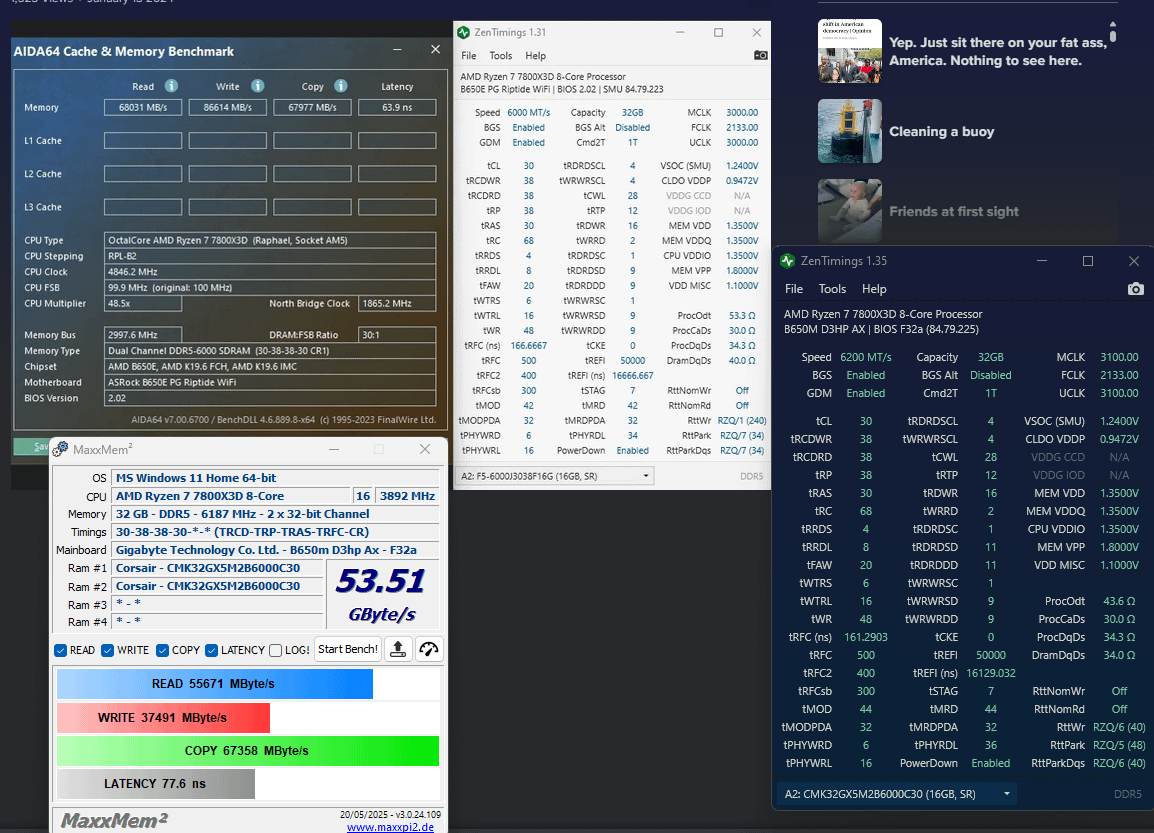
Ah man I am so stressed out, I've spent 12 hours tryin to learn to OC Ram, its harder then I thought… Ive reverted to just trying to copy a techies BIOS parameters.
7800x3d with Corsair Vengeance 32GB (2x16GB) 6000MHz CL30 DDR5 RAM (CMK32GX5M2B6000C30) on a Gigabyte b650M D3HP AX
Honestly I just want more fps in VR, specifically trying to improve iRacing frametime which is very CPU limited for me. I've been running my ram at 6000 30-36-36-76 for as long as Ive had the PC. Ive explored curve optimizer etc for my CPU, didnt realise I had more potential in my RAM, I though factory XMP was it… Fell down a rabbit hole and started on RAM last night and holy cow… Turns out changing random parameters to bullcrap redditors and AI suggest doesnt work well. I can post at 6400CL30, 6200CL30, 6000CL26, idk how to test or what I should aim for, higher clock or lower tCL… Ive decided to focus on trying to get higher clocks at the xmp timings. So I try follow to 6400 image, no post, so i play around, get it to post but freezing/crashing during memory tests, cant fix it, so I try follow the 6000 image, it work, posts, no errors detected in occt, but the latency…. wtf….
People keep referencing 'Buildzoid' he seems to know his stuff. I cant find a guide though, only youtube videos non-specific to my CPUxRAM setup… CPU is important here right? Like this video where he works on a DR5-6000CL30 kit on a Ryzen 9 9950X. IDK if its relevant to me…
This random reddit post shows two profiles 'Buildzoid 6000' and 'Buildzoid 6400' referencing a 7800x3d Ive copied the settings to a tee… almost completely replicated. But my latency isnt decreased at all? it seems whacked? My read speed is good, write speed is half what it should be??? The person in the post gets between 63-65ns with their 3 setups, Ive never seen mine under 75ns! Im getting a big write speed penalty they're not!?
Like right now I'm so confused. I replicated his setup to a tee, only difference is tRDRDSD 11 and tRDRDDD 11 (auto) instead of 9 9, but im getting way more latency then he is? Same CPU, very similar MOBO, Same RAM timings, Same secondary timings, same voltages, same FLCK
Im lost…. I need help… Im missing a whole day and my PC is just MORE unstable…. and no faster… My programs are randomly freezing and crashing sometimes now. Im probably going to revert to XMP and wipe all these timings and clock changes if noone can help… Im getting the same latency as before I started fiddling… IDK… Just introduced a bunch of instability and parameters i dont understand for 0% performance increase???
SEND HELP!
7 Comments
For reference, My latency/write speed is garbage ~77 with stock XMP aswell, the latency im pointing out isnt because of these secondary timings I configured today! It was crap with no timings changes! No improvement to ns after changes?! FLCK autos to 2000, set to 2133
What is ‘CR1’ Didnt see that in bios? That bit is blank in my timings description on MaxxMem, but its in theirs on AIDA64, maybe something I missed?
Have you tested with all your background tasks ended? If not, either boot to safe mode with all programs disabled, or just shut down all tasks in task manager, then test.
Your write speed is garbage because on AM5, your write speed is bottled necked by your infinity fabric speed (FCLK), and the amount of CCDs on your chip. Two CCD CPUs like 9950x will have higher write speed; your write speed is as expected for your CPU.
EDIT: I mean read speed here.
Aida latency is affected by a lot of things that are not your timing. If you want to score well, you need to kill every process running on your computer, or benchmark in safe mode. You can also change a lot of bios settings, such as turning off SMEE, TSME, Data Scramble, setting Bankswap mode to APU.
The most important bios setting will be an option usually labeled as “latency killer”, “gaming optimization” or some similar language depending on bios, and turning on or setting it to legacy mode. Keep in mind, this option only improves your Aida latency number and has been shown to actually have a negative effect on “real world” performance.
Lastly, the Buildzoid timings people are referencing are from his “Easy memory timings for Hynix DDR5 with Ryzen 7000” which also has links to his Patreon for a text version. From your post it seems like you are not stable on the timings you’ve copied from other posts, and you aren’t really stress testing your settings. I would recommend you stick with XMP settings if you are frustrated with this. If you want to continue with trying with Buildzoid timings, or your own timings, you need to use some stress testing programs such as testmem5 with Anta Ryzen 5 x3d profile to test stability of you settings.
Ive perfectly replicated his timings… Every one… Same CPU(7800x3d), Same RAM Timings(CL306000,2133), Same voltages, Same MOBO type(b650)…
[https://imgur.com/sRwjwyC](https://imgur.com/sRwjwyC)
They score:
Read: 68031
Write: 88614
Copy: 67977
Latency: 63.9ns
I score:
Read: 56819
Write: 35820
Copy: 67276
Latency: 74.8ns
Why is my system performing worse? What is an acceptable memory latency? Surely not 70+… Why is OP’s system ~11ns faster? Don’t say safe mode…. Look at the read write discrepancy… Both AM5? Same Same everything? How do I proceed?
“Core Tuning Config For Gaming” in the Bios, what did you set it to? Try Legacy and check the latency again.
75ns “stock” isnt bad, rather its normal so take a deep breath.
“Your READ speed is garbage because on AM5, your write speed is bottled necked by your infinity fabric speed (FCLK), and the amount of CCDs on your chip.”
If I have the same amount of CCD’s, same FLCK, also on AM5, why is my READ worse? Silicon lottery?
“Aida latency is affected by a lot of things that are not your timing. If you want to score well, you need to kill every process running on your computer,”
Uh nah im not using AIDA that was the reference redditor, Ive tested with OCCT and MaxxMem, both show the same. OCCT a bit more detailed. (L1 ~2.8ns, L2 ~7.19ns, L3~49.77ns, Memory 76.85ns)
“Have you tested with all your background tasks ended?”
Yes didnt help the write issue unfortunately…
“The most important bios setting will be an option usually labeled as “latency killer”, “gaming optimization” or some similar language depending on bios, ”
I have ‘EXPO Low Latency Support’ Enabled along with ‘XMP/EXPO High Bandwidth Support’
“looks like those timings are not stable on your system”
THEN WHY ARE THEY STABLE ON HIS *pulls hair out*
“75ns “stock” isnt bad, rather its normal so take a deep breath.”
Then why is he getting 11ns faster then meeeeee….. I wann make RAM go faster nyoom
“post an Aida screenshot”
>$59.95
Ok so yall are saying that maybe he ran AIDA in safe mode, and got a really nice score… Even still, that doesnt explain the write discrepancy? Unless AIDA measures write differently or theres an AM5 error displaying the data in MaxxMem or something?
Oh… Yeah dont compare AIDA64 to OCCT/MaxxMem… I confused the hell out of myself… I wonder if theres a way to get another AIDA trial 🤔