Use ethernet cable, wifi can be slowed down by things like microwawes.
dead_jester
Use an Ethernet cable to connect to your router or get a set of good quality WiFi boosters
Or if it’s the actual provider that is the problem get a new provider
v81
A million people are about to brigade here about you testing over WiFi.
Truth is, testing this way is ok, but it doesn’t rule out any influences wi-fi reliability has.
Best to test from a PC if you can.
If you still get the same results.. you’re gonna have to deal with it… Preferably without crime… But hey.. surprise us.
SoulFlame69
Hey man mine goes from 0.4 to 40 max lets be grateful here
TheFragturedNerd
Do you live in an apartment building? Maybe there is a lot of interference from other apartments? Look at moving to 5ghz if you are on 2.4ghz
dageshi
Had this problem, used a powerline connection between my PC power socket and the router power socket, for me it worked really well and didn’t cost too much.
Might be worth trying.
Brianshoe
wtfi?
ConradMcduck
Get some powerline adapters. All the benefits of a direct ethernet connection without the hassle of cables or relying on spotty WiFi.
carlbandit
If you can’t run an ethernet cable, look into powerline adapters.
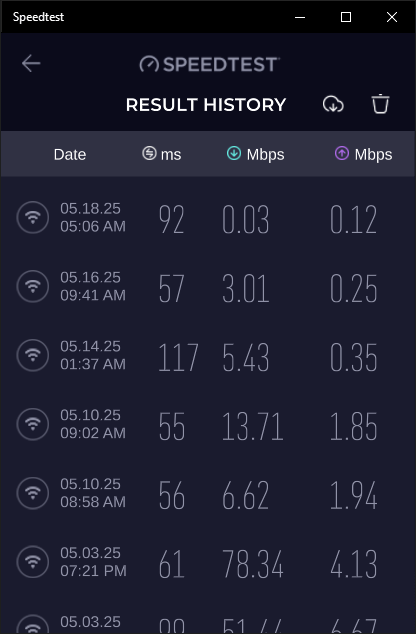
1 plugs into a wall socket (not an extension!) near the router and the other into a wall socket near your PC. The internet signal is then sent via the electrical wiring in your house. They can work to varying degrees based on how old/poor your wiring is, but should generally be better than WiFi that is going between 80mb and 0.03mb.
If you don’t have spare wall sockets near your router and/or PC, they sell ones with power sockets built in, so you can put the powerline adapter into the wall, then plug your router / extension into it. [Something like these](https://www.amazon.co.uk/TL-PA4010PKIT-Passthrough-Powerline-Configuration-Required/dp/B08DVGRQ59), you can get cheaper ones if you don’t want up to 1gb speeds or need sockets on them because you have spare wall sockets. You can also spend more on better brands such as Denuvo or get ones that also boost wifi signal if you have black-spots. You can also add more than the 1 if you wanted to add ethernet ports to other rooms or place wifi boosters elsewhere.
ShowRunner89
Crash out approved.
theroguex
Probably your wifi.
tasknautica
I hate that everyone keeps mentioning just ‘wifi’. Yeah, it could be the wifi, but its not wifi itself. Its something making the wifi bad. Wifi is really decent these days, its comparable to ehternet at speeds below ~250mbps, at least on average, ISP routers.
OP, do you have a microwave or anything that emits or recieves rather powerful radiation or radio waves nearby? Not just in your house, but in the surrounding area?
Do you have thick walls or lots of obstructions, or a decent amount of metal in between your device and the router? Whats the wifi icon signal strength given as (how many lines of the wifi symbol)?
It could also be the router. Id reccomend, just temporarily, bringing the device right up to the router and plugging it in via ehternet, and spend an hour using it there, see if theres any problems. That reminds me, can you confirm whether you have any issues when connected via wifi and standing right up next to the router?
Also, have u noticed whether time has any effect at all on this?
Cheers
Alarmed-Tortoise5516
Australia???
2roK
Every house I lived in had bad working internet until I had them send a service technician, not to fix stuff in my house but to fix the distributor box down the street that services my house with Internet. I know so many people who just went years thinking the “internet justs sucks where they live”, when in reality, the ISPs are just cheating out on setting up new connections correctly.
Ok_Improvement4733
same too bro… Before this house, my table was placed right on the ethernet port and I could enjoy flawless ping gaming. But now, its so inconsistant and annoying, sometimes it barely works at all
Strude187
Everyone here acting like WiFi is the devil. What will you all say if OP gives the same results connected via Ethernet? Can we not help OP if WiFi is not the issue, or if they have to connect via WiFi ?
why_1337
If you live in apartment building, try to find channel that has the best performance and stick to it. Also make sure to use correct frequency based on how far away from the router you are. No point using 5Ghz if there are multiple walls inbetween.

26 Comments
Not even 10 minutes after the last one what the fuck
https://preview.redd.it/y7phyqssmi1f1.png?width=416&format=png&auto=webp&s=074e59a097903148b438c9a7a6fde8a966d6ae60
Wifi
wifi?
Use ethernet cable, wifi can be slowed down by things like microwawes.
Use an Ethernet cable to connect to your router or get a set of good quality WiFi boosters
Or if it’s the actual provider that is the problem get a new provider
A million people are about to brigade here about you testing over WiFi.
Truth is, testing this way is ok, but it doesn’t rule out any influences wi-fi reliability has.
Best to test from a PC if you can.
If you still get the same results.. you’re gonna have to deal with it… Preferably without crime… But hey.. surprise us.
Hey man mine goes from 0.4 to 40 max lets be grateful here
Do you live in an apartment building? Maybe there is a lot of interference from other apartments? Look at moving to 5ghz if you are on 2.4ghz
Had this problem, used a powerline connection between my PC power socket and the router power socket, for me it worked really well and didn’t cost too much.
Might be worth trying.
wtfi?
Get some powerline adapters. All the benefits of a direct ethernet connection without the hassle of cables or relying on spotty WiFi.
If you can’t run an ethernet cable, look into powerline adapters.
1 plugs into a wall socket (not an extension!) near the router and the other into a wall socket near your PC. The internet signal is then sent via the electrical wiring in your house. They can work to varying degrees based on how old/poor your wiring is, but should generally be better than WiFi that is going between 80mb and 0.03mb.
If you don’t have spare wall sockets near your router and/or PC, they sell ones with power sockets built in, so you can put the powerline adapter into the wall, then plug your router / extension into it. [Something like these](https://www.amazon.co.uk/TL-PA4010PKIT-Passthrough-Powerline-Configuration-Required/dp/B08DVGRQ59), you can get cheaper ones if you don’t want up to 1gb speeds or need sockets on them because you have spare wall sockets. You can also spend more on better brands such as Denuvo or get ones that also boost wifi signal if you have black-spots. You can also add more than the 1 if you wanted to add ethernet ports to other rooms or place wifi boosters elsewhere.
Crash out approved.
Probably your wifi.
I hate that everyone keeps mentioning just ‘wifi’. Yeah, it could be the wifi, but its not wifi itself. Its something making the wifi bad. Wifi is really decent these days, its comparable to ehternet at speeds below ~250mbps, at least on average, ISP routers.
OP, do you have a microwave or anything that emits or recieves rather powerful radiation or radio waves nearby? Not just in your house, but in the surrounding area?
Do you have thick walls or lots of obstructions, or a decent amount of metal in between your device and the router? Whats the wifi icon signal strength given as (how many lines of the wifi symbol)?
It could also be the router. Id reccomend, just temporarily, bringing the device right up to the router and plugging it in via ehternet, and spend an hour using it there, see if theres any problems. That reminds me, can you confirm whether you have any issues when connected via wifi and standing right up next to the router?
Also, have u noticed whether time has any effect at all on this?
Cheers
Australia???
Every house I lived in had bad working internet until I had them send a service technician, not to fix stuff in my house but to fix the distributor box down the street that services my house with Internet. I know so many people who just went years thinking the “internet justs sucks where they live”, when in reality, the ISPs are just cheating out on setting up new connections correctly.
same too bro… Before this house, my table was placed right on the ethernet port and I could enjoy flawless ping gaming. But now, its so inconsistant and annoying, sometimes it barely works at all
Everyone here acting like WiFi is the devil. What will you all say if OP gives the same results connected via Ethernet? Can we not help OP if WiFi is not the issue, or if they have to connect via WiFi ?
If you live in apartment building, try to find channel that has the best performance and stick to it. Also make sure to use correct frequency based on how far away from the router you are. No point using 5Ghz if there are multiple walls inbetween.
That’s not broadband, that’s rubber band
https://preview.redd.it/ixuktw5oti1f1.jpeg?width=404&format=pjpg&auto=webp&s=eed3d5d265e64471e76577371bc9194a6347a643
My actual WiFi yesterday :/
Nah, its consistently shit
Are you sending the packets by mail?
It’s not inconsistent. It’s consistently terrible.
DLAN?