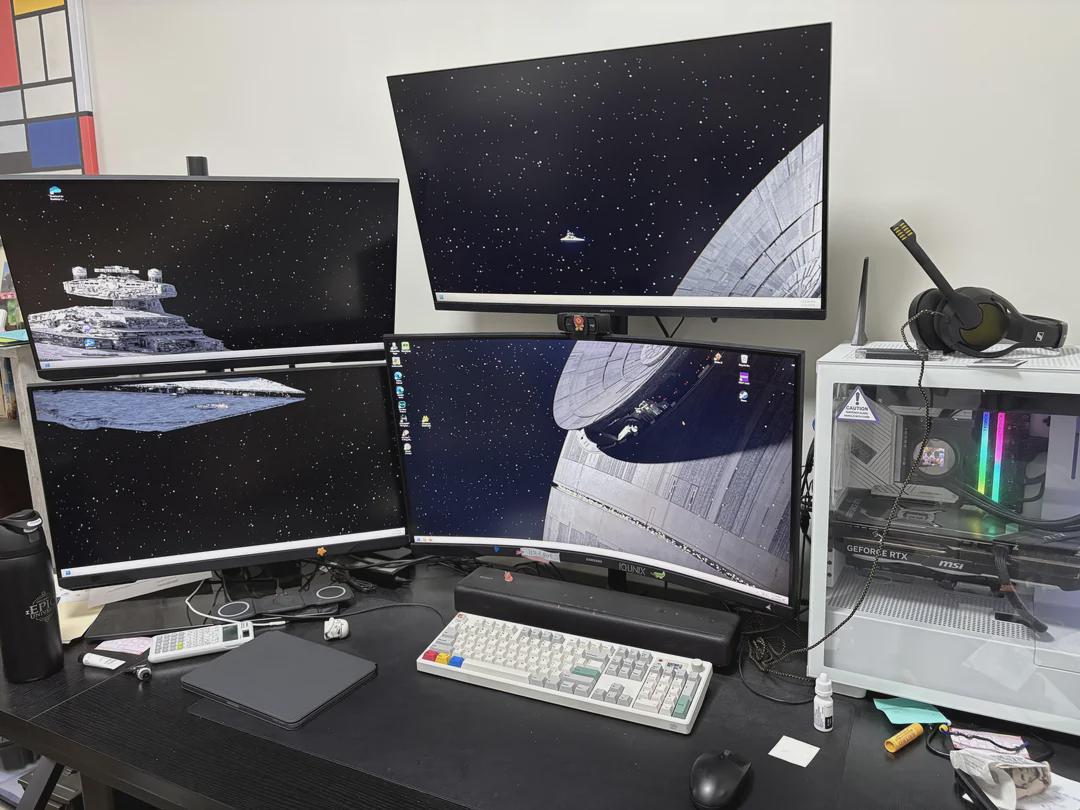
I didn't get any help from r/setups on this. I use all 4 monitors and think it would be helpful to add a 5th. Any suggestions on where to put it? Do you also just plug it into the motherboard if the GPU is full?

I didn't get any help from r/setups on this. I use all 4 monitors and think it would be helpful to add a 5th. Any suggestions on where to put it? Do you also just plug it into the motherboard if the GPU is full?
22 Comments
If your CPU* has an iGPU you could plug straight into the motherboard for a 5th monitor.
Otherwise maybe a usbc to HDMI adapter?
If you’ve got money to burn and don’t mind replacing some monitors, there are monitors that can be daisy chained together so you can drive multiple monitors from one cable.
Is moving the PC off the table an option?
You could get one of those portable monitors and use a tablet mount. Not sure what you need 4 monitors, never mind a fifth, but that’s the best I’ve got. Maybe use something like a USB hub, but for HDMI?
Clear off your desk, and put it in an empty space that doesn’t already have a monitor. Not sure what you’re asking? We can’t see the whole space
Control+windows key+ right,or left arrow key.
This is the way. Task view is the way!
This is the space station setup 🔥
what gpu do you have ?
Get bigger monitors and use PowerToys to make more efficient use of the space you have.
Damn! you a hacker good sir?
Move ur pc, duh 😐
I’d move the case and place a vertical ultra wide on that side.
Genuine question, what do you do? Because I can’t imagine having a use for 4 monitors, and you need 5?
Wouldn’t it be better if you got bigger monitors or even an ultrawide?
Buy those usb3 to 2 hdmi adapters so you can add 2 more monitors.
This is giving Krennic a headache in his eye.
Well ok, but only if it has the Enterprise preparing to destroy everything else, as it rightly *can and should.*
pc off the desk, or the 5th on top of the pc …
If your graphics card has it you should daisy chain with DisplayPort cables. You can do up to six monitors on one line. Get an ultra wide screen and have that be your main. Then have the rest as your reference sheets and chats.
You need 7. So you can do the jerk the world challenge. 7 videos from the 7 continents at the same time, in 7 minutes or less. Dry.
ok so you want to add more asymmetry? Why not move top left to bottom right, and instead invest in a 3/4 arm hydraulic stands and raise them up in front of you to more eye level, have three monitors in front and one up top
Maybe ontop of the PC? If you don’t want to move the PC, and don’t want to just add another on top, maybe ontop of the PC tower? It’ll be same height as the one at the top middle, so I’m guessing you like that height
You got a android tablet?
I use ‘Super display” on my tab s7 zero issues and a stand