
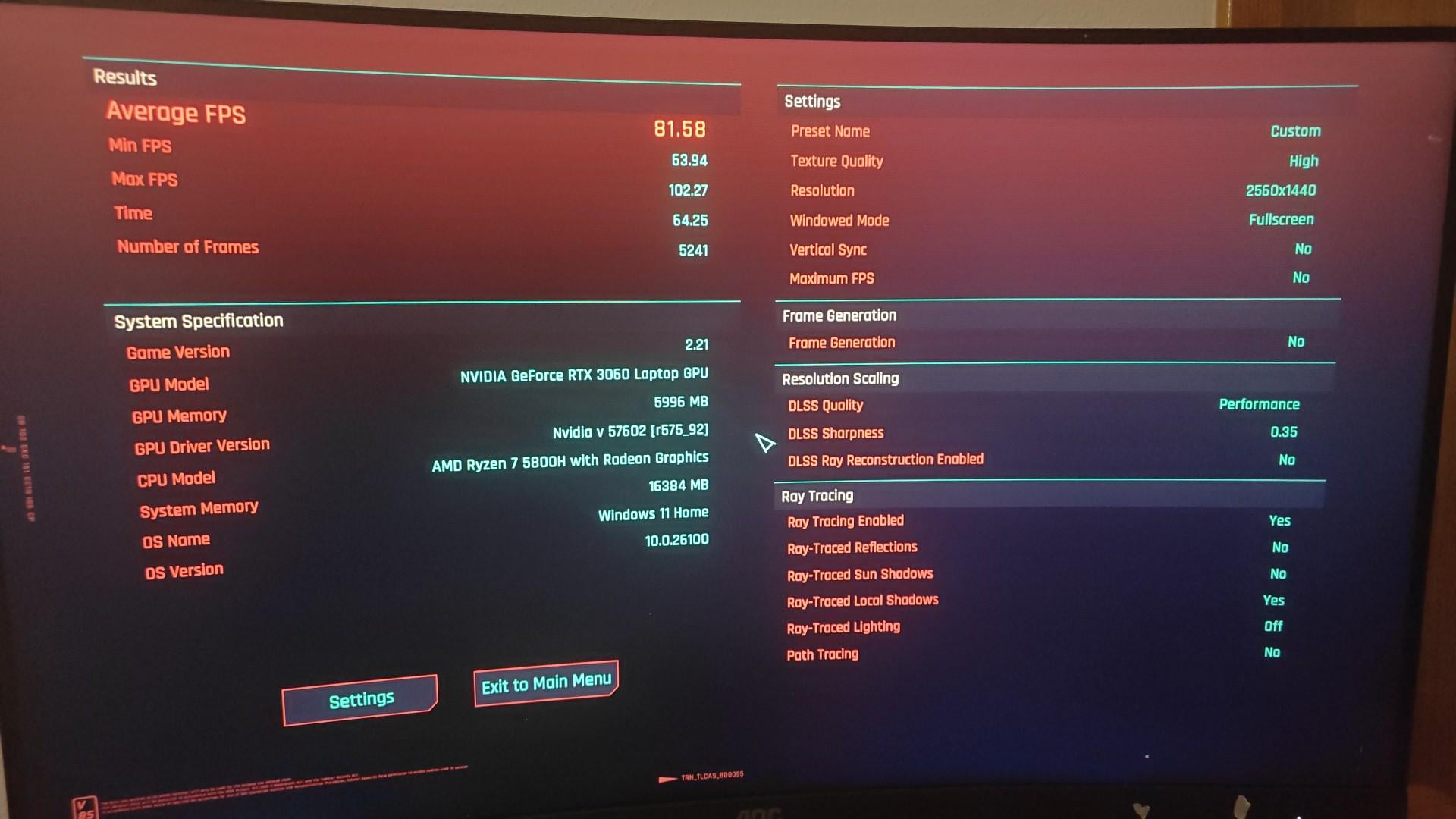
Just wanted to share this because I honestly didn’t think it would be possible.
I’m playing on a €500 used laptop with an RTX 3060 and Ryzen 7 5800H, pulling 80+ average FPS at 1440p on medium/high settings — more leaning toward high. DLSS is set to Performance, ray tracing is off and the visuals still look amazing.
When the game launched in 2020, it made $3,000+ desktop rigs beg for mercy. Now I’m running it on a budget laptop that costs less than a console bundle — and it’s buttery smooth.
Sure, I had to tweak a few settings:
Turned off RT lighting and reflections.
Dropped Volumetric Fog to Medium.
Enabled DLSS Performance + sharpening ~0.35.
Textures and most visuals are still on High.
Honestly, I expected FSR 3 Frame Generation to help more, but it only added a couple FPS, so I turned it off because of the drawbacks it gave. DLSS alone is doing the heavy lifting.
This tech leap is insane. Massive respect to CDPR for finally optimizing the game and to NVIDIA’s AI magic for making this even possible.
Welcome to 2025, chooms.
15 Comments
DLSS and FG are fake frames. Raw performance is expensive. Basically DLSS exists because of global inflation
Holy shit it’s Rache Bartmoss
1440p on 6GB VRAM? 😳
The only thing to be concerned about here is if the laptop can sustain that FPS over long sessions. The benchmark test is good, but it doesn’t measure thermal throttling that will occur with the card soaked in heat inside a laptop chassis.
Can’t speak to the 3060 specifically (especially not the laptop version), but the high end desktop Ampere series cards (3080 and 3090) were such power hogs that you’re usually looking to undervolt them to keep them from thermal throttling. I could easily see a 3060 in a laptop doing the same
You are a bright light for us when gta 6 comes out
Lol I have a Ryzen 5 6600H + Rtx 3050 4gb laptop and I’m playing the game for a third time
Okay so that’s awesome! Sooo I need some help! Since my games keeps crashing often after like 10 mins sometimes or after hours.
I run a i5 11th gen with an RTX3050 and 16gb ram +1.5TB Storage.
Its an ASUS TUF F17 2021 version.
So if you have any tips and suggestions for what I can do about the crashing let me know!
Since I just use the settings which the bench mark test applied.
Mind you before upgrading my ram i used to play cyberpunk [when I had 8gb ram] and it never crashed. Used to lag sometimes after many hours so I used to just close and restart.
The constant crashing kills the moment of enjoyment of PL and doing stuff so if anyone can help it would be awesome
Thanks!
It runs on my ASUS ROG Ally Z1 too.
It ran on my previous desktop with a 1080Ti..
Don’t know where you are going with it.
Why it looks like a curved screen…lol
Yes gane this runs so well. W3 on the other hand..
Without ray tracing this is sort of pointless. May as well run it at 480p and claim 500fps. Ray tracing is literally the reason it’s so demanding and looks as good as it does.
I’ve installed a thing called dlss unlocker for the game and my 1660 ti laptop feels like heaven on medium-high (of course no rt)
>claims cyberpunk runs 80+fps with low rt
Look inside
>DLSS Performace rendering the game at 720p and upscaling to 1440p
Regardless I hope you enjoy it and don’t get too many artifacts or ghosting I noticed some even on dlss balanced in the past
I’m not the biggest fan of performance DLSS. I’d rather up that to balanced and get less frames.
Dlss performance.