I really don’t understand how you can’t spot the difference
LilJashy
Bro I’ve had 165hz monitor for years and thought it was 144hz, so always had it capped. Just realized last week. Not as big of a deal for me, but you’re not alone
RegalPine
bless your soul
Khryen
I just found out mine had a refresh rate of 75hz and I had it set to 60hz for three years.
hiredhobbes
Every time someone posts this, I always immediately have the urge to double check mine
Skauher
Why the heck wouldn’t you check settings immediately after connecting the monitor?
kaskayde
I just played through all of avowed wondering what this annoying ass ripple effect constantly going thru my screen was…windows had my refresh rate stuck to 60 on my 165hz monitor and just had awful screen tearing lmao
turkeyburpin
Have two identical monitors at 144hz native, they’ve been slowly dieing for half a decade so I am just slowly lowering the refresh rate so they unscramble the image every time they decide the current refresh rate is too much to handle. I’m down to 75Hz. Just 15 left and I’ll have to get new monitors.
poligoza
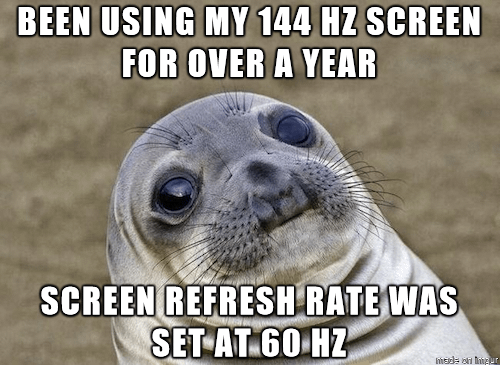
i miss the awkward seal memes
Droogie54
i just checked one of my monitors, i thought that was just a 60hz so i never checked. It’s a 120hz! i guess i got a free upgrade lol
Former-Discount4279
Sometimes my PC switches to 60 from 240, it’s… Strange.
zaku49
Well at least you saved some electricity.
Mayoo614
And now I’ll go verify mine, again, just to realize it is set correctly. But OCD tells me to verify.
A_PCMR_member
Windoof will also reset that upon update sometimes
Bought myself a 4080, huge upgrade from my 2070s! Wasn’t getting the performance I expected so investigated. Turns out I’d slotted it into the wrong PCI slot and it was massively throttling performance.
This was the PCI slot I’d had my 2070s in for my entire 5 years of ownership.
VapeRizzler
I got a 244 hz and when I went to adjust the hz it only showed 60 so I thought I got scammed. Like 4 years later I learned it’s cause I needed a proper HDMI or that other cable for fast speeds.
NoCase9317
There’s only a special place in hell for you, if you have the average stupid ass Reddit post/comment saying “I honestly can’t tell the difference between 60 or 120fps, but I guess some guys are sensitive to this kind of stuff, or just love their placebo”.
if not, don’t worry everyone makes mistakes xD
Ezekiel-25-17-guy
lmao happened to me too with my 175HZ monitor
stRiNg-kiNg
The seal or sea lion in this meme looks like Ellie from the last of us
DataPhreak
Now do a color calibration.
AbleBonus9752
I have a 144hz screen but I’m forced to use 60hz because the HDMI version on my monitor doesnt support it
InstanceFeisty
When I see 60 I can tell immediately. Even just in windows if you move the window around it’s obvious if you have 60 or less

30 Comments
somethings wrong with people that cant tell the difference
Free upgrade! Hell yeah!
“Dude I literally see no difference between 60 and 120Hz”
For your convenience, we default to 60 hz
You made me just check mine.
You just thought all your games just happened to only go to 60fps?
For anyone who isn’t sure, here’s how you check:
Settings > Display > Advanced Display > choose your refresh rate
I really don’t understand how you can’t spot the difference
Bro I’ve had 165hz monitor for years and thought it was 144hz, so always had it capped. Just realized last week. Not as big of a deal for me, but you’re not alone
bless your soul
I just found out mine had a refresh rate of 75hz and I had it set to 60hz for three years.
Every time someone posts this, I always immediately have the urge to double check mine
Why the heck wouldn’t you check settings immediately after connecting the monitor?
I just played through all of avowed wondering what this annoying ass ripple effect constantly going thru my screen was…windows had my refresh rate stuck to 60 on my 165hz monitor and just had awful screen tearing lmao
Have two identical monitors at 144hz native, they’ve been slowly dieing for half a decade so I am just slowly lowering the refresh rate so they unscramble the image every time they decide the current refresh rate is too much to handle. I’m down to 75Hz. Just 15 left and I’ll have to get new monitors.
i miss the awkward seal memes
i just checked one of my monitors, i thought that was just a 60hz so i never checked. It’s a 120hz! i guess i got a free upgrade lol
Sometimes my PC switches to 60 from 240, it’s… Strange.
Well at least you saved some electricity.
And now I’ll go verify mine, again, just to realize it is set correctly. But OCD tells me to verify.
Windoof will also reset that upon update sometimes
https://preview.redd.it/3t6faugeglye1.jpeg?width=300&format=pjpg&auto=webp&s=6ff50c55512e8d259810157718e2fa852e21c3b6
Bought myself a 4080, huge upgrade from my 2070s! Wasn’t getting the performance I expected so investigated. Turns out I’d slotted it into the wrong PCI slot and it was massively throttling performance.
This was the PCI slot I’d had my 2070s in for my entire 5 years of ownership.
I got a 244 hz and when I went to adjust the hz it only showed 60 so I thought I got scammed. Like 4 years later I learned it’s cause I needed a proper HDMI or that other cable for fast speeds.
There’s only a special place in hell for you, if you have the average stupid ass Reddit post/comment saying “I honestly can’t tell the difference between 60 or 120fps, but I guess some guys are sensitive to this kind of stuff, or just love their placebo”.
if not, don’t worry everyone makes mistakes xD
lmao happened to me too with my 175HZ monitor
The seal or sea lion in this meme looks like Ellie from the last of us
Now do a color calibration.
I have a 144hz screen but I’m forced to use 60hz because the HDMI version on my monitor doesnt support it
When I see 60 I can tell immediately. Even just in windows if you move the window around it’s obvious if you have 60 or less