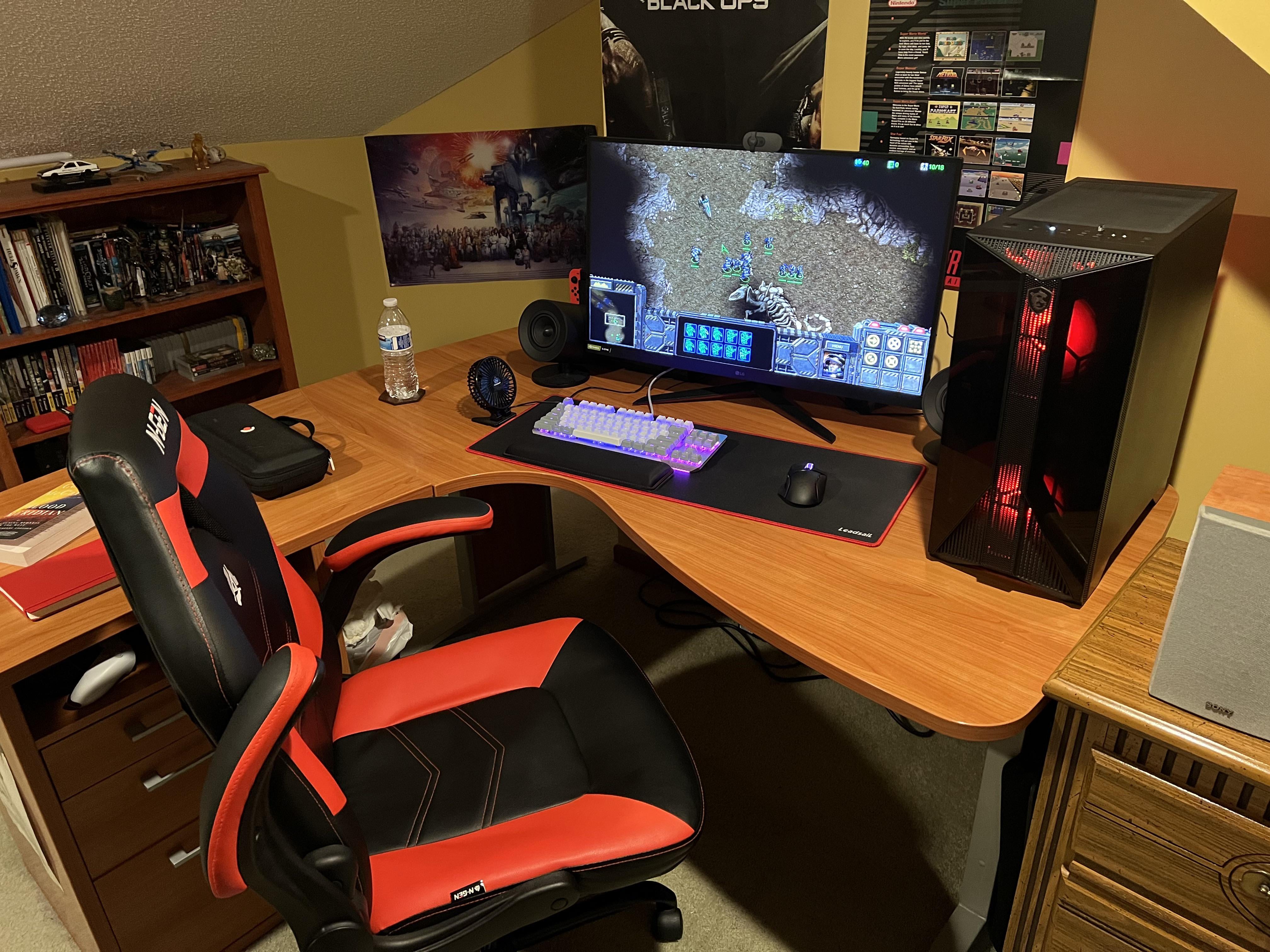
I feel like the desk is horribly shaped so it might be a big reason it’s uncomfortable. I can’t seem to find any position that feels good.

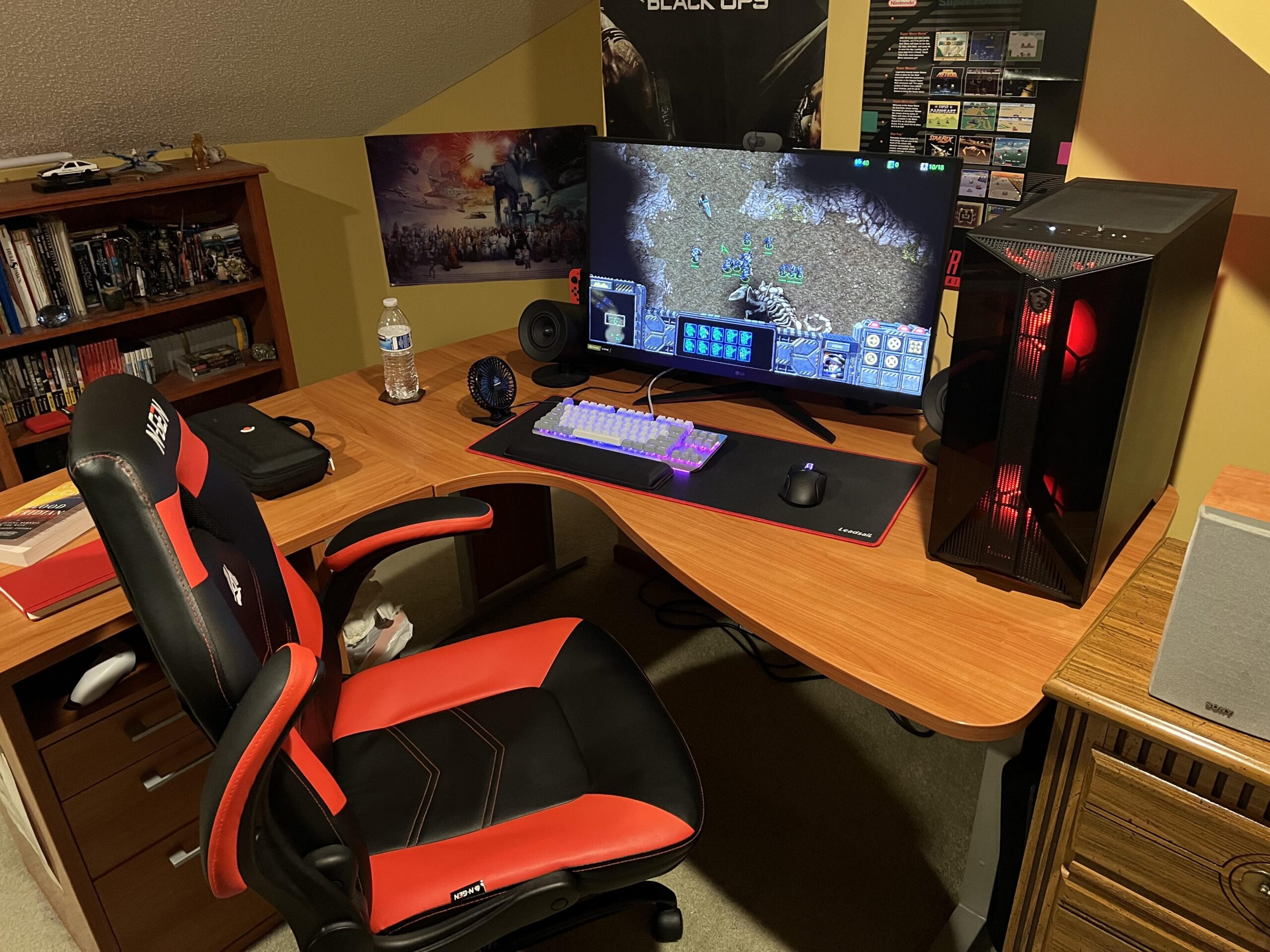
I feel like the desk is horribly shaped so it might be a big reason it’s uncomfortable. I can’t seem to find any position that feels good.
31 Comments
Move the PC to the left side of the monitor. Overall, -1/10 desk design, what the hell. Would replace.
Get a new desk. Literally just some black one from IKEA will do. Get out of the corner. And get a bigger mousepad
Well, to start with **you’re facing the desk at an angle instead of straight on**. Your monitor, keyboard, and mousepad should all be parallel to the straight end of your desk. Currently, they’re not.
Ideally, you would be using the straight section of the desk instead (the part with the drawers), but if the drawers can’t be moved, that’s not an option.
A third, quite radical option, would be just to cut part of the desk to make the front straight instead of wavy.
Other than that, good kit for ergonomics, that you’re currently lacking, would be: Height-adjustable arm rests on your chair (the arm rest height should match your desk height), a monitor arm so that you can position your monitor at an angle and height that’s correct (head-on, top edge of the monitor aligned with your eyes when sitting straight). Lastly, the height of the seat should be such that your feet sit flat on the floor. You might also consider a foot rest to address that.
You said your moving soon so I would get a new desk for that space that is straight on. Can easily throw together one from Ikea. For now move the PC to the left so you can move the monitor further right and see if that feels better.
I would also think about getting a decent office chair. Those gaming ones are mostly just for show. You can find some good deals on refurbished chairs. Get one with height-adjustable arm rests. Those also look pretty stiff. I have some soft armrest covers I found on amazon that I put on mine and it made a world of a difference on my forearm/elbow
Get a better desk, get rid of the racing chair and get an office chair
Full mouse pad table or id suggest moving your tower to the left side of your monitor so it’s not by your mouse
New desk or maybe try to have the monitor in the middle at a 90 degree angle
fuck yeah starcraft
Get a mouse hand a pad or something to rest your wrist at a better angle. Might pad the entire right side?
Get a ergonomic office chair instead of the gaming chair you have. Its not really good for your spine and significantly more expensive. Id recommend anything that lines your spine up.
Everyone’s saying new desk, so not going to beat that horse. However, you could also get yourself a monitor arm to allow flexible positioning with your monitor and possibly give some more room on the desk itself. This is totally optional as a new desk would help already.
It’s the chair. Non adjustable arm rests are a pain in the butt. I’d replace that
Idk, but move Raynor to the command center
I see you enjoy a good RTS, check out Tempest Rising.
The desk must be sacrificed.
Bruh, just scoot the keyboard and mouse pad closer to you, i like my mouse on the edge of my desk personally. Having to rest your arm on the desk is not ideal, at least for me. It doesn’t need to be square with the monitor.
And yeah like others have said, move the tower to the left and move the rest further to the right so you can be closer to your mouse and not have to be smashed up against the desk corner like that.
i really love L shaped desk just move your pc tower to the left, i get yourself a monitor arm, this looks cozy to me.
https://preview.redd.it/pi9l2bm7dhye1.jpeg?width=4160&format=pjpg&auto=webp&s=690d5e415fe74aebf89436288a4ee2a45de8b709
this is my setup and as you can see the L shape allows you to get a second pc
PD: sorry for the mess 😀
whoever thought of this desk was def trippin on somethin
get rid of that shit desk with the stupid curve in it.
put your desk against a wall, not in the middle of the room sticking out like this.
get the desktop out of the way. position your display so that you’re sitting right in front of it and you’re not turned, leaning, tilting, or moving your body/neck to see it. you should be able to sit upright and look straight forward in your chair and comfortably see your monitor.
Move keyboard and mouse to corner so your elbows rest on the desk. Move computer far far away with hdmi extension. Monitor mounts
get a new desk and an executive chair.
This desk was created for writing manifestos, not gaming
Agree with other comments, desk is the issue. Check target for ultra budget
Ditch the chair. While I understand racing chairs are cool, they are not designed for comfort at all.
PC left side under desk, place something flat so it doesn’t suck up all the carpet fibers.
Get a real office chair.
Put tower on the left of the monitor instead, align mousepad and monitor to the curve of the desk edge.
Desk please
Best thing I can ever advise is NEVER buy a ‘gaming’ chair. Go to a office max, if they even exist any more, and find a nice office chair. Also move computer to left side of desk imo. You also could attach your monitor to the wall with a mount, push everything back and clear off a ton of of desk space for your arms to rest on.
Sell it to someone left handed
Those chairs are the worst for gaming comfort