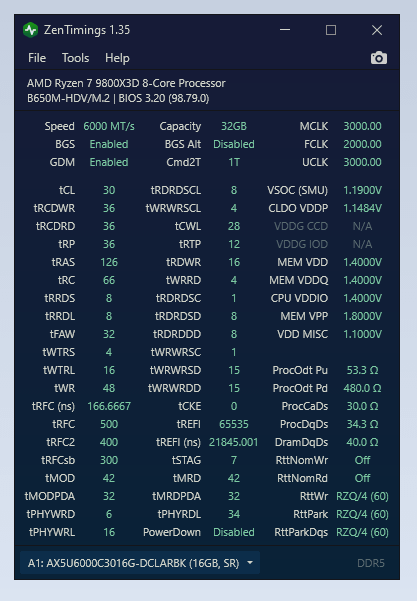
using buildzoid timings.. mem temps around 54 on stress test usmus and x3dchips anta cfg. What can I improve to achieve lower latency and more 1%low gaming?
xpg adata lancer ax5u6000c3016g-dclarbk, —- hynix A-DIE OR M-DIE???

using buildzoid timings.. mem temps around 54 on stress test usmus and x3dchips anta cfg. What can I improve to achieve lower latency and more 1%low gaming?
xpg adata lancer ax5u6000c3016g-dclarbk, —- hynix A-DIE OR M-DIE???
6 Comments
You own 9800X3D , solid 6000Mhz DDR5 and you worry about games not run smooth enough ?
Bruh.. Just enjoy your games 😏
According to Buildzoid, the x3D chips really don’t see much benefit if any from fine timing adjustments
Don’t really think ram timings have much effect on the X3D cpu’s. You could try to hit 6200 or 6400, higher fclk and try to get timings stable, but I don’t think it’ll have an effect on the 1% lows or latency at all. You sorta get what you get if you buy x3d, really is the chip for plug and play.
Raider fclk to 2133 should work on most CPU’s, try going for 2200
Gamingchair. Always upgrade gamingchair first.
Tras trc are wrong
Trp min is tcl +4
Would start with trrdl 12 twtrl 24 scl 5, 17 (you would need to test what settings on these are faster on your system)
Trfc should be dividable with 32, a-die can go to ~120ns
Twrrd 1, timings after this are used only on DR
Data scramble off, svm off, igpu off, bank swap mode = swap apu, fclk vdi mode = predictive, nitro 1-2-0 x8 x8
You could also increase fclk to as high as proosible, 2100+ should be better than 3:2 sync at 6000.
Tune PBO with CO per core, there is a guide on OCN
Tldr
Activate pbo, limits motherboard, scalar x1, then tune a per core CO, so voltages of cores are harmonized, then increase negative value so that lowest is like -12. Increase fmax +200, test for stability with y-cruncher + aida. Go lower if stable, higher if unstable.