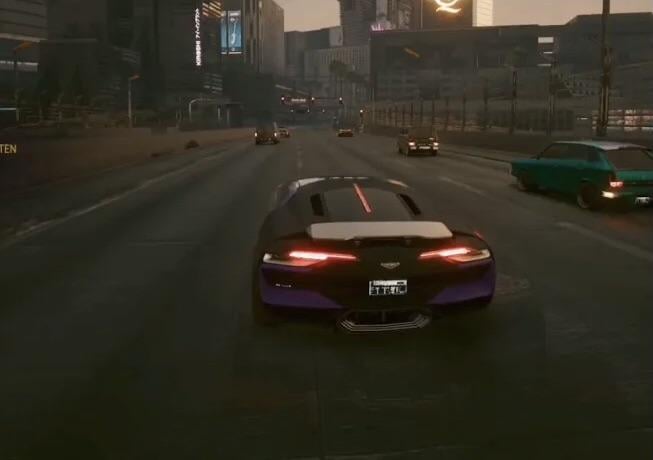
I’ve been playing cyberpunk for quite a while and I’ve always seen this ghosting effect on my cars when I go fast. Is there a way to get rid of it on ps5? I noticed it’s less noticeable when I turn motion blur on, the thing is I hate motion blur

I’ve been playing cyberpunk for quite a while and I’ve always seen this ghosting effect on my cars when I go fast. Is there a way to get rid of it on ps5? I noticed it’s less noticeable when I turn motion blur on, the thing is I hate motion blur
11 Comments
Yeah buy a better monitor or tv
It is caused by resolution scaling\frame genaration. I don’t know how it works on PS5 as I am on PC, but I assume if you are on performance mode switching to quailty mode will reduce\remove the ghosting but with lower performance. If you are already using quailty mode then I don’t know.
Turning off frame gen is the only option, but I am not sure if you can on PS5.
But a PC thats how
I don’t think PS5 uses frame gen as only fsr 3.1 has it. but cyberpunk on consoles uses an older version of fsr which has really bad ghosting.
It won’t ever be fixed unless they update it to 3.1
Drive in first person view. It still there, but not as noticeable.
I ran into this issue on Series X. I discovered that turning motion blur ON will reduce it a noticeable amount. But then you have to play with motion blur :/
I’ve been told it’s something to do with the TAA anti aliasing technique. I’ve noticed it in tons of other games too. Unfortunately that’s not a setting consoles let you change.
That happens because of FSR and you can’t turn it off
Not sure if you can switch between performance mode, and non performance mode on PS5. This is DLSS/FSR/XESS up scaling in effect and you are getting the ghosting because of it.
one solution could be to cap your console’s output resolution in the console’s settings.
Cyberpunk runs at a variable resolution between 1440p and 4K, so i recommend choosing a max output res of 1440p.
and to anyone telling op to “get a pc,” plz touch grass
Can confirm that turning motion blur ON-will reduce this vehicular ghosting esp. on around tires.