I have that same laptop for work. The number of times I have hit that stupid button when I am trying to press “delete” is ungodly
Unique-Ad-6308
Also applicable to clumsy tiny fingers.
InternetExploder87
My work laptop is set up similar. I haven’t hit it many times, but more than 0, and it’s infuriating everytime
otakunorth
Good thing nothing happens when you hit it, this gets posted daily here.
SoftwareSource
I got the same hp laptop for work, fucking hate it, only good thing is the touchpad.
melanthius
Are you not able to change what the power button does in control panel? (Not disagreeing with the hate)
ItsMrDante
It does nothing tho, unless your laptop was made in the dark ages. I have a button as part of the keyboard for power as well and when I press it nothing happens and when I hold it for 5s nothing happens either because it just prompts me to shut down, if I hold it for over 10s it hard shut downs, but who’s fat fingering a button for 10s?
OperativePiGuy
I know comments say you can disable the setting or whatever, but it still makes me wonder why they chose to put it there of all places. It just seems like poor design, regardless of options to make it less bad.
bones10145
I hate that style of enter key too.
cooolcooolio
Straight to design jail
Delphin_1
mine is the same, but when pressing it nothing happenes. you have to hold it for a second for it to go into standby. Still hate it though
Morudith
A third of my job is hardware repairs for HP EliteBooks and ZBooks. When doing the keyboard diagnostic test for functionality this button is included. I have to press every single other key first to make sure they all work because when I finally check this one, it shuts down.
nmfpriv
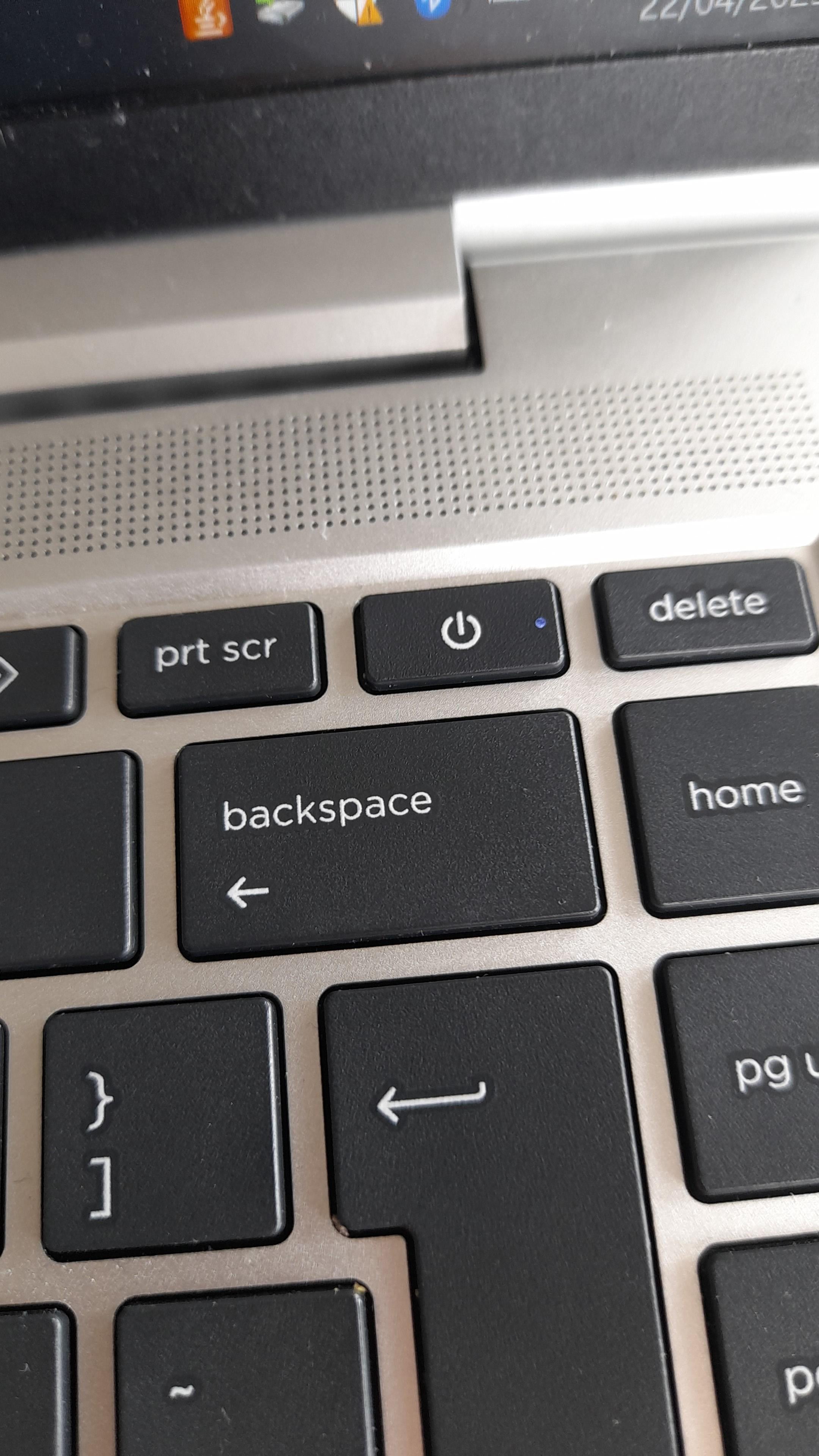
Only the devil could think of putting that key between backspace and delete
punchedboa
HP?
adjgamer321
If that’s an HP, I promise it’s so much better than the new Dell XPS laptops. It’s right next to the backspace and I have put my laptop to sleep twice today already.
TurboJaw
My work laptop has a similar layout, but the effort required to press down the button is significant. It won’t budge if I hit it with a normal typing force.
Puuurpleee
The one on my laptop is deliberately made much harder to press than the other keys so you can’t accidentally turn it off
56kul
Why is the power button not all the way to the side..?💀
pupperdole
The cat walking across my keyboard would like to have a word
Kongo808
Whoever decided this is a good idea needs to be publicly shamed.
doupIls
I have the same laptop. I set the button to “do nothing”. Haven’t had any issues yet. But I agree, it’s such a stupid place for a power button.
Aeons80
That should be illegal
azoten
Lol, personally as an owner of a laptop with the power key being in that exact position, I often find myself hitting the print screen key instead, when I’m actually trying to power my computer off, and the other way around. Good job HP.
LasersTheyWork
Delete and ultra delete right next to one another.
No_Arachnid_9198
op, please tell me that you do have 9999tb ram
fubarbob
I have some cheap usb keyboards that place since unnecessary power keys in place of the pause/scroll lock/prtscrn cluster (with those moved down a rank).
Warcraft_Fan
Can change how power key works in Windows. Mine is set to disabled, I close the lid to hibernate and I use Windows-X then U key twice to shut it down quickly.
Settings > System > Power & battery > Lid, power & sleep button controls
BlackCatFurry
My previous hp laptop had it exactly where esc sits on a regular keyboard. There were quite a few times i fatfingered my laptop to sleep instead of pausing the game i was playing…
Big_Tasty_67
I have an HP with that placement. The saving grace is that it requires a long press to do anything.

32 Comments
God damn, nice user flair lmao
I have that same laptop for work. The number of times I have hit that stupid button when I am trying to press “delete” is ungodly
Also applicable to clumsy tiny fingers.
My work laptop is set up similar. I haven’t hit it many times, but more than 0, and it’s infuriating everytime
Good thing nothing happens when you hit it, this gets posted daily here.
I got the same hp laptop for work, fucking hate it, only good thing is the touchpad.
Are you not able to change what the power button does in control panel? (Not disagreeing with the hate)
It does nothing tho, unless your laptop was made in the dark ages. I have a button as part of the keyboard for power as well and when I press it nothing happens and when I hold it for 5s nothing happens either because it just prompts me to shut down, if I hold it for over 10s it hard shut downs, but who’s fat fingering a button for 10s?
I know comments say you can disable the setting or whatever, but it still makes me wonder why they chose to put it there of all places. It just seems like poor design, regardless of options to make it less bad.
I hate that style of enter key too.
Straight to design jail
mine is the same, but when pressing it nothing happenes. you have to hold it for a second for it to go into standby. Still hate it though
A third of my job is hardware repairs for HP EliteBooks and ZBooks. When doing the keyboard diagnostic test for functionality this button is included. I have to press every single other key first to make sure they all work because when I finally check this one, it shuts down.
Only the devil could think of putting that key between backspace and delete
HP?
If that’s an HP, I promise it’s so much better than the new Dell XPS laptops. It’s right next to the backspace and I have put my laptop to sleep twice today already.
My work laptop has a similar layout, but the effort required to press down the button is significant. It won’t budge if I hit it with a normal typing force.
The one on my laptop is deliberately made much harder to press than the other keys so you can’t accidentally turn it off
Why is the power button not all the way to the side..?💀
The cat walking across my keyboard would like to have a word
Whoever decided this is a good idea needs to be publicly shamed.
I have the same laptop. I set the button to “do nothing”. Haven’t had any issues yet. But I agree, it’s such a stupid place for a power button.
That should be illegal
Lol, personally as an owner of a laptop with the power key being in that exact position, I often find myself hitting the print screen key instead, when I’m actually trying to power my computer off, and the other way around. Good job HP.
Delete and ultra delete right next to one another.
op, please tell me that you do have 9999tb ram
I have some cheap usb keyboards that place since unnecessary power keys in place of the pause/scroll lock/prtscrn cluster (with those moved down a rank).
Can change how power key works in Windows. Mine is set to disabled, I close the lid to hibernate and I use Windows-X then U key twice to shut it down quickly.
My laptop has this dumb shit
https://preview.redd.it/o6mr62e3ahwe1.png?width=800&format=png&auto=webp&s=0811bba407d9ced64977b62d9cf6e51b9f946970
I fatfinger pgup/pgdn all the time.
shitty design
but there’s a solution for Windows 11:
Settings > System > Power & battery > Lid, power & sleep button controls
My previous hp laptop had it exactly where esc sits on a regular keyboard. There were quite a few times i fatfingered my laptop to sleep instead of pausing the game i was playing…
I have an HP with that placement. The saving grace is that it requires a long press to do anything.