
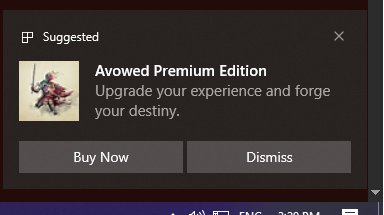
Windows 10. I have all advertisements and notifications disabled, and for some reason – once a week, I get an ad for Avowed Premium Edition. It's always fucking Avowed. I don't even own Avowed so how would I be upgrading my ''experience''?
Before Avowed released, I think I had one notification about gamepass so I disabled them and didn't see a notification for almost 2 years, and yet..
20 Comments
I’m a schmuck who paid too much money for a windows license, and it’s horseshit to be advertised to on my desktop.
Can you disable notifications from “Suggested”? I don’t have a Windows 10 machine handy to check.
I’m on Windows 11, so I’m not sure if it’s the same, but you can try turning the notifications off for Settings > System > Notifications > Suggested
https://preview.redd.it/ik7vduaxmque1.png?width=1739&format=png&auto=webp&s=ccd3f109ba59e98d733b807933aa7a72d57959b0
Win + G -> Notifications -> Disable.
In fact, I just disabled the entire GameBar. I just re-enable it temporarily if I ever have to do crossplay invites.
https://preview.redd.it/1atwa1lttque1.png?width=686&format=png&auto=webp&s=22ef6f9103e31ff93d06c65f5358f138bc71ec69
Bah. Peasants and their consumer editions of Windows. Enterprise baby.
The only way to disable ads like this permanently is to install Linux
Just buy it lool
Stop allowing random websites access to your push notifications
Any company selling a product that is attached to a network of any kind:
1. They want your money up front for the “product”, which you might not even own because it’s actually a lease but they don’t tell you, and then they still want control over it; but also
2. They want your data so they train their A.I. to create products to make more money off who you are as a person, by knowing every little thing about you; but also
3. They want your data so that they can sell it through data brokers so that others can know every little thing about you; but also
4. They want money from advertisers to send you ads; but also
5. They want you to buy those products through them, so that they will get a commission off that sale as well;
6. Even some car companies are doing stuff like this; heck, even kitchen appliances, etc.
Quite the business model, huh?
Just wait for Steam OS.
Microsoft needed to be suited for ads on OS on a bad game they are publishing.
Try O&O ShutUp. It works on Win10 and 11. You can disable most of the crap from Windows/MS.
The only caveat is that you need to run it after each major Windows update just to make sure they did not RE-enable part of the crap you disabled.
Don’t use windows.
ReviOS is my answer.
I would like to once again share WinAeroTweaker!
I’ve used this Program for probably a decade? Feels like yesterday I was MAD AD HELL at windows 8.0 and had to find a solution. Also because of course I had to use it for work at the time as well.
nowadays it’s even more powerful, allowing full disable of copilot/Cortana(Rip), changing the windows search to not prioritize internet over local items, removing advertisements entirely or from specific areas, returning the right click menu to Win 10 style because somehow THAT was a great win11 choice, M$….. Essentially one can fix windows how it should have been, but a lot of people seem to hate when I bring up the program, as down votes can tell me.
Main criticism I keep hearing is that windows shouldn’t be so ass in the first place. Kind of hard to disagree there, but my use case does not easily allow an OS switch, nor do I want to relearn a new one at this time. Also I feel thats kind of an unfair statement as it has nothing to do with the effectiveness of WinAeroTweaker 🙁
If anyone would like help setting it up, or taking a copy of all my changes even, I’m here to help!
there are no such advertisements. You have something third party going on here.
Funny how the ad is Avowed, the game that was destroyed by its own director
My desire to sarcasticllly tell you to install Linux… hides in me like The Green Goblin hides in Norman Osborn. But I will supress it for the time being.
https://github.com/ChrisTitusTech/winutil
Switch to Linux /s