Maybe you turned on desktop recording for instant replay; check it in AMD Adrenaline.
Izan_TM
shhhh don’t wake it up, it’s dreaming
TwoCylToilet
Go to processes and enable the GPU usage column. Sort by GPU usage and see which process(es) are using it.
Supernova849
There are quite a few apps that use the gpu for hardware acceleration. Windows desktop, discord, chrome, the list is extensive but I would pin it to one of those three first. Task manger isn’t well known for its accurate usage metrics either.
Zuokula
Maybe that windows Recall?
Twin-Duct
It could be a number of things. I actually was having this issue earlier today. My mind goes to malware first. Install malwarebytes and run a scan. It comes with a free trial of the full membership so the scan will be better than the free version. Run the scan, and if it detects anything, it will get rid of it. If you wanna be extra cautious, you could reinstall windows.
If no virus(es) detected, I’d check to make sure your drivers are up to date. If they are, then reinstall your drivers. I see you have a radeon card, so you’d have to look up how to reinstall the drivers because I’m not well versed with radeon gpus.
Also, if you use an overlay/HUD like radeon overlay, msi afterburner, or discord’s overlay, turn it off because they can use up resources.
Hope this helps
redditisantitruth
That is a wonderful question to ask task manager
HazardousHD
Wallpaper Engine?
sankto
Requesting tech support from r/pcmasterrace is asking for trouble
Razex15
Maybe check out the power usage in the amd software. It usually gives a much better representation of how much a gpu is actually working
Saitzev
Either download process explorer or bring up Resource Monitor and see what tasks are running. They’ll give you exponentially more data than task manager.
shedosexy
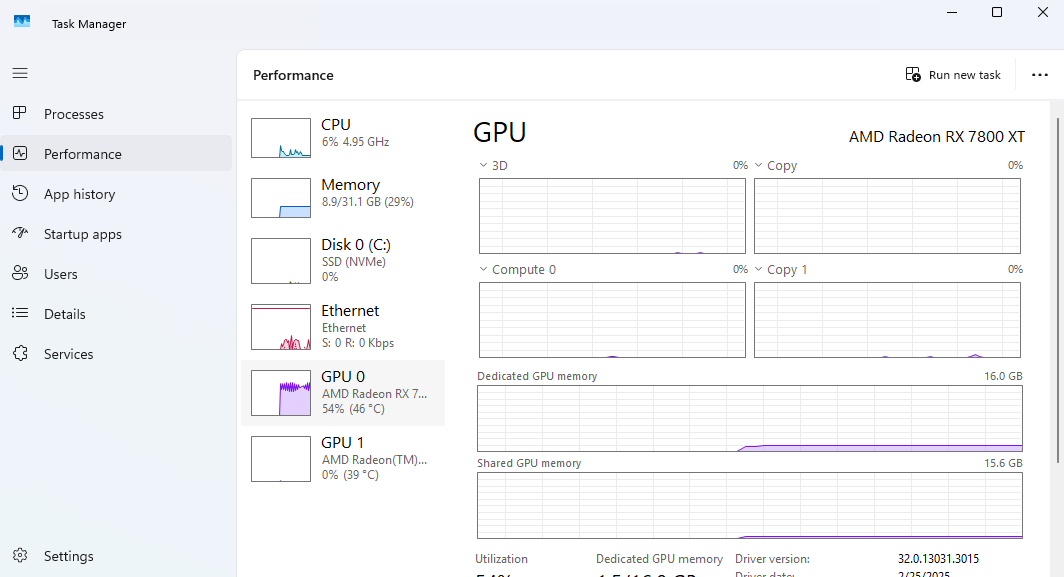
Y’all are saying it should be Instant Replay, but it shouldn’t, there’s no way Instant Replay is pushing 54% of a gpu.
I think it’s a crypto miner or some malware.
Kougeru-Sama
Weird how literally no one is asking if you’re watching a fucking a video. If you have hardware acceleration on (which you should in 2025), videos all use the GPU video decoder. Task manager is kinda useless for watching GPU usage because it will show activity like this when only the encoder or decoder is in use. So if you’re watching a 4k or 8k video on AV1 it could easily show up as 50-100% GPU usage while having no noticeable effect on your PC’s performance (the entire point of GPU decoders). So, were you watching videos at the time? There should also be setting there to enable viewing the encoder and decoder usage to confirm this but it’s off by default. Click the three dot menu
Hattix
It’s ReLive/desktop recording and the use isn’t actually high.
The GPU is clocked down and so even a very low load “looks” high.
Necro-User-29
It’s based off the clock speed when the card is idle is down clocks so the little bit of shit it’s doing actually takes up most of the available resources at that slow speed.
Haliphaxx
I was just about to make a post about this. I just got a 9070xt and it’s running at about 55% usage just sitting at the desktop. I do have instant replay on so maybe I will try turning that off.
Ferchitoqn
Someone is using pirate software hahaha
lLoveTech
I think it’s a bug because I have that too when the adrenaline software says that the GPU utilisation is zero
iAmGats
Hi! Yeah, sorry it’s me. I’m mining crypto with your PC rn.
Different_Variation6
someones mining bitcoin on ur shit bro
Effective_Top_3515
Browser have hardware acceleration on?
PowerMinerYT
Right click on the top panel tab which shows CPU/memory etc.. and tick gpu.

23 Comments
malware. wipe your drive and reinstall
Maybe you turned on desktop recording for instant replay; check it in AMD Adrenaline.
shhhh don’t wake it up, it’s dreaming
Go to processes and enable the GPU usage column. Sort by GPU usage and see which process(es) are using it.
There are quite a few apps that use the gpu for hardware acceleration. Windows desktop, discord, chrome, the list is extensive but I would pin it to one of those three first. Task manger isn’t well known for its accurate usage metrics either.
Maybe that windows Recall?
It could be a number of things. I actually was having this issue earlier today. My mind goes to malware first. Install malwarebytes and run a scan. It comes with a free trial of the full membership so the scan will be better than the free version. Run the scan, and if it detects anything, it will get rid of it. If you wanna be extra cautious, you could reinstall windows.
If no virus(es) detected, I’d check to make sure your drivers are up to date. If they are, then reinstall your drivers. I see you have a radeon card, so you’d have to look up how to reinstall the drivers because I’m not well versed with radeon gpus.
Also, if you use an overlay/HUD like radeon overlay, msi afterburner, or discord’s overlay, turn it off because they can use up resources.
Hope this helps
That is a wonderful question to ask task manager
Wallpaper Engine?
Requesting tech support from r/pcmasterrace is asking for trouble
Maybe check out the power usage in the amd software. It usually gives a much better representation of how much a gpu is actually working
Either download process explorer or bring up Resource Monitor and see what tasks are running. They’ll give you exponentially more data than task manager.
Y’all are saying it should be Instant Replay, but it shouldn’t, there’s no way Instant Replay is pushing 54% of a gpu.
I think it’s a crypto miner or some malware.
Weird how literally no one is asking if you’re watching a fucking a video. If you have hardware acceleration on (which you should in 2025), videos all use the GPU video decoder. Task manager is kinda useless for watching GPU usage because it will show activity like this when only the encoder or decoder is in use. So if you’re watching a 4k or 8k video on AV1 it could easily show up as 50-100% GPU usage while having no noticeable effect on your PC’s performance (the entire point of GPU decoders). So, were you watching videos at the time? There should also be setting there to enable viewing the encoder and decoder usage to confirm this but it’s off by default. Click the three dot menu
It’s ReLive/desktop recording and the use isn’t actually high.
The GPU is clocked down and so even a very low load “looks” high.
It’s based off the clock speed when the card is idle is down clocks so the little bit of shit it’s doing actually takes up most of the available resources at that slow speed.
I was just about to make a post about this. I just got a 9070xt and it’s running at about 55% usage just sitting at the desktop. I do have instant replay on so maybe I will try turning that off.
Someone is using pirate software hahaha
I think it’s a bug because I have that too when the adrenaline software says that the GPU utilisation is zero
Hi! Yeah, sorry it’s me. I’m mining crypto with your PC rn.
someones mining bitcoin on ur shit bro
Browser have hardware acceleration on?
Right click on the top panel tab which shows CPU/memory etc.. and tick gpu.
It will start showing gpu usage as well.
https://preview.redd.it/7hmw8lkrkoue1.png?width=1080&format=png&auto=webp&s=b9c93a6d785523ae6c58a5ec1ad78be5b93f54f1