
![[OC] Can't get 5GHz on my 12700KF.](https://www.fpshub.com/wp-content/uploads/2025/04/z8I6lFl0Ut_faSS6It0NXBAtqSte3ViZfPmYR5TdmA.png "[OC] Can’t get 5GHz on my 12700KF.")
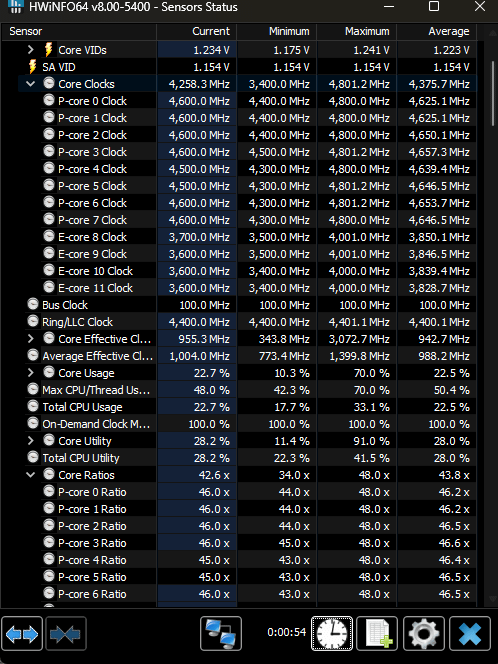
So I've had this CPU for 2 years now and decided to try to push it beyond the 4.7Ghz I always had it set.
After couple hours of tweaking and testing, I can't get it to go above 49x, not stability wise but, something is preventing it to go past 49x eventho I have 50x set in the bios (among few other settings changed ofc). The P-Cores are actually switching between 48x and 49x randomly.
-
Board : Asus TUF GAMING Z690-PLUS WIFI D4
-
Multicore : Remove All Limits (90C)
-
Vcore : 1.25
-
AVXs Offset : 0
-
LLC : 5
-
C States : Disabled
-
Enhanced C-States : Disabled
I even went as far as disabling XMP and inputting values manually, to no avail.
EDIT: Booted a game for few minutes and Clock multiplier is dropping for some reason
https://i.imgur.com/nyQW3ST.png
https://i.imgur.com/kSE3BCM.png
EDIT2 : Ok at last, I changed :
- Performance Preferences (a setting that my MOBO has) to Asus Advanced OC Profile
- Asus MultiCore Enhancement to Let Bios Optimize
- Enabled Intel Adaptive Boost Tech
- IA TDC Current Limit to Auto
- Lowered Ring Ratio to 40
Not sure what but bomething in there did it (Maybe the IA thing). Now getting 5GHz on all P-Cores and it seems stable , at 1.3 manually set Vcore (1.252-1.296 in HWINFO), so far. HWINFO shows that Min Clock Speed is 49x so it still does slightly drop for some reason but my P-Cores Clock Speed AVG. is 4,996MHz after 20min.
2 Comments
Might be a longshot, but is your “processor maximum state” set to 100% on windows power plan?
Expand the sub headers that show all the limits and see which limits you are hitting.
That will give you a pointer as to what the issue is. Whether it’s power limited, thermal limited, voltage limited, current limited etc.