Yeah sometimes. But it’s a game and it doesn’t effect anything for me so meh
fadijec
Can you please increase the FOV?
yabab
I reported this bug, it’s world cells loading incorrectly. This was months ago… While 2.0 was still coming out. Another thing that’s broken is that if the AI hurts itself, they assume it’s you and enter alert status by themselves. Given some areas in the game have broken pathfinding, you can’t stealth properly certain challenges in the game.
They don’t really care, support was making me jump through all sorts of hoops to test the game for them, even though I supplied them the save files, as they requested.
T0asty514
I’ve never seen any of this, no.
You playing it off a hard drive? lol
DREAM066
I downloaded a “draw distance increase” mod and it did this.
Adventurous_Touch342
Considering I run GTX 1650 I don’t raise FOV to the point it would xD
LockenCharlie
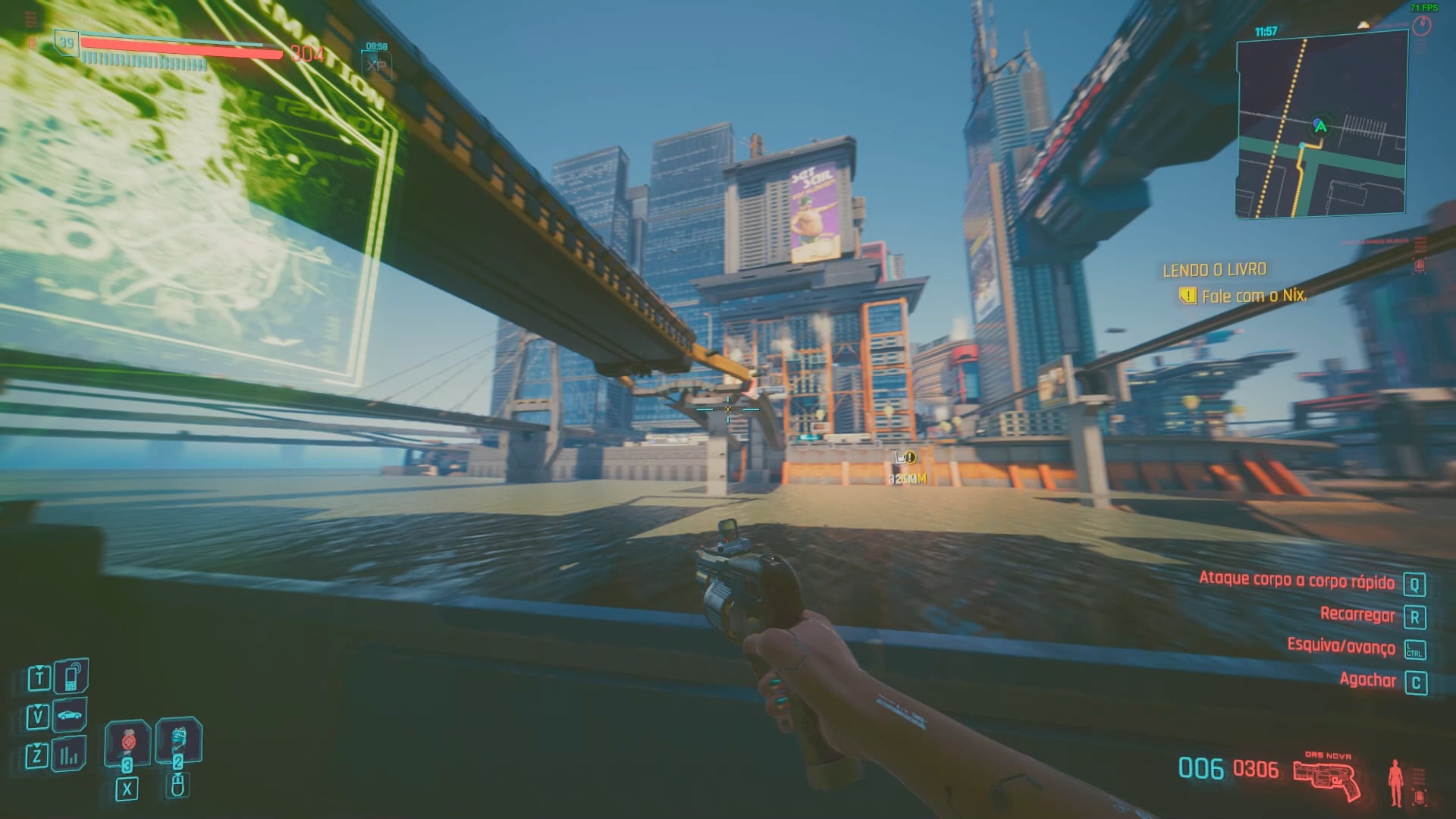
Stop playing with a fish eye lense before your eyes. Looks terrible and does cause glitches as you see.
Cyboogie4816
lol yeah decrease FOV just eliminated this issue, its a bit claustrophobic but better than seeing this
Sexddafender
Once I clipped through the bridge in the gig Dirty Biz and skipped sneaking past the Maelstrom,then burned daddy and son for my troubles
Cool-Camp-6978
I thought that was a PS4 exclusive feature.
PotatoGodJames
That’s a new one to me, and I have mine set to max FOV
vlad_kushner
Slk bicho, q FOV é esse???
starfruit_enjoyer
the game isn’t meant to have an fov that wide. that’s why you don’t set fov that wide. fovs are tyically limited as a way of maintaining performance by reducing the amount of shit the game has to render. when you increase fov beyond normal limits you either see dramatically reduced performance as the game now has to render twice as much as normal, or you see all the culled things that are normally hidden off camera, like that.

15 Comments
Game lod breaks above 103 FOV
Maybe reduce fov a bit, like to 90?
Yeah sometimes. But it’s a game and it doesn’t effect anything for me so meh
Can you please increase the FOV?
I reported this bug, it’s world cells loading incorrectly. This was months ago… While 2.0 was still coming out. Another thing that’s broken is that if the AI hurts itself, they assume it’s you and enter alert status by themselves. Given some areas in the game have broken pathfinding, you can’t stealth properly certain challenges in the game.
They don’t really care, support was making me jump through all sorts of hoops to test the game for them, even though I supplied them the save files, as they requested.
I’ve never seen any of this, no.
You playing it off a hard drive? lol
I downloaded a “draw distance increase” mod and it did this.
Considering I run GTX 1650 I don’t raise FOV to the point it would xD
Stop playing with a fish eye lense before your eyes. Looks terrible and does cause glitches as you see.
lol yeah decrease FOV just eliminated this issue, its a bit claustrophobic but better than seeing this
Once I clipped through the bridge in the gig Dirty Biz and skipped sneaking past the Maelstrom,then burned daddy and son for my troubles
I thought that was a PS4 exclusive feature.
That’s a new one to me, and I have mine set to max FOV
Slk bicho, q FOV é esse???
the game isn’t meant to have an fov that wide. that’s why you don’t set fov that wide. fovs are tyically limited as a way of maintaining performance by reducing the amount of shit the game has to render. when you increase fov beyond normal limits you either see dramatically reduced performance as the game now has to render twice as much as normal, or you see all the culled things that are normally hidden off camera, like that.