
Unusual temps after gaming
Hello all!
MY QUESTION: Is there anything out of wack with my temps, clock speed, voltage etc? I see my undervolt at min, but it doesn’t show it at max. More data below.
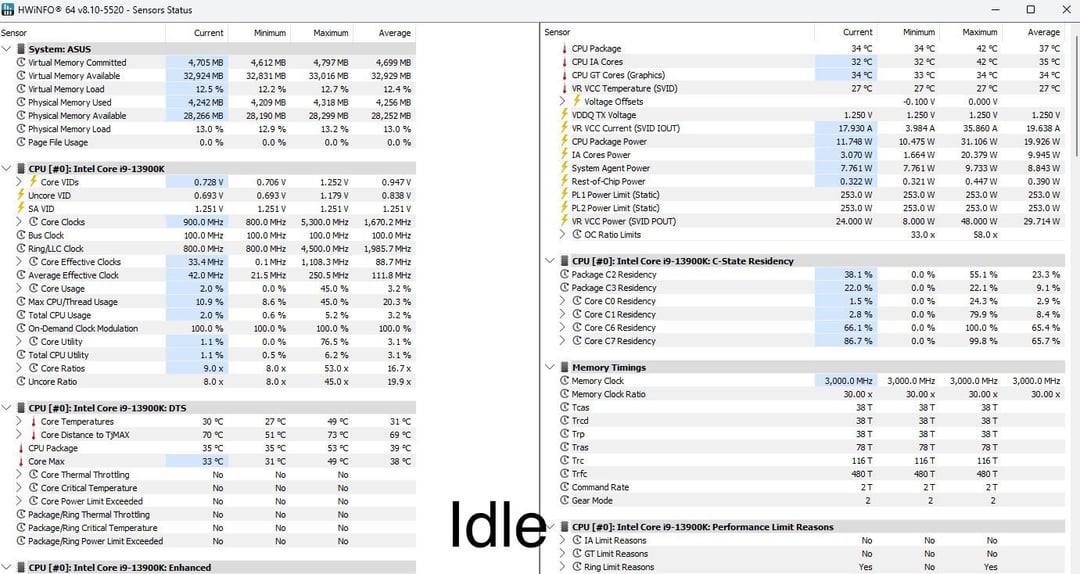
I posted a few days ago, but I was going off of limited data. I downloaded HWinfo and took screenshots when completely idle, during gaming (FIFA) and after.
At idle my temps are in the low 30’s. During gaming after 20 mts it looked like it went up to 68c, but after I got out of game and shut everything down related to the game the temps were mid 40’s to 50’s. This seems to be a consistent pattern where even if load is 0%, my temp is still 10-15 higher than it was initially.
I had some errors, so I did a complete factory usb install of windows and wiped everything, cleaned my case, and replaced my thermal paste.
I totally understand these are good temps, but with fifa being the only program running and a low load, my temps playing something intensive would be through the roof.
- CPU: Intel(R) Core™ Processor i9-13900K
- CPU Cooler: Phanteks Glacier One 360MP D-RGB 360mm AIO
- HDD: 1TB WD BLACK SN850X (PCIe Gen4) NVMe M.2 SSD
- RAM: 32GB (16GBx2) DDR5/6000MHz Dual Channel Memory (Team T-Delta RGB)
- ASUS PRIME Z790-P WIFI D5 DDR5 ATX w/ Wi-Fi
- POWERSUPPLY: 1,000 Watts – Corsair RMe Series RM1000e 80 PLUS Gold Fully Modular
- GPU: MSI GeForce RTX™ 4080 SUPRIM 16GB GDDR6
I've updated to the 0x129 microcode and am using the latest 1663 BIOS. Below are the changes I've made so far in BIOS:
- Performance Preferences: Intel Default Settings
- AI Overclock Tuner: XMP1
- Intel(R) Adaptive Boost Technology: Disabled
- ASUS MultiCore Enhancement: Disabled – Enforce All Limits
- SVID Behavior: Typical Scenario
- Performance Core Ratio: Sync All Cores
- All-Core Ratio Limit: 53
- CPU Load-Line Calibration: Auto
- Current CPU Load-line Calibration: Level 3
- Synch ACDC Loadline with VRM Loadline: Disabled
- Unlimited ICCMAX: Auto
- CPU Core/Cache Current Limit Max: 400
- Long Duration Package Power Limit: 253
- Short Duration Package Power Limit: 253
- IA CEP & SEP: Enabled
- IA TDC Current Limit: Intel's Default
- Undervolt Protection: Enabled
- Global Core SVID Voltage: Adaptive Mode
- .1000
- Intel (VMX) Virtualization Technology: Disabled
5 Comments
How long did you wait after recording the “after gaming” results? Simple thermodynamics seems to point towards heatsoak on your cooler causing temps to slightly rise after a gaming load. This is completely normal for anything that is related to heatsinks/radiators. The rate of dissipation for a cooler is not fast enough that it can drop back to equilibrium(before gaming) in a matter of seconds. Usually takes some time for CPU package to return fully to equilibrium.
What Yabuko is saying is right, what are your ambient temperatures like? A 13900K with a 360 AIO should be more in the 30c range idle
If your fan speed control is based on CPU temperature, and not the coolant temperature, then this is to be expected.
The coolant in your AIO has heat soaked, but once you end the load, the CPU temperature drops enough for the pump and fans to slow right down.
So now you have warm coolant in your AIO, and it’s only cooling down very very slowly.
So instead of you CPU at idle having nice cold coolant chilling it, it’s got warm coolant doing not a lot.
I’d try adjusting the fan speed curve.
Look at your package power from idle to after gaming. It’s higher. I sit idle at 35 C and 12-17w of package power, right where you are. If I watch a youtube video or actively browse the web, it jumps towards 20+ and I get temps closer to 40.
Need more radiators to get rid of heat soak. These are normal.
Also fifa seems to be known to eat cpu usage. Not well optimized so it’s a fairly heavy cpu task.