
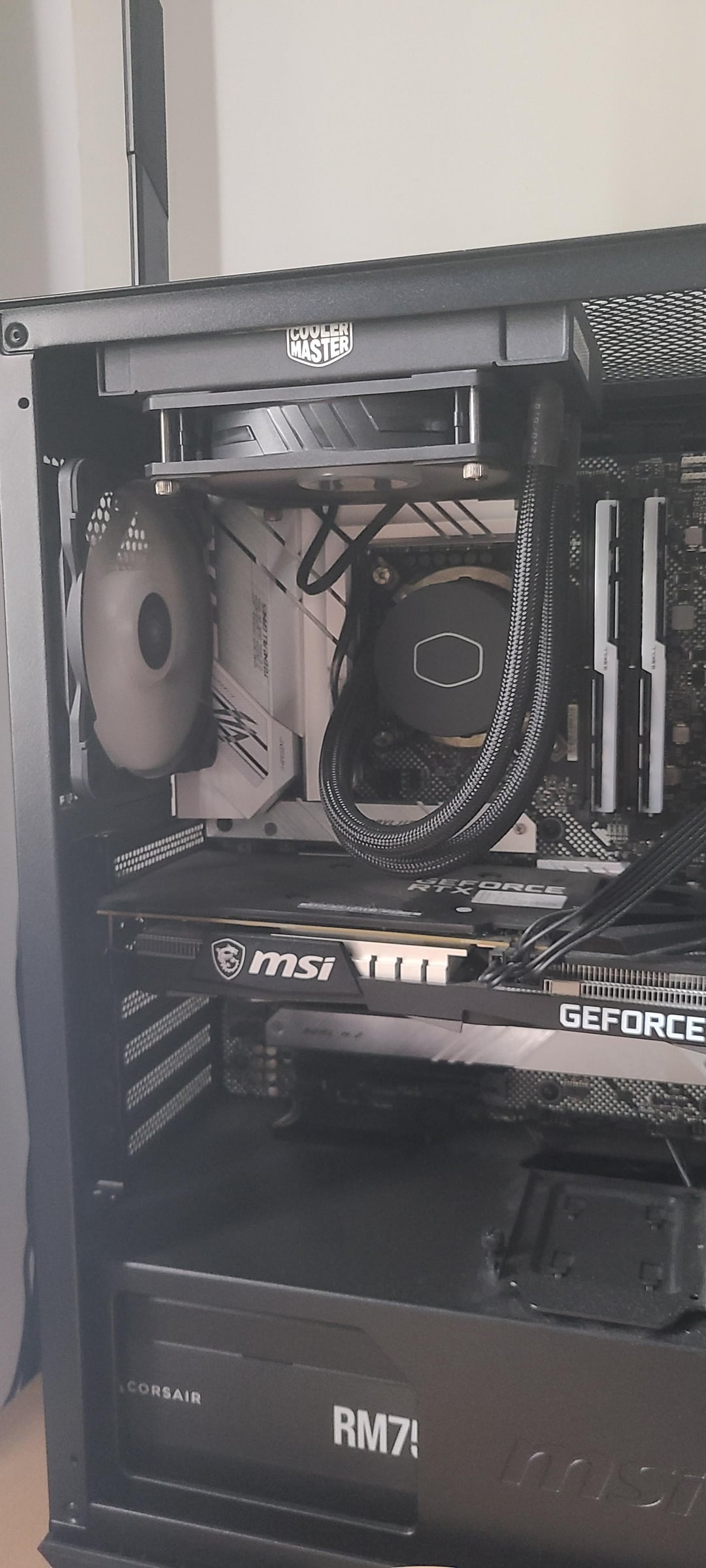
Had my PC for about a year now and seems like whenever I'm playing any games remotely intensive on CPU like Mount and Blade: Bannerlords or even Dead Island 2, CPU temp rockets to about 90-100°C.
Worthwhile to note I live in a place where it's usually 30+ degrees Celsius.
Weird thing is that my GPU temp is always around 60, never even stressed.
Any advice or help greatly appreciated.
Specs:
Intel i7-11700K CPU
Asus B560-A motherboard
Cooler Master ML120LV2 Cooler
MPG Gungnir case
5 X built in ARGB fans
28 Comments
Assuming the cooler is installed correctly with decent thermal paste, it’s probably because it’s only a 120mm radiator, which typically perform worse than a basic air cooler.
120mm aio is terrible, cheap air cooler is way better
120mm aio there’s your problem
Your AIO cant handle that, get an air cooler or a 240mm AIO.
bruh.
cooling an I7 with a 120mm AIO…
it’s usually 240mm AIO, if not 360.
those 120mm AIO are good for non-overclock processors and those that got 65w power draw(theoretically, IMO.).
Did you remove the sticker?
120mm AIOs are worthless. A $40 air cooler would outperform that
[You’re welcome](https://www.amazon.com/Thermalright-Peerless-Assassin-120-Cooler/dp/B0C5MBLHD2)
Did you remove he plastic peel?
Buy a good be quiet air cooler. Can handle every cpu
AIO could be a Problem … I would switch to Air Coolers Dual Fan Thermalright EVO 120 or Dark 4 Assassin or Noctua D15
If those are standard fans they both exhaust air from the case, right? Try AIO fan as intake or back fan as intake.
That might help a little. But in a hot area a 120 AIO is just not enough for that CPU, I guess.
That cooler is the problem.
120mm aio is a bit of an issue, 240 or 360mm aio or a high quality air cooler (Deepcool AK620/Thermalright Phantom Spirit 120 EVO)
Do you remove the plastic peel. If so then it’s just bc 120 aios are shit
I would make sure the sticker was removed on the cooler’s cold-plate, and that the pump speed is set to max in the BIOS. I’ve seen people often leave the BIOS at default so tje pump will run all over the place. I’ve always been a proponent of setting a fixed speed.
120mm aio are e-waste
Don’t wanna parrot but you need a better cooler, it’s as simple as that.
Your pump could be hooked up to the wrong header, or there is a bios option you forgot to enable that tells the mobo that a water pump is connected to that header. I made this mistake more than once.
Everyone is saying that it’s the 120 AIO. But, I have one for my r5 5600x. The temps are minimum 35, in casual use it’s in the 40s and in max usage, it’s 80-85 max. Am I using it right? Serious question.
I didn’t get a better fan cooler is cuz my case can’t handle a better fan cooler. Didn’t know that about the case back when I bought it but I’m satisfied with my temps. Are they fine though?
That CoolerMaster is rated for 180W, the 11700K has a TDP of 125W, it should be able to handle it, even if not performing in a stellar way. I love how everyone is parroting the same “120mm AIO are TRASH!” sentence, but almost nobody asks questions.
Let’s go in order:
1. You have this PC for a year, was it **ALWAYS** running this hot or is it a **NEW THING**?
2. Have you removed/reinstalled the cooler recently?
Now, before you go out and spend money on a different cooler (which is not “wasted”, but maybe also not needed depending of the fact the issue can be solved), the approach will depend on the fact the issue is new or has been happening since the beginning.
**TROUBLESHOOTING STEPS – NEW ISSUE EMERGING AFTER 1 YEAR USE**
1. Make sure the pump is running and spinning at the expect RPMs; It should probably be going in the 1800-2500rpm range (it can vary between coolers, but that should be a solid guess)
2. Make sure the fan is spinning at a suitable speed under load; with these temperatures, it should be going full blast in the 1500-2000rpm range, depending on fan characteristics
3. Remove the fan from the radiator and make sure the radiator is not completely clogged up with dust. Even if your environment is not too dusty, the radiator fins get very dusty very easily, and if you only have a small surface, like in the case of a 120mm radiator, that gets things hot very fast
**TROUBLESHOOTING STEPS – ALWAYS BEEN THIS HOT**
1. Make sure the pump is plugged in onto the correct header; Some motherboards have a “CPU_PUMP” header; if your doesn’t have it, it should go on the “CPU_FAN” one
2. Make sure you don’t have some BIOS settings or some other program that slows down/disables the CPU Pump or Fan; as a general rule, it’s a good idea to keep pumps running “constantly on medium”, as opposed to fans that slow down/ramp up with the temperature;
3. Remove the pump/hotplate from the CPU and check that there are not extraneous bodies in there – a classic example is the “remove me” protective peel that is on cooler hotplates
4. Once you have the pump removed from the CPU, verify that there is some form of thermal compound, clean everything with alcohol (the cleaning variety, not the drinking one :D), apply some thermal paste, remount everything and make sure the cooler is screwed down very tightly (if you’re unfamiliar with the procedure it will feel like you are breaking something, don’t worry – it needs to be TIGHT. Just tighten the screws down in a diagonal order, like “top left-bottom right-bottom left-top right” in STEPS.
Let us know how you get on – your cooler is not the best of the best, but it’s not the case that it should be unable to handle a standard core i7 of the 11th gen, unless you’re running some dramatic overclock.
Did you remove the sticker on the AIO coldplate? Also get rid of that 120 and get a Phantom Spirit air cooler
Get either a bigger aio or just a basic air cooler
120mm aio’s and any aio’s for tha matter, can accumulate brown crusty bits inside the loop that end up blocking the cooling fins(heatsink has tiny metal strips on the inside part of the loop that water passes through and picks up the heat). If your cpu aio fan is spinning very loudly and it seems like its always in a hurry to cool the damn thing down, this might be the case. Simple aios are made to last for like couple of years only under warranty anyway.
Warning not adviced: If you feel spicy, you can open the aio device(all in one) and flush out these brown crusty bits and make the water run easily again inside the loop. I have done this twice now for my aio that came with nzxt h1 case 4 hears ago, and it seems to run like brand new after the most recent clearing. However, it is really not recommended by manufacturers to open aio pumps and the whole process might not even be worth it, as basic aircoolers with same capabilities are kinda cheap.
what are the odds you did it “100% correctly” except forgot to take the plastic off the cooler face
Pretty weak cooler
1. Intel cpu, 2. 120mm aio is a joke and exists solely for aesthetic purposes
Have you peeled the plastic off the bottom of your cooler? Just askin