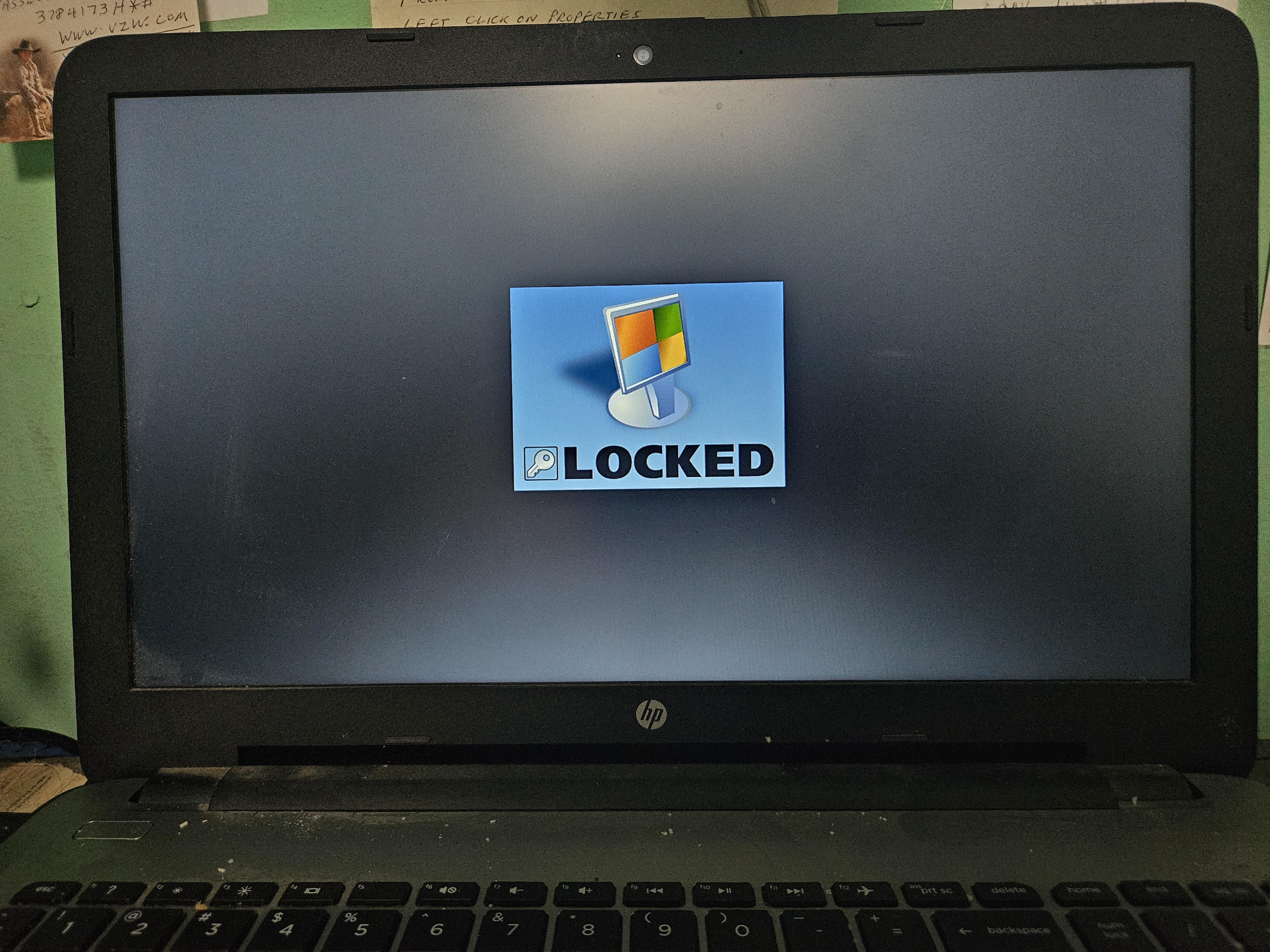
Anyone know what program this is or how to bypass? My elderly father got tricked by scammers. I'm going to be fully reformatting the HD, but it would be nice to be able to save a copy his documents and pictures first.

Anyone know what program this is or how to bypass? My elderly father got tricked by scammers. I'm going to be fully reformatting the HD, but it would be nice to be able to save a copy his documents and pictures first.
33 Comments
That depends, is it just a full screen program that runs on startup, or is it a ransomware program that encrypts the hard drive?
If it’s the latter, the photos and documents are gone without paying the ransom, and even then, they may just take the money and run without giving the decryption key.
If it’s just a full screen program that runs on startup; ctrl+alt+del; task manger; kill the process; remove it form startup in the startup tab; run a full scan with MalwareBytes.
Gotta reinstall Windows. I had this on a clients PC, I couldn’t even used hirens to unlock. And creating a new account locks that aswell.
Once an adversary has control, you need to wipe and restore from backups. If there are no backups, go to an expert to have then try to do data recovery, and then wipe and restore cleaned recovered data.
Boot into a live environment (Hirens bootstick is a lifesaver) and see if you can access the files from there.
If they are encrypted you can’t do anything without the proper decryption key but format the drive and start fresh.
You could try to obtain the key from [here](https://www.nomoreransom.org/crypto-sheriff.php?lang=en) by uploading a file and hoping it’s a known strain.
Recently ran into something like this.
Restart the pc and try to boot the BIOS. Usually del button or F1 when the computer is starting up.
Once in the bios you turn off virtualization. Maybe that will solve it.
Worked on an old windows vista laptop from an elder neighbor of mine who said she couldn’t get into her computer. They must have been running some sort of start up program that would take control of full screen and displayed a bunch of error messages but ctrl+alt+delete wouldn’t work for some reason. Did the above and disabled virtualization and on the next restart it went straight to her Home Screen with all her old docs and pics.
My guess is that the attack opens a virtual desktop like a Linux kernel or something like that to disable the ctrl+alt+delete from closing the instance. Not too sure what disabling virtualization in the bios had to do with this but guessing it has something to do with creating virtual environments, basically the OS within an OS. Maybe turning that off disabled the attacks ability to open up another kernel.
That’s my speculation but idk let me know if that works for you
Normally I would mount the HD onto another PC, and back up from there, if it’s not encrypted.
Can you boot in a linux LIVE USB stick to see if the disk is encrypted? If not, recover the needed files using another USB stick (live USB is not persistent unless you programm it to be). 😀
You can try to dual boot linux, see if the files are encrypted. Otherwise you can just copy/paste them.
2 options. Safe more. Or try and access the hdd from a separate boot drive. Like windows installed on an external hdd. I wouldn’t recommend plugging it into another pc unless you don’t care about what’s on it.
I would take out the hard drive plug it into my pc and the extract the important stuff on it and the reinstall windows on the hard drive (then obviously put important stuff back in)
I hope the safemode uninstall works. I feel bad for your elderly pops. Doing his best to keep up with new tech and assholes have to come and try to fork him over.
Bisacly go into safe mode and download auto runs and disable from there the virus, but domt actully disable shit needed to use laptop
Start pc in safe mode with internetconnection an run “tronscrip” its opensource virus removel/ pc repair script that goes thru all the virus programs automatically. Communith project, really a wonderfull tool.
I’m with the ones recommending to wipe everything out. As i would never trust to type a password or place sensitive info there never again until everything is fresh and clean.
Once I go scam-ck I do noteturn back.
Better forget about those pictures or games and install all new
There is a thingy called “windows admin hack iso” or something. You boot from cd, reset password and voila
boot into safemode and uninstall the program and registry keys associated with it
Wipe the infected HD, do not connect it to another computer to transfer files as you run the risk of cross infecting the other computer.
Use a Linux Live USB, (I recommend Kubuntu or Linux Mint, very easy to use) copy your files, and format it in Linux as well.
I’m pretty sure this is a program called “lock my pc” that’s used a lot by scammers, so much that’s the company behind the program made a bypass for it.
https://fspro.net/lock-pc/
That’s their website. It’s going to ask for a code that the lock will give you, and the website will give you admin unlock code for the program.
Hopefully this works.
You can try booting into a linux key and recovering the files, but that would only work if the drive isn’t encrypted. If they encrypted the drive, I’m afraid all is lost.
For people saying the files are encrypted, they’re not. It’s simply a program that replaces explorer and locks out any key commands to exit it.
OP, try this: [**https://www.youtube.com/watch?v=LcKvhVdGfGE**](https://www.youtube.com/watch?v=LcKvhVdGfGE)
Knoppix should work but the guy used [http://jodybruchon.com/downloads/tss-cre-2.0.3d.iso](http://jodybruchon.com/downloads/tss-cre-2.0.3d.iso)
Best to wipe it and start over
Do I see correctly the camera light is on, next to the lens?
Boot from Linux on a stick, save the files, if they weren’t encrypted, then format the hard drive and install windows.
Alright, there has been good and bad advice here, but generally speaking, safe mode *should* prevent this application from launching. Assuming it does, uninstall it, reboot to your normal OS, and perform malware scans with something like Malwarebytes just to make sure they didn’t leave anything else nasty on there. Odds are there isn’t.
Typically these are scammers attempting to extort money from the end user to access their files. Working in PC repair in an area with a lot of retirees, this is incredibly common. We have flash drives which we boot to so we can remove these system lockers, but Safe Mode also usually works. Might also be worth grabbing Revo Uninstaller and removing anything else out of place like PDF software that isn’t Adobe, Driver Updater software, Wave Browser, Clear, One Launch, etc. I often find a lot of these alongside system lockers like this.
Run a live linux distro from a USB drive, mount the internal storage and if it’s not encrypted, you can just copy whatever you want from it.
Hi try this https://youtu.be/r9Wezti9TUU?feature=shared
Format and reinstall windows probably the best bet. That way you wipe any trace of the virus.
EDIT – Also try making a live linux usb from another pc so you can boot into that to recover the files on the hard drive
Try this password “unlocked” sometime it works.
I installed Linux on my mom’s computer so she can’t install any speed up programs or anything like that. Computer works great when I go there and I’m pretty sure it stays on for months at a Time
I would recommend getting him to change his banking passwords. No guessing what they had access to if they were able to do this.
How you tried entering Fail-save mode? I had really similar thing and it did not started up when I have had entered pc in that mode.
[Try this](https://fspro.net/lock-pc/passrec1/)