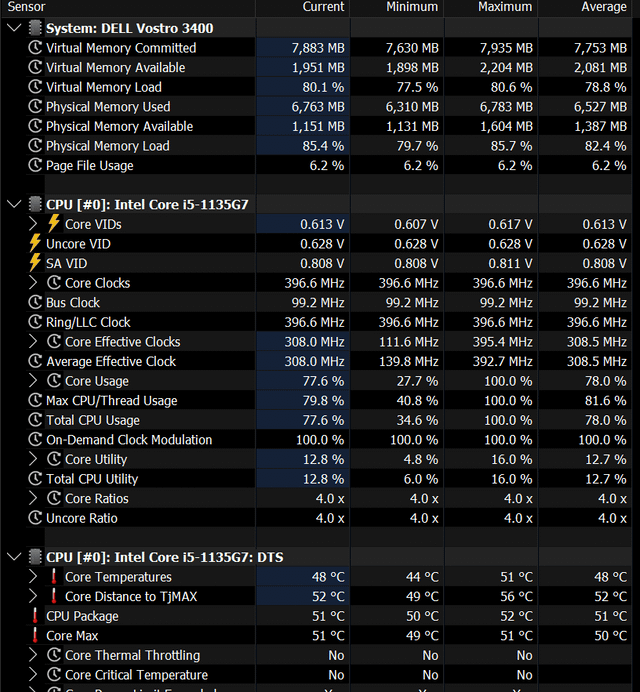
I’ve visited almost all Google searches already pertaining to this problem and did all the suggested steps, but still my CPU is stuck at .39 GHZ.
That’s why I’m posting this myself now, and hopefully, anyone can help me.
I’ve attached my HWFiNFO if that helps.
I own a Dell Vostro 14 3000 laptop, Windows 11, i5 11th generation.
My laptop never overheated, technically all hardware is working. I think I don’t have a throttling problem as well.
_redditadmin_
Don’t listen to other user telling about effective clock, they don’t know anything. I’ve had this problem for years on two of my work laptops on U series Intel processors. It’s some issue with the power scheduler where after waking up from sleep, the processor doesn’t change its power state and only options that worked for me was to either plug in and unplug laptop multiple times for the power profile change to kick in, or reboot while plugged in. It’s a known issue, just searching “Processor stuck on 0.39Ghz” on Google would show you ample results. The problem solved now when I upgraded to a K series processor now on the laptop, haven’t had this problem in last one year on this processor.

2 Comments
I’ve visited almost all Google searches already pertaining to this problem and did all the suggested steps, but still my CPU is stuck at .39 GHZ.
That’s why I’m posting this myself now, and hopefully, anyone can help me.
I’ve attached my HWFiNFO if that helps.
I own a Dell Vostro 14 3000 laptop, Windows 11, i5 11th generation.
My laptop never overheated, technically all hardware is working. I think I don’t have a throttling problem as well.
Don’t listen to other user telling about effective clock, they don’t know anything. I’ve had this problem for years on two of my work laptops on U series Intel processors. It’s some issue with the power scheduler where after waking up from sleep, the processor doesn’t change its power state and only options that worked for me was to either plug in and unplug laptop multiple times for the power profile change to kick in, or reboot while plugged in. It’s a known issue, just searching “Processor stuck on 0.39Ghz” on Google would show you ample results. The problem solved now when I upgraded to a K series processor now on the laptop, haven’t had this problem in last one year on this processor.