Did you clear CMOS and set bios to Intel default settings? If you did all that and it still behaves weird, you should probably RMA the CPU and/or motherboard.
Cute-Plantain2865
GG welcome to 1.72v out of the box. Imagine buying an enthusiast chip and expecting it to work out of the box, go rma. Even if it still works you already shot the thing and it’s bleeding. You can reboot and monitor your vids but I have seen this exact shit over and over. Let me guess about 90 days? If that seems right check if you have intel fail safe on in your auto tune bios.
If that setting is enabled you are 100% gg that shit degraded. No coming back. If this is actually your first few crashes you might be okay if you set all core sync. You won’t get that single core boost nonsense and a working cpu.
sp00n82
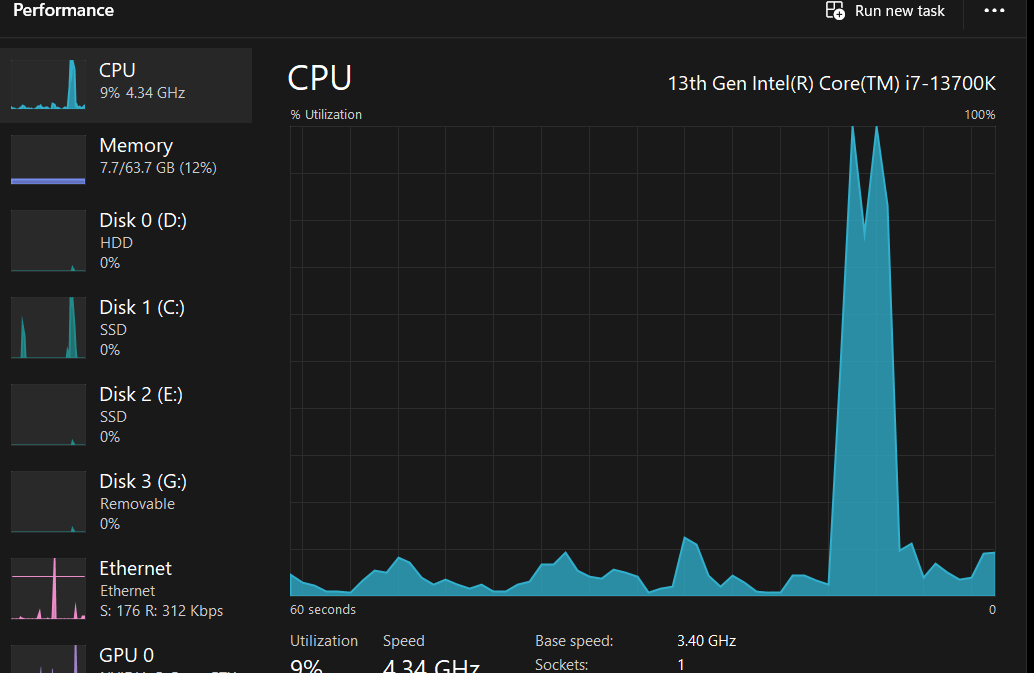
And which process actually causes the CPU spikes?
Mysterious_Lion_7639
It seems like your your CPU is processing something read from your SSD – your SSD spiked to 100% at the same time of your CPU

5 Comments
Just RMA that shit if possible.
Did you clear CMOS and set bios to Intel default settings? If you did all that and it still behaves weird, you should probably RMA the CPU and/or motherboard.
GG welcome to 1.72v out of the box. Imagine buying an enthusiast chip and expecting it to work out of the box, go rma. Even if it still works you already shot the thing and it’s bleeding. You can reboot and monitor your vids but I have seen this exact shit over and over. Let me guess about 90 days? If that seems right check if you have intel fail safe on in your auto tune bios.
If that setting is enabled you are 100% gg that shit degraded. No coming back. If this is actually your first few crashes you might be okay if you set all core sync. You won’t get that single core boost nonsense and a working cpu.
And which process actually causes the CPU spikes?
It seems like your your CPU is processing something read from your SSD – your SSD spiked to 100% at the same time of your CPU