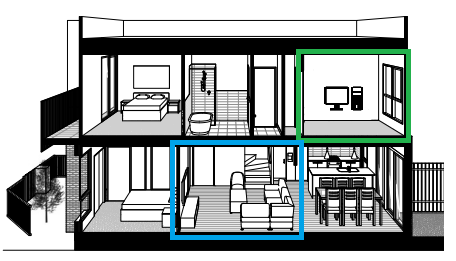
Best way to play Steam Games from office (upstairs) to living room (downstairs)? More description in comments. TYIA

Best way to play Steam Games from office (upstairs) to living room (downstairs)? More description in comments. TYIA
31 Comments
Looking to play Steam games in my living room downstairs more.
The options I’ve seen to be able to do this consist of either one of the following:
* Connect any windows device (regardless of performance, like a 15+ year old dell optiplex) and use remote steam play/steamlink
* Nvidia Shield Pro downstairs
* Build new rig just for downstairs
Some of the things I would want to be able to do from the living room include playing couch multiplayer games (so needing 2-4 controllers to work), and potentially be able to play in 1440p resolution or greater (assuming my upstairs rig is setup for it).
The PC upstairs and the TV downstairs both are connected to ethernet and not reliant on WiFi.
What would be the best way to achieve this and which methods should I consider first for best experience? Are there any methods not listed above that could work as well?
Thanks All!
(Also, this is not my exact floorplan, just a render I found that closely resembles what I want to achieve). 🙂
try nvidia geforce or steam remote play
Currently using a similar setup. I primarily use Linux for most of my daily computing tasks aside from gaming. I have a dedicated rig that I keep in an office upstairs that I no longer spend much time in so downstairs I have a little alcove setup with and ultra wide and an optilex using Moonlight. On the windows machine I have the sunshine server that essentially allows me remote desktop access that has reasonably low latency to play a majority of my games. I play things like star citizen which won’t let me use something like a VM to play in case your wondering why I have a dedicated machine. The setup is relatively easy most of it is done on the machine you want to connect to. I have had pretty good success with it. Tested it out on a crappy WiFi at work just to see if I could connect and worked almost flawless with my wireguard tunnel.
The thing that moonlught and sinshine are similar to is something like Parsec. I have also used that service and it works just as well. Just like something a little more self hostedesc if that makes sense. Hope this kind of gives you ideas.
Sunshine/Moonlight (and tailscale if you want to stream out of lan too.)
What about just drilling a diagonal hole in the place where green and blue boxes touch
2 computers
if you cant afford 2 gaming systems u can have a cheaper system in living room and use steam streaming to stream to cheaper pc .
Steam deck with a dock may be cheaper than a new rig.
Valve used to have this fun device that would link to your WiFi and steam account would remote play your pc on another monitor or tv. I can’t remember what it was called, came out at the same time as the steam controller though. It worked pretty well. Maybe you could find one of those used somewhere.
I stream from my PC to tv
My main rig is on my garage other side of the yard. Streaming games to my Legion go, which is in my livingroom connected to TV. Using moonlight/sunshine. Latency is very small
I would go for a Steam deck with Moonlight/Sunshine set and one of these cables for the TV so that you can still use it as a controller, and you’d get the ability to play 3DS and WiiU games with the dual screen setup as a bonus
https://preview.redd.it/qzzgdr0auhmd1.png?width=1008&format=pjpg&auto=webp&s=15b281966b2241211c09d20f74e4f33737487f02
Yall remember the steam link? The little black box? I still have one and it works fine for stuff like this.
I just run a 25ft hdmi lol i also have a 50ft for the projector outside
Steamlink. Available on everything, personally use a appletv
Did all the commenters in this thread have a seizure after reading OPs question?
Sunshine on Host PC, Moonlight on whatever Client you want to stream to. I use the same setup for in home game streaming *( seamless, can’t tell the difference compared to playing natively on my PC )* as well as self-hosted WLAN based streaming and it works flawlessly once you get everything configured to what works best for your hardware and robustness of your network.
Your best bet if you can’t run a direct cable connection to the router from your PC is to look into Gigabit capable Powerline Adapters *( ~$50 nowadays )*. You can technically use WiFi on the Host but it’ll be a pretty inconsistent experience if you’re not running at the very least a really solid WiFi 6 network with very little interference.
I recently bought a white fiber optic HDMI cable off Amazon, ran it around baseboards neat and tight with 3M clips and it works great. 4k 120hz HDR on the LG 65″ OLED.
any old micro office pc with at least a 7th or 8th gen intel cpu would be fine as the client. I mention old office pcs with intel chips because they are really cheap atm and they will perform better than any androidbox or like a pii 5. Just make sure it has duel channel ram and not just the stock 8 gig stick. After you got your client pc, set up a program called sunshine on your host pc and moonlight on the client pc.
The best experience would be having another rig. I have my gaming laptop to my TV when I’m in big chill controller mode. I tried streaming some games through steam just to try, and i feel like the quality wasn’t quite there with my TV being 4k.
realllly long USB hub and realllly long HDMI cable
Really long hdmi cable, really long usbc cable and an Xbox remote. Yes, steam link is a thing, but long cables will make things faster.
people talking a lot about steam link but not explaining it so in depth. Steam link is a device that streams your PC over the home network. It can function over Wi-Fi, but works best when one or both of your devices (the PC and the steam link – TV is not necessary) are wired into the router. I run my steam link fully on the WiFi and it has the odd visual artifact, and I have to connect my input directly to the PC otherwise it lags noticeably.
the steam link is discontinued, but valve still gives it software updates to let it function with new equipment – it even has a phone app.
You will have to buy one 3rd party, valve dumped their remaining product stock over 5 years ago
I had a similar setup as far as rooms go. I ran Ethernet, audio, HDMI, and USB through the wall/ceiling, ending at wall plates. Ran HDMI/Ethernet/USB from PC to wall, and from wall to TV and keyboard/mouse downstairs. Worked great, totally lag-free, and only took like an hour to run everything and get it all connected.
An Apple TV, Google TV Chromecast, and a lot of smart TVs have steam remote play and moonlight. If the network isn’t strong consider MOCA connectors
An Apple TV, Google TV Chromecast, and a lot of smart TVs have steam remote play and moonlight. If the network isn’t strong consider MOCA connectors
My recommendation is a HDMI cable, it’ll have to be an Optical HDMI 2.1 cable (if you want 4k 120Hz in the future). It’ll set you back about $100-150 (AUD for me). You’ll want to measure everything to even see if you can do it.
Avoid joists and use stud finders to make sure you’re not hitting anything. Measure as precise as possible and don’t guess, ensuring you measure corners too as if you’re just slightly over 15m you’ll screw yourself.
I can’t recommend Steam Link as although it’s good enough for 1080p 60Hz anything above that and your bandwidth requirements start to sky-rocket.
As for controllers for couch co-op with more controllers well that’s just the same route as the HDMI cable but USB doesn’t have nearly the same length restrictions as HDMI.
ethernet. nothing beats ethernet and its not rocket surgery to run a cable through your walls.
Easiest way would be to have a smart TV, basically any android OS, that has the steam link app in its app store already. That’s the only kind of TV I’m going to buy from now on myself. Fuck Samsung for removing their steam link app.
Otherwise, as mentioned. You should try a second computer with an ethernet connection to your network set up at the TV for streaming via steam remote play.
There’s an app on most smart TVs to allow in house streaming of Steam. Works for me, get a BT controller and connect it to your TV and bam sorted. You may want to get a less latency inducing network like a Ethernet over Power of Ethernet of Coax.

I have a similar setup. I used a 50ft fiber optic hdmi 2.1 since I wanted to do 4k120 and ethernet cable with a usb hub. They are like $60 on Amazon and you just need a normal ethernet cable. Mine has 4 usbs on the end. So I have mouse, keyboard, and Bluetooth dongle connected.
If you have an Apple TV and a Bluetooth controller, then you don’t need to do anything.
There’s a program you can run on the Apple TV and then you can just play your gaming rig on your Apple TV.
I use a PS4 controller