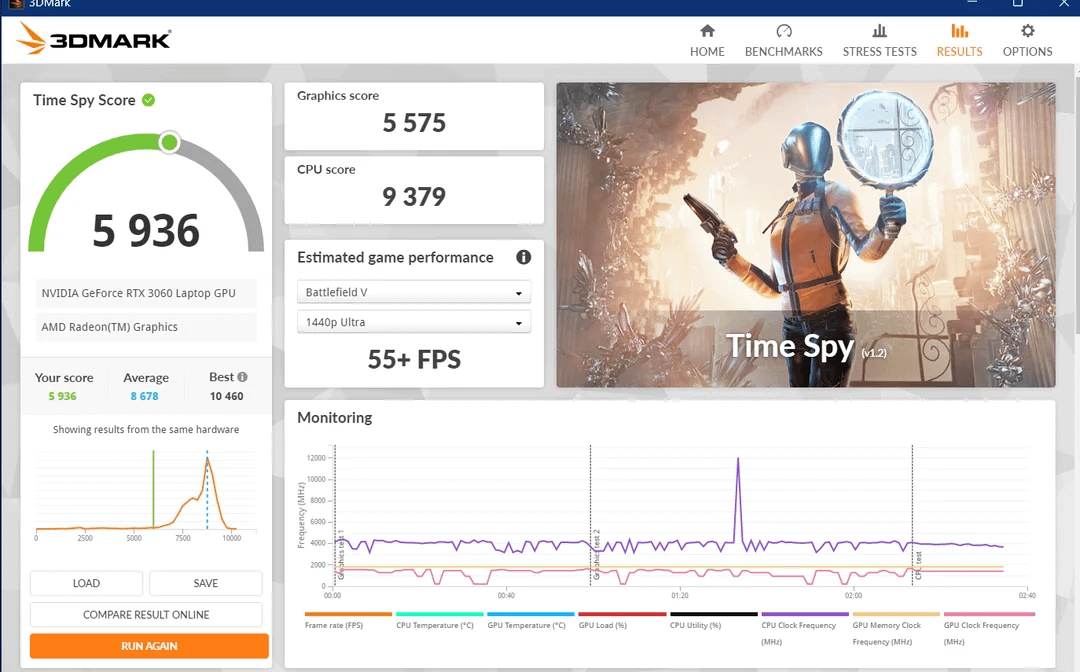
My RTX 3060 Laptop 3DMark score is 50% of the average. What could be the problem? Additional details in comment. Pls help

My RTX 3060 Laptop 3DMark score is 50% of the average. What could be the problem? Additional details in comment. Pls help
6 Comments
Some details:
– Laptop: ASUS TUF Gaming A15 FA506QM (2021). R7 5800H, RTX 3060 90W 1630MHz, 32GB RAM (2×16) 3200MHz, SSD Samsung 970 Evo Plus.
– Windows 11 Pro – Version 10.0.22631 Build 22631 (latest)
– Nvidia driver: 560.94 (latest)
As you can see, my score is only about 50% of the average. That is the result after I tried:
– Core Isolation off
– Tried reinstall driver with Nvidia Cleaner tool
– No overclock or undervolt
– Reinstall Windows
– No other tasks or apps running
– No overclock or undervolt
– All dirt inside cleaned
During the benchmark, the GPU reached 75-80W+ with temperature around 75-80C (176F) and CPU reached 90C (194F). However I don’t think the CPU was bottlenecking, because the CPU score above is higher than the average score. Just the GPU score is only 50% of the average. I noticed that the GPU clock jumped and dropped with lowest 210Mhz and highest 1600Mhz+, but I cannot find the root cause.
What could be the problem here? Any help is appreaciated.
Additionally, here’s the comparision of 3DMark between mine and 2 random runs I pick at the average: https://www.3dmark.com/compare/spy/49960148/spy/39953053/spy/45670447#. I am the left.
Have you set a fps cap?
Laptop
Not sure how much I can help, but I can provide some things I’ve learned along the way.
– For one, I believe there is a standard for the maximum temperature the surfaces of a laptop can be. In some cases, especially with my work laptop, the CPU or GPU will throttle long before it reaches the actual TjMAX, because the surface is too hot. When I started cooling the surface, I noticed the CPU and GPU temperatures went *up.* That was what motivated me to look into this. They were running at higher power and getting closer to TjMAX because the surface was cooler.
Not sure how that works, because I haven’t seen any thermistors on laptop chasses. But perhaps they use board temperature.
– Another is that power management can be a substantial restriction on laptops. I had a laptop once that identified the *OEM* power supply as being “insufficient power”, and the CPU would max out at like 15% of its full power. Getting a third-party power supply unlocked the full performance.
– Performance profiles can be an issue, too. I assume you verified you were in performance mode, and I don’t picture the CPU and GPU reaching 80-90C if they are power restricted.
– One I have seen before, though not specifically on a GPU, is a grounding issue, where you get ground loop noise which can give the internal power management the impression that the power supply can’t keep up. I could picture it dropping the clocks way down like you say.
A few other things you can check:
– Check that bios is updated.
– If you have something like HWMonitor or HWInfo, there should be a section of GPU flags. Run the test in windowed mode, and check these flags while it is running. There should be flags like “V Limit” or “TDP Limit” or “Therm Limit”. If these start turning on, that can often tell you very quickly what the source of the down-clocking is coming from.
What is your power management profile set to?