
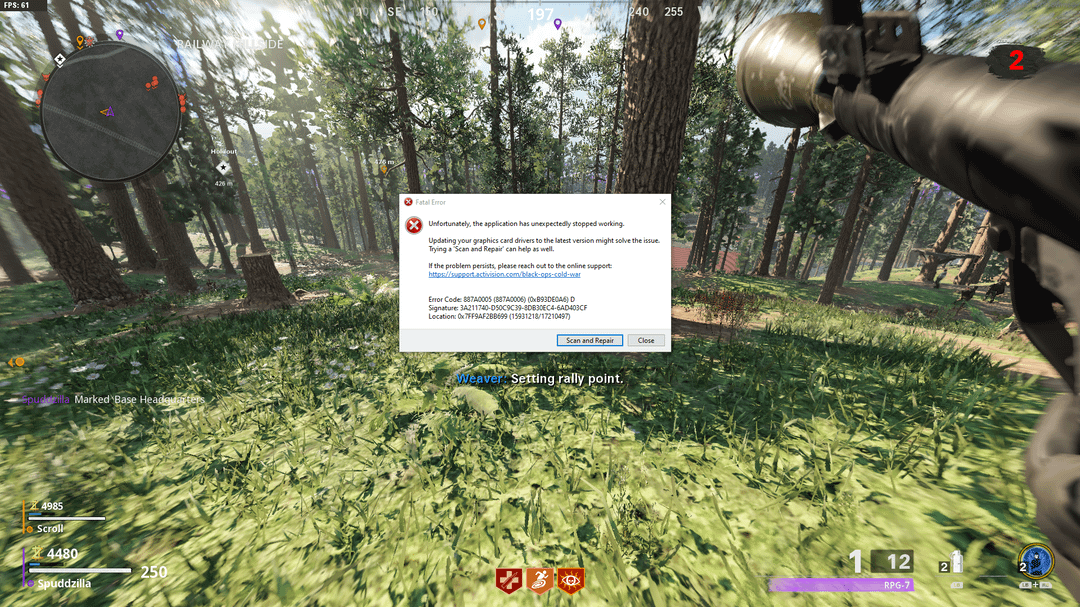
I've had Cold War on PC for a very long time and I've always wanted to complete the Outbreak EE (it's the only EE in zombies I HAVEN'T done) but I just keep crashing.
It could be on World 1 or I could be half way through the EE and on World 5. It's super inconsistent but I always crash on Outbreak. I've tried every fix I could find under the sun for this error. Updated every driver. Made sure Windows Game Mode is off. Ran in both Direct X versions to see if that might make a change. I run the game on the lowest settings. I've done way more than just this to try and fix this error but it won't go away.
I'm finally posting about it cause maybe someone here who's seen this has had to deal with this like me and figured out a fix. It's always this exact same error every time.
CPU: AMD Ryzen 5 5600x 6-Core
GPU: AMD Radeon RX 6700 XT
32 GB of RAM
Samsung SSD 980 PRO 2TB m.2
6 Comments
Have you tried completely re-installing the game?
Welcome to COD zombies
i had a 6750xt and it kept doing this. I fixed it by upgrading to a 7800xt LMFAO that was the only thing that stopped these errors, I tried everything
Anyone saying “reinstall drivers” or updating windows, that’s not gonna solve this. The game is genuinely just that buggy and crashes randomly. Have this issue as well once in a while. They really just never fixed it I’m sure.
Cold War is a somewhat unstable game on most configurations. If you get lucky, you’ll just get super slow menu asset loading like I do (I rarely get to see what attachment and camo changes look like, I have to wait until ot wants to cooperate). If you’re unlucky, the game starts crashing on you.
I used to get errors like yours back on Windows 7. What is your thread (not core, THREAD) count? Changing the thread count in your config file in the Documents to match your CPU does wonders for overall stability and performance.
Is the game installed on a Hard Disk Drive? How old is it? What speed is it? Cold War doesn’t seem to like 5400 RPM drives on PC at all.
If neither of these things help, you may just be out of luck. A fresh reinstall of Windows could help, but I wouldn’t do it just for this unless resetting won’t take you a lot of time (or if it’s been years anyway, as errors pile up).
definitely a skill issue