
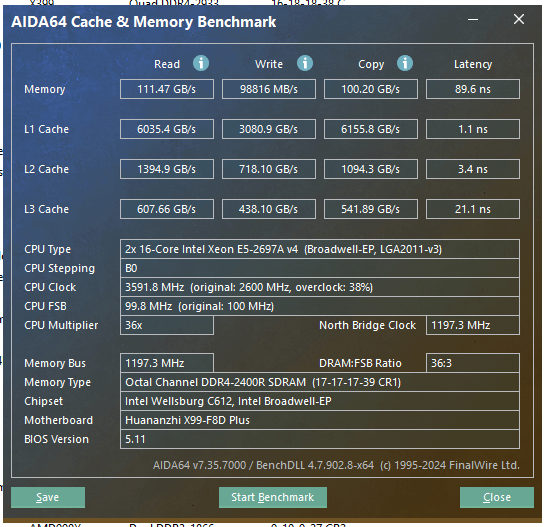
Hello. I've built a workstation for some extensive math. MB is Huananzhi X99 DUAL-F8D Plus v1.2, two 2697av4 CPUs, 8 sticks of 8gb DDR4-2400R ECC REG МTА18SF1G72PZ-2G3B1II – see 3rd screenshot for its info. Bios has default settings but memory frequency is set to 2400. Full Memtest86 – no errors. WHiNFO – no errors.
My setup does 65000 MB/s read speed, 22000 MB/s write speed and has ~114 latency.
Same single 2697av4 with x4 of similar memory in cheaper MB has 75000 MB/s read, 60000 MB/s write speed and 76 latency. According to Aida64, dual Xeon 2660 v3 with x8 DDR4-1866R does 93000 MB/S write speed.
What should I change/check/google/test/etc.?
Screenshots – Quad memory, Octa memory, Stick description:
Memory description from Aida64
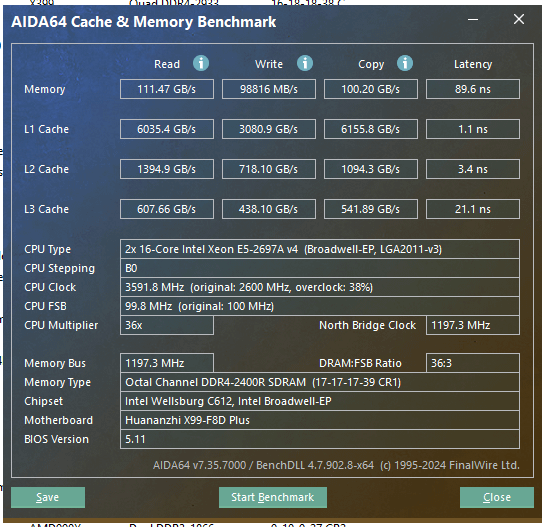
Solution: NUMA was turned OFF in BIOS by default. Enabled it – now it looks like this (111 GB/s read, 98 GB/s write, 89 latency).
4 Comments
Force Aida to run just on one CPU and see if it changes something
Have you tried y cruncher to see time?
You have registered memory. It is intrinsically slow. The registered part is a buffer chip, that keeps the memory one cycle behind. Makes the IMC way more stable with crapton of sticks and gazillion ranks at the cost of high latency. If that really is R-DIMM, if you drew the short straw, you’re fucked. Not all accept UDIMMs (desktop ram). Memory speed and latency mean nothing if your servers run out of memory all the time.
Low writes are probably because the RAM isn’t put properly and it has to go thru the CPUs, instead of each having it’s own local memory (4×4) or NUMA is being a bitch as usual and you need to figure out that :/ Don’t buy dual CPU hardware, if you’re not ready to deal with NUMA gotchas.
Solution: to check how many NUMA cores I have was a golden lead – NUMA was turned off by default in BIOS. Not by me, by default. Googled how to check count of NUMA nodes – NUMA option was gray in Task Manager. In some distant place in BIOS in 3rd layer of menus among many abbreviations I have found NUMA, enabled it, and now it looks like this – [screen with NUMA enabled](https://i.imgur.com/4msOybm.png) (111 GB/s read, 98 GB/s write, 89 latency).