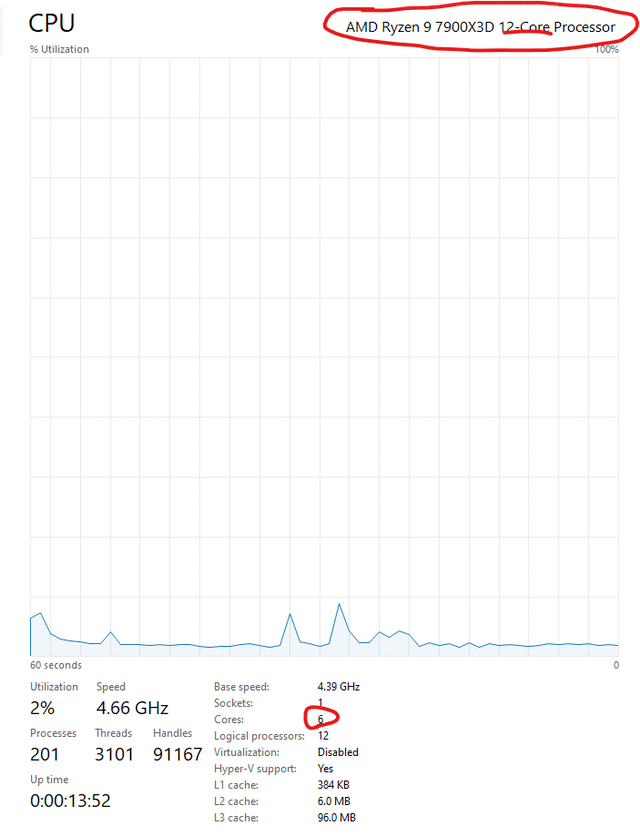
I have lightly overclocked and am wondering if I have blown a chiplet, or if all the tools aren’t recognizing the other cores. Any insight would be gratefully accepted. Thanks in advance.
DarkDrakoLinker97
You use the razer master gaming mode?
ChristOurLife84
Go to your bios and see if you have some sort of “Only use half cores” or something similar ticked on
00X00_Potato
7900X3D has 6 cores that have access to the extra L3 cache the 7900X3D has over the 7900X and 6 that don’t. I believe you can enable/disable those 6 other cores?
Icy-Success-69
I only had this thing where my pc only recognized 3 out of the 6 cores, but then i changed… uhm… i think it was on… if someone knows where it was lemme know lmao, there is a setting that lets you change how many cores are active. Some say to turn it on to fix it, i had to turn it off to fix it.
Jaimy_L
This may help:
1. Run msconfig
2. Select the boot tab
3. Click Advanced options
4. Ensure Number of processors checkbox is unchecked
5. Click Ok
6. Click Apply
7. Reboot the system
Voxelium
bro got an early sample of a 7600x3D
ExtraTNT
Maybe some gaming mode disabling the slower ccx to work against lowlevel kernel design fuckups from NT…
Asleeper135
Did you ever set it to game mode in the BIOS or in Ryzen Master? I believe that would make it only use the 6 3DVcache cores and disable the others.
HanaKatana1
Only 1ccd is active. Ryzen 9 7900X3D Remeber to update windows store app because it is controlling the software for windows game mode. Intel cpu is using own software amd is using windows game mode. try switch off game mode to se if it run at 12 cores Stuff like ryzen master should not be installed. in bios it ishould be on auto by default. If both chips are used at same time while gaming it can result in alot of microstuttering. If you bought this cpu for gaming you actually bought an 6 core cpu If your computer skills is above basick you kan force stuff to dedicated cores and ccd1 or 2 If ryzen master is installed set it to creator mode and 12 cores wil pop up, gaming mode it will be 6 cores. This cpu have 2 chiplets inside is is two different cpu on one socket one is a 3d chip and one is a standard chip with an interconnect chip between. It is actually WERY important to hawe the latest bios instaled from your motherboard wendor [https://community.amd.com/t5/gaming/how-to-set-up-your-system-with-a-new-amd-ryzen-9-7950x3d-or/ba-p/589464](https://community.amd.com/t5/gaming/how-to-set-up-your-system-with-a-new-amd-ryzen-9-7950x3d-or/ba-p/589464)It is also WERY important to hawe amd orginal drivers installed not windows drivers.
Hattix
Your non-X3D “productivity” cores were parked.
If you’ve manually unparked them, you’ve downgraded gaming performance almost to the level of a non-X3D CPU.
Shot_Challenge_3609
I would recommend leaving it as is, Ryzen is designed to turn off underutilized cores, the 7900x3d has 2 CCD packages, 6 cores in each, so it likely has 1 package turned off unless you are doing something that requires the extra power, like editing or gaming. Having all the cores enabled all the time is wasting $ and lifespan.
[deleted]
[removed]
OldManAtterz
Ryzen Master Gaming configuration disables all Hyper threading.
Status_Instance_4639
you forgot the zero
UncleRuckus_thewhite
Turn on SMT in bios
freyjasaur
I ate a couple sorry
bigfathairybollocks
You have to download the other 6.
Prodding_The_Line
If the OP’s issue has not been solved yet then listen to this. If you upgraded/kept your existing Windows installation when installing this processor then that won’t work. AMD has specifically recommended installing a fresh copy of WIndows when installing the 7900X, 7900X3D, 7950X, and 7950X3D. It’s the only way to get those parked cores to switch properly between games and production.
My source (and other sources exist on Reddit and the internet):

22 Comments
I have lightly overclocked and am wondering if I have blown a chiplet, or if all the tools aren’t recognizing the other cores. Any insight would be gratefully accepted. Thanks in advance.
You use the razer master gaming mode?
Go to your bios and see if you have some sort of “Only use half cores” or something similar ticked on
7900X3D has 6 cores that have access to the extra L3 cache the 7900X3D has over the 7900X and 6 that don’t. I believe you can enable/disable those 6 other cores?
I only had this thing where my pc only recognized 3 out of the 6 cores, but then i changed… uhm… i think it was on… if someone knows where it was lemme know lmao, there is a setting that lets you change how many cores are active. Some say to turn it on to fix it, i had to turn it off to fix it.
This may help:
1. Run msconfig
2. Select the boot tab
3. Click Advanced options
4. Ensure Number of processors checkbox is unchecked
5. Click Ok
6. Click Apply
7. Reboot the system
bro got an early sample of a 7600x3D
Maybe some gaming mode disabling the slower ccx to work against lowlevel kernel design fuckups from NT…
Did you ever set it to game mode in the BIOS or in Ryzen Master? I believe that would make it only use the 6 3DVcache cores and disable the others.
Only 1ccd is active. Ryzen 9 7900X3D Remeber to update windows store app because it is controlling the software for windows game mode. Intel cpu is using own software amd is using windows game mode. try switch off game mode to se if it run at 12 cores Stuff like ryzen master should not be installed. in bios it ishould be on auto by default. If both chips are used at same time while gaming it can result in alot of microstuttering. If you bought this cpu for gaming you actually bought an 6 core cpu If your computer skills is above basick you kan force stuff to dedicated cores and ccd1 or 2 If ryzen master is installed set it to creator mode and 12 cores wil pop up, gaming mode it will be 6 cores. This cpu have 2 chiplets inside is is two different cpu on one socket one is a 3d chip and one is a standard chip with an interconnect chip between. It is actually WERY important to hawe the latest bios instaled from your motherboard wendor [https://community.amd.com/t5/gaming/how-to-set-up-your-system-with-a-new-amd-ryzen-9-7950x3d-or/ba-p/589464](https://community.amd.com/t5/gaming/how-to-set-up-your-system-with-a-new-amd-ryzen-9-7950x3d-or/ba-p/589464)It is also WERY important to hawe amd orginal drivers installed not windows drivers.
Your non-X3D “productivity” cores were parked.
If you’ve manually unparked them, you’ve downgraded gaming performance almost to the level of a non-X3D CPU.
I would recommend leaving it as is, Ryzen is designed to turn off underutilized cores, the 7900x3d has 2 CCD packages, 6 cores in each, so it likely has 1 package turned off unless you are doing something that requires the extra power, like editing or gaming. Having all the cores enabled all the time is wasting $ and lifespan.
[removed]
Ryzen Master Gaming configuration disables all Hyper threading.
you forgot the zero
Turn on SMT in bios
I ate a couple sorry
You have to download the other 6.
If the OP’s issue has not been solved yet then listen to this. If you upgraded/kept your existing Windows installation when installing this processor then that won’t work. AMD has specifically recommended installing a fresh copy of WIndows when installing the 7900X, 7900X3D, 7950X, and 7950X3D. It’s the only way to get those parked cores to switch properly between games and production.
My source (and other sources exist on Reddit and the internet):
[https://www.youtube.com/watch?v=4wdQpVcL_a4](https://www.youtube.com/watch?v=4wdQpVcL_a4)
Amd is a scam
Did you enable gaming mode in bios or ryzen master? This option disables one ccd to improve gaming performance
I love how unsure all the comment base is. Either he fixed it or made it worse lol