
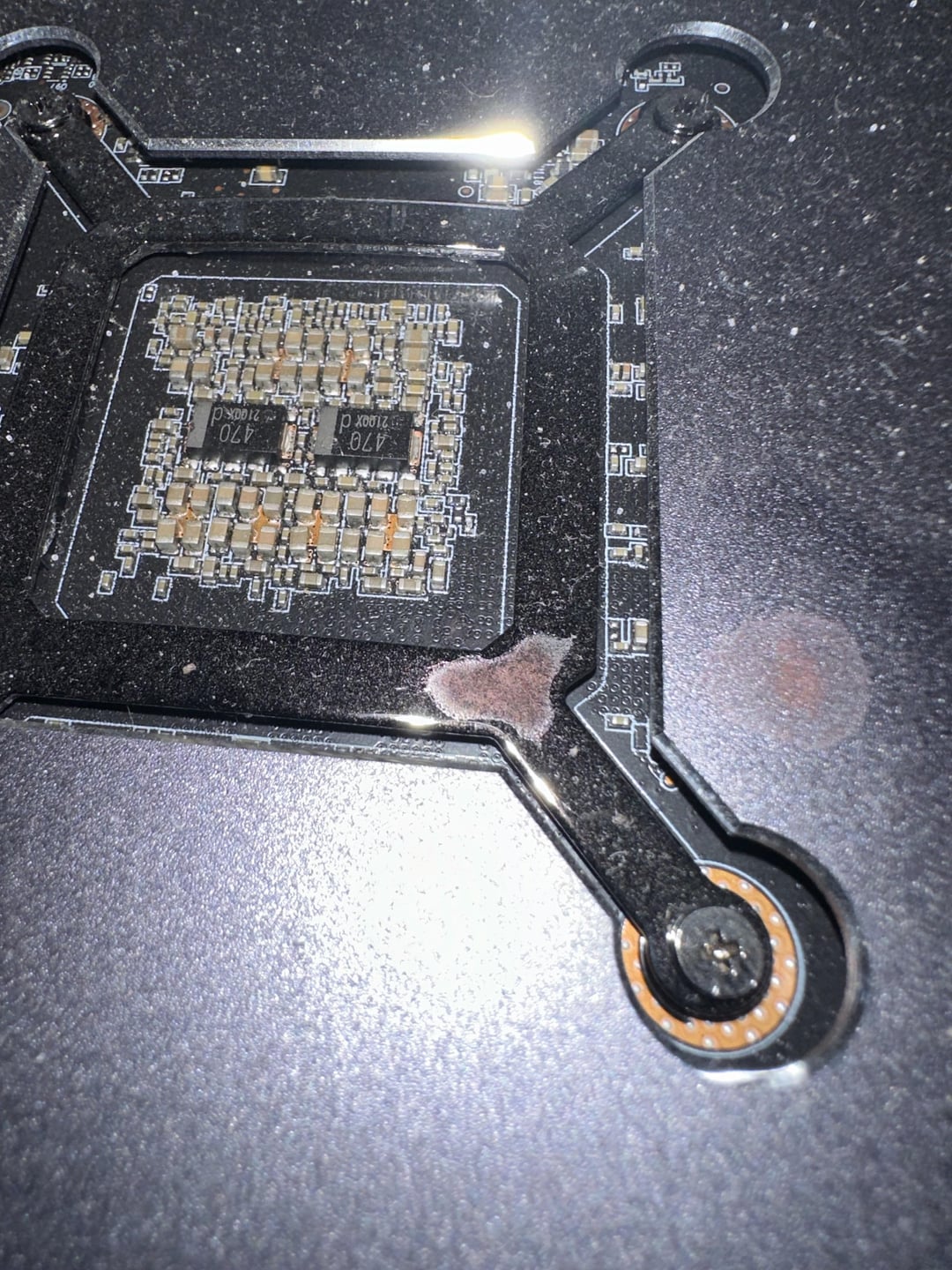
I accidentally dropped liquid into my pc and I only noticed this when I realized that my pc sounded like a plane that was about to take off so I unplugged it. The water seems to have corroded it a bit but when I opened up my pc, I didnt rlly see much damage in any important parts of the pc. But I’m still scared to turn it back on, thoughts on what I should do?
24 Comments
OP during the discovery:

>thoughts on what I should do?
Don’t have your PC where liquids can be spilt on it.
why would you ever put a liquid item on top of the pc… imo just be careful bc this pc won’t ever be the same especially if a transistor or other delicate part is corroded and therefore broken.. especially right behind the gpu chip
Oof why do people drink liquids without lids near their expensive PC parts? I’ll never understand…
looks like chocolate milk
Best thing you can do is take the PC apart and clean everywhere water might have got motherboard, ram, slots, under heatsink, etc. contact cleaner can be good option for cleaning. I would even take the GPU backplate out and check if water got on the GPU back somewhere you can’t see.
Remember – after shorts, corrosion is your biggest concern.
There needs to be a PC protective service that takes PCs away from irresponsible owners and puts them in a foster system for people who can’t have PCs of their own.
Looks like it could do with a wash anyway 🥸😅
Grab some Isopropyl 99% and clean it.
Use Isopropyl alcohol to clean it up good and make sure it’s dry. Once everything is dry then you should be good to turn it on again.
This is why we keep pc’s on the desk
https://preview.redd.it/2ynkbuluhpjd1.jpeg?width=4032&format=pjpg&auto=webp&s=1fcba1df1e33af36c70ab2e71b5cd1e808f0b342
eww yuck
This is computer tech not munition weaponry no bullets could have been dodged.
Take the GPU out of the computer, move it around to make sure no water is sitting inside, use compressed air to get water out, and keep the computer off until you`re 100% sure it`s dry. Check the rest of the motherboard and connectors for water damage.
Buy a sack of rice and submerge your pc in it /s
I had something similar, but that was my AIO that leaked. Luckily, I believe my radiator fan wasn’t spinning when that happened, PC was idling, so it all dripped in a straight line.
Same reason why I never thought AIOs and water cooling was worth it. One leak is all it takes.
Clean it off with some 99% isopropyl alcohol, and you should be good.
(Also I noticed a lot of people downvoting your comments because you spilled something on your PC, accidents happen and it will probably be fine.)
THAT F-ING stomach dropping feeling
I remember the pure horror to this day when I once forgot to close the outlet of my Custom Watercooled System. I was playing Dark Souls 3 while my Pc stands on my right side. Through my Headset, I could hear the sound of dripping water. I first thought it would be raining outside or something. Then I through the glass panel of my pc and saw water pouring against my panel like a small water fountain. It was quite a shock. Nothing was broken, but it took days to take everything apart. Water gets fucking everywhere. I even found something under my Ramslots. No idea how that got there.
Anyway @ OP
Take everything apart or pay someone to do it for you. Water, especially water with contents like sugar or what ever, conduct electricity very easily. That’s as bad as it sounds. That basically means, if some water got on the right place, and you turn your pc on, the chance is high to instantly fry said component or (if you have very bad luck) fry your entire system (if something got into your PSU for example). Additionally, you lose any kind of warranty once the manufacturer finds water stains in your Pc. So better safe than sorry is my advice.
Have you cleaned it/fixed the problem yet OP?
This one fear is why I stopped using liquid cooling.
Yikes 😬
Air cooled FTW