I would remove the door for more airflow but other than that I see no issue
floeddyflo
Your PC may be a bit hotter (check the temps, and as long as the GPU isn’t in 80s and CPU over 90s, it should be fine), but it will be fine in the cabinet.
_eESTlane_
while case has only 1 fan to begin with? xD
randomgenerator666
I had a similar setup but without the backside and front doors. If the case fits it’s all fine
DisplayNameSir
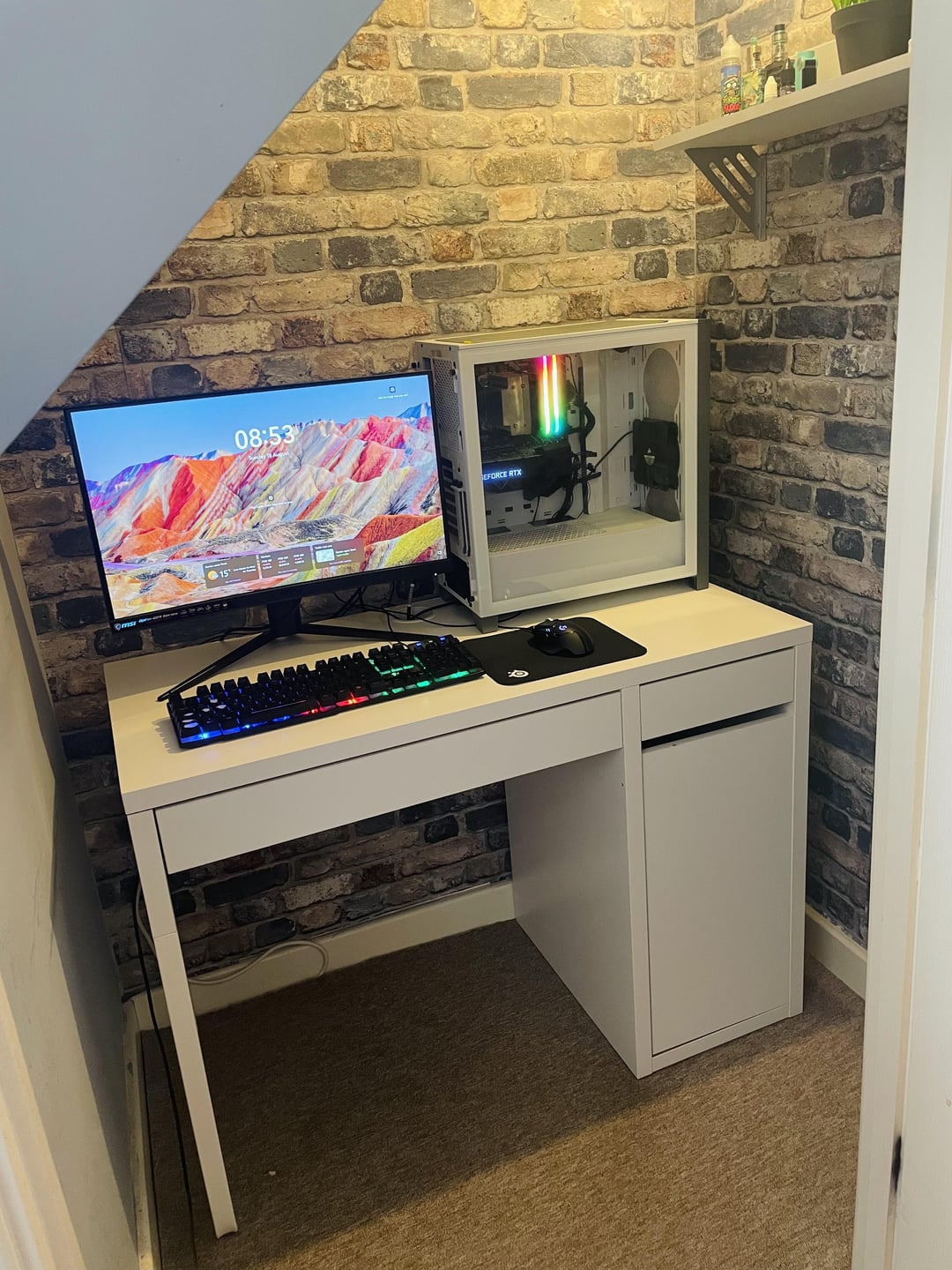
The cabinet looks pretty closed off and could overheat if you kept the door closed.
I seen other users cut holes in the cabinet with fans installed to have better airflow
MattxPatrick
I would of course remove the doors in the cabinet. Many thanks for quick responses guys. Looks like i will give it a go while monitoring the temps!
IamrhightierthanU
What they say and maybe get the desk a little bit more off the wall to.
IGPUgamer99
Remove the door if possible. Also try maybe moving it off the wall for like an inch so Exhaust will be good.
More-Hedgehog6583
You must have a lot of faith in that singular fan to even consider that
riba2233
Bro, you need an r/sffpc, that case is 90% air anyways 😉
Mahsunon
You need a smaller case. Try jonsplus z20
thewallamby
If your remove the door it is ok. Have done it myself. With the door no. You will fry it.
Prestigious-Scar-507
I hope you got some ports on forward side and not often plug-in stuff otherwise you’re gonna hate yourself.
Ireallydontkn0w2
If you close the door it’ll overheat.
Same reason why you can’t put a pc in a fridge, no airflow.
JDFS83
I have that desk and I just keep the door open when my PC is on.
AgathormX
Your only seems to have 1 fan installed, so I don’t think it would be a good idea as it is.
Here’s my advice:
1. Check how much clearance you’d have between the top of the case, and the drawer above the cabinet, if there’s a decent clearance, continue.
2. Install 2 more fans as in the front as intake, and install 3 fans at the top as exhaust
3. Remove the door and put the PC in the cabinet
pant0m_OO1
Just put one more front intake and a rear exhaust
navagon
You’re going to want to add at least one more fan to improve airflow. As True_Ad said, just take the door off (and vinyl over the hinge holes if needed).
czerwona_swinia
You have gaps above and behind so it will not cook itself – give it a chance (check temps when gaming before and after, and then decide if doors should be removed).
I personally use old case with side/top vents covered (duct tape) to control the flow (only one 120mm intake on front with no extra fans – on idle pressure and PSU is enough and GPU takes vent job when gaming) and used to have some similar setup (squeezed between desk and sofa with three fingers space behind) for years with no issues.
ClaB84
He has 1 single intake Fan installed…..and i see also not an exhaust-Fan. I dono what Mickey-Mouse CPU is installed and if the only heavy Task on that PC will be Excel, but thats not really good.
Femboy_Meaa
As long as it’s not fragile, yea. Also, get 2 more fans for your pc, one fan is not enough for airflow
mysteryprickle
Have same setup. I cut a hole in the back wall inline with the CPU exhaust to encourage that heat to leave the cabinet. There’s a space between cabinet and wall for heat to disperse.
I just game with the door wide open and when PC is off, door shuts and box disappears.
My case sucks air from the front bottom and when I put my hand there there’s no heat being drawn in.
Monitored internal temps are no different to being up on desk.
boccas
I would remove the door and moving the desk like 10 cm from the wall to give more airflow.
Genix98
Maybe add some more fans, 2 more on front, 2 on top, couldn’t harm 😬
C5-O
It’ll run a bit hotter, but that’s it
If you don’t have any issues with temps/throttling right now, this probably won’t change anything, if you do, I’dd add some more ventilation and/or remove the door.
pereira2088
remove the door, add more intake fans and you’re good to go
Slickk7
Anything except putting it on your table as if it was a screen. Idk why people started doing that, it’s so silly…
_StereoGhost_
r/G502MasterRace
despaseeto
you only have one fan at the front and I don’t see any more yet you wanna suffocate it even more inside a cabinet? if you must put it in there, just make sure the door is open while in use and also make sure you have enough clearance at the back.
apachelives
If i was a computer i would feel claustrophobic.
If you moved it a few cm off the wall to allow good air flow out and no front door it should be fine.
B333H
open the door while using the pc
iPhoenix_Ortega
without a problem. Less dust I think
lotti_luv
It’ll be fine, just don’t close the door while gaming or other intensive tasks, also it looks like it might be worth adding a couple of extra fans, you can get a 3 pack of Thermalright ones for like $15.
MattxPatrick
MASSIVE THANK YOU! Appreciate every single advice!
Reasonable_Royal_334
You can it just that you don’t have much air flow. I see 1 fan intake. Heat is gonna be a problem with ur system.
ElderElo_Official
Hi,
I’d say to be safe..
Add more quality fans to your pc. Ensure good intake outtake setup.
Ventilation on the desk, cut hole on top to pull wires through, semi-multi-purpose. Or holes on the side
Maybe a really small fan inside the top of cabinet, pushing or pulling air.
I’m just concerned about how close the pc would be to the wall, so all that heat will just sit there. I might be overthinking it though!
TheDurandalFan
that cabinet looks like it’d have awful airflow, even with the door open.
OlmiumFire
RGB RAM and a side panel. Puts PC where no one will see it.
barra_giano
Yeah I’d just remove the door and move the desk away from the wall a little bit. Could even attach an external USB fan to circulate the hot air out and ensure fresh air is being pulled into the cabinet.
jigaachad
this ikea desk is a scam and is LITERALLY made of paper. lean on it too hard and you might put your fist through it
Tapil
But how will we see the bootiful components and Are-Gee-Bee wam 😢

43 Comments
I would remove the door for more airflow but other than that I see no issue
Your PC may be a bit hotter (check the temps, and as long as the GPU isn’t in 80s and CPU over 90s, it should be fine), but it will be fine in the cabinet.
while case has only 1 fan to begin with? xD
I had a similar setup but without the backside and front doors. If the case fits it’s all fine
The cabinet looks pretty closed off and could overheat if you kept the door closed.
I seen other users cut holes in the cabinet with fans installed to have better airflow
I would of course remove the doors in the cabinet. Many thanks for quick responses guys. Looks like i will give it a go while monitoring the temps!
What they say and maybe get the desk a little bit more off the wall to.
Remove the door if possible. Also try maybe moving it off the wall for like an inch so Exhaust will be good.
You must have a lot of faith in that singular fan to even consider that
Bro, you need an r/sffpc, that case is 90% air anyways 😉
You need a smaller case. Try jonsplus z20
If your remove the door it is ok. Have done it myself. With the door no. You will fry it.
I hope you got some ports on forward side and not often plug-in stuff otherwise you’re gonna hate yourself.
If you close the door it’ll overheat.
Same reason why you can’t put a pc in a fridge, no airflow.
I have that desk and I just keep the door open when my PC is on.
Your only seems to have 1 fan installed, so I don’t think it would be a good idea as it is.
Here’s my advice:
1. Check how much clearance you’d have between the top of the case, and the drawer above the cabinet, if there’s a decent clearance, continue.
2. Install 2 more fans as in the front as intake, and install 3 fans at the top as exhaust
3. Remove the door and put the PC in the cabinet
Just put one more front intake and a rear exhaust
You’re going to want to add at least one more fan to improve airflow. As True_Ad said, just take the door off (and vinyl over the hinge holes if needed).
You have gaps above and behind so it will not cook itself – give it a chance (check temps when gaming before and after, and then decide if doors should be removed).
I personally use old case with side/top vents covered (duct tape) to control the flow (only one 120mm intake on front with no extra fans – on idle pressure and PSU is enough and GPU takes vent job when gaming) and used to have some similar setup (squeezed between desk and sofa with three fingers space behind) for years with no issues.
He has 1 single intake Fan installed…..and i see also not an exhaust-Fan. I dono what Mickey-Mouse CPU is installed and if the only heavy Task on that PC will be Excel, but thats not really good.
As long as it’s not fragile, yea. Also, get 2 more fans for your pc, one fan is not enough for airflow
Have same setup. I cut a hole in the back wall inline with the CPU exhaust to encourage that heat to leave the cabinet. There’s a space between cabinet and wall for heat to disperse.
I just game with the door wide open and when PC is off, door shuts and box disappears.
My case sucks air from the front bottom and when I put my hand there there’s no heat being drawn in.
Monitored internal temps are no different to being up on desk.
I would remove the door and moving the desk like 10 cm from the wall to give more airflow.
Maybe add some more fans, 2 more on front, 2 on top, couldn’t harm 😬
It’ll run a bit hotter, but that’s it
If you don’t have any issues with temps/throttling right now, this probably won’t change anything, if you do, I’dd add some more ventilation and/or remove the door.
remove the door, add more intake fans and you’re good to go
Anything except putting it on your table as if it was a screen. Idk why people started doing that, it’s so silly…
r/G502MasterRace
you only have one fan at the front and I don’t see any more yet you wanna suffocate it even more inside a cabinet? if you must put it in there, just make sure the door is open while in use and also make sure you have enough clearance at the back.
If i was a computer i would feel claustrophobic.
If you moved it a few cm off the wall to allow good air flow out and no front door it should be fine.
open the door while using the pc
without a problem. Less dust I think
It’ll be fine, just don’t close the door while gaming or other intensive tasks, also it looks like it might be worth adding a couple of extra fans, you can get a 3 pack of Thermalright ones for like $15.
MASSIVE THANK YOU! Appreciate every single advice!
You can it just that you don’t have much air flow. I see 1 fan intake. Heat is gonna be a problem with ur system.
Hi,
I’d say to be safe..
Add more quality fans to your pc. Ensure good intake outtake setup.
Ventilation on the desk, cut hole on top to pull wires through, semi-multi-purpose. Or holes on the side
Maybe a really small fan inside the top of cabinet, pushing or pulling air.
I’m just concerned about how close the pc would be to the wall, so all that heat will just sit there. I might be overthinking it though!
that cabinet looks like it’d have awful airflow, even with the door open.
RGB RAM and a side panel. Puts PC where no one will see it.
Yeah I’d just remove the door and move the desk away from the wall a little bit. Could even attach an external USB fan to circulate the hot air out and ensure fresh air is being pulled into the cabinet.
this ikea desk is a scam and is LITERALLY made of paper. lean on it too hard and you might put your fist through it
But how will we see the bootiful components and Are-Gee-Bee wam 😢
Hehe, I have the same desk
Don’t… that’s gonna raise temperatures significantly