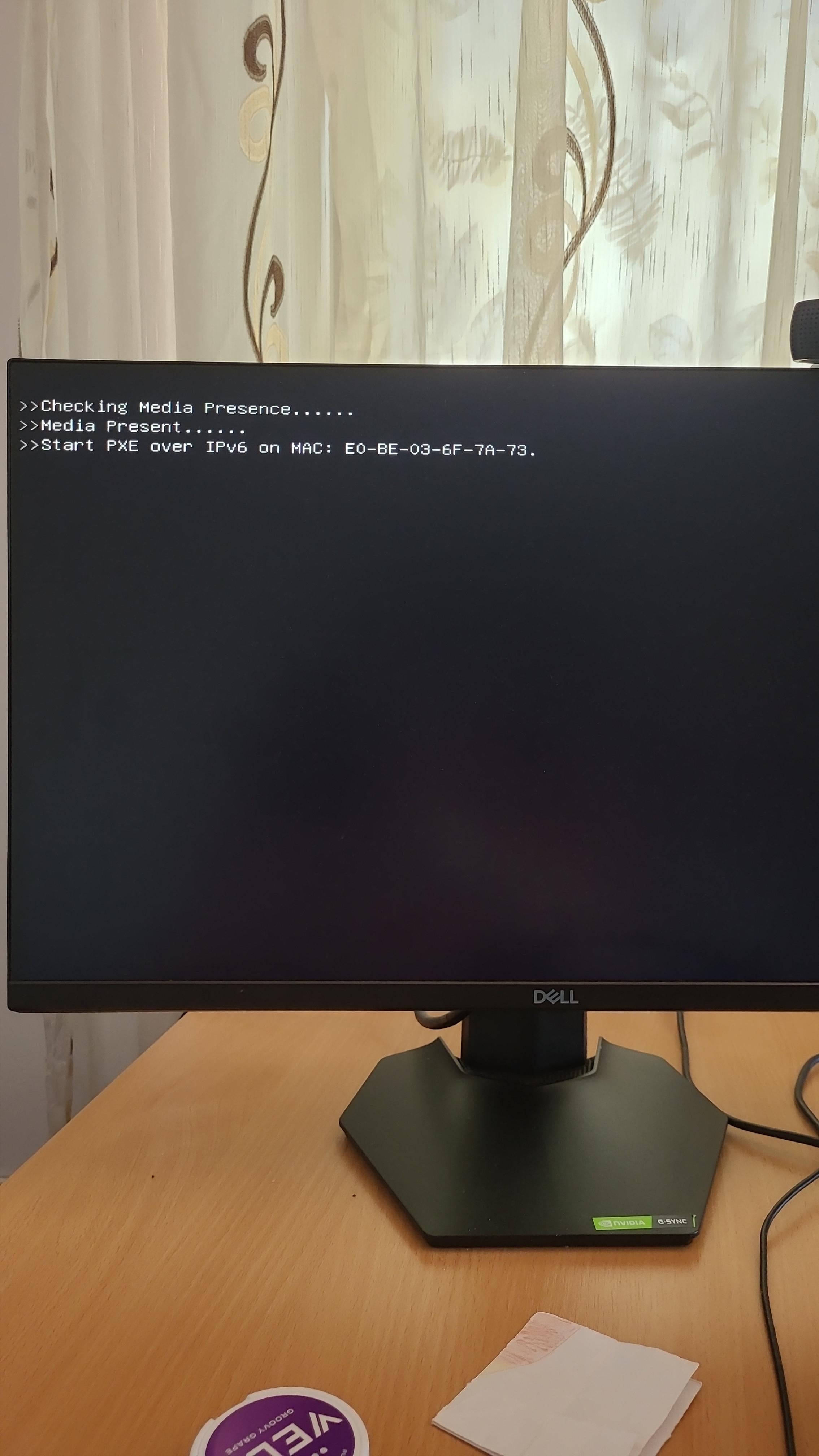
Before it starts my PC it shows these 3 phrases and it takes like 2-3 minutes before it starts. I had it in repairs. It was not showing this before. Thank you

Before it starts my PC it shows these 3 phrases and it takes like 2-3 minutes before it starts. I had it in repairs. It was not showing this before. Thank you
26 Comments
Its trying to find a drive on the network to boot from.
Make sure your boot order has your boot drive first.
you have PXE network boot first in your boot order.
you’ve either enabled network boot, or option ROM for your network card (same thing but burried deeper in BIOS settings)
Your computer is trying to boot from a remote location. Are you sure the people who worked on your computer are trustworthy?
That looks like an attempted network boot. Go into bios and move it back down to the bottom. Not really any reason for them to network boot your PC in a repair shop. Run a malware sweep asap.
Pxe my beloved
Change the order of boot devices in bios
Someone messed boot options.
Just hit F5 or the equivalent in restore default values for your bios and thats it.
Never saw that enabled by default.
PXE boot is above your drive in the boot order in the BIOS.
Is your boot priority correct in the first place? Is your boot drive still alive?
Why don’t people just Google first and try and find a solution before coming to Reddit. Dude provides zero information on Manufacturer and model number, just a photo of the screen. Not to sound rude but we really gotta ask you to help you bro? And people are definitely willing to help.
Here you go…
https://gprivate.com/6cq45
Wow this hurt my age lol. I remember pxe booting to install windows XP at my first IT job.
Don’t you love when someone asks for help and then just ghosts his own post?
Your computer supports PXE booting (pre-execution environment).
PXE booting lets your computer boot from a special network server. It uses DHCP to capture information about how to do it and where to get the relevant data.
However you don’t have it, nor do most people need it. In that case, the solution is to either disable LAN booting and/or remove the LAN adaptor from your computer’s Boot Order options.
Doing so can save about 20-40 seconds of boot time, since it’s no wasting time searching for the server, and it can easily be undone by re-adding the network boot option to the list.
It’s attempting a network boot. Check your boot priority in your bios.
PXE boot is higher in the boot order than your HDD
Happened yesterday to my manager’s pc. Just disconnect the network wire and boot the pc, and then I just connect it when Windows was loaded
G-sync monitor hooked up to a Dell business pc.
This smells fishy.
Have you stole a production laptop from your work? Tell me
The repair person PXE booted to (probably) a Windows PE environment for diagnostics. Go to your BIOS, find boot settings, and make your C drive the first in line.
Check your boot order.
This is network boot.
If you move it to the bottom of the boot list, it shouldnt bother you anymore
Boot priority, you’re set to check for PXE boot as top priority
How else would you know that media was present?
Go into your bios and make sure your (presumably) SSD is first in the boot order, yo it BIOS probably has it set to try a PXE/Network boot before anything else
FYI you can just hit enter or escape (can’t remember which) to speed this up. You don’t have to sit and let it search the entire time.
This happened to a company computer I used and they wouldn’t fix the issue. I just hit enter a few times to boot it up more quickly.
It’s looking for a PXE server to boot from .
It’s your boot order. It’s set to boot via network connection. This is usually set in offices so the IT people can reimage your machine with a new Operating System (Windows, Linux, ect) remotely.
If this is at your house and you don’t know why it’s doi g this:
1. It’s fine you can leave it, just makes startup a tiny bit longer
2. You can go into the BIOS (F2, F9, F12, esc) it will tell you on the screen what to press. Then go to boot option and put your drive first.
If none of this makes sense just leave it. It’s not hurting anything and if you don’t know what you’re doing in the bios you can mess up your comouter.